Digital Monitoring Products XF6 Series Installation and Programming Guide
4
INSTALL THE PANEL
MOUNT THE ENCLOSURE
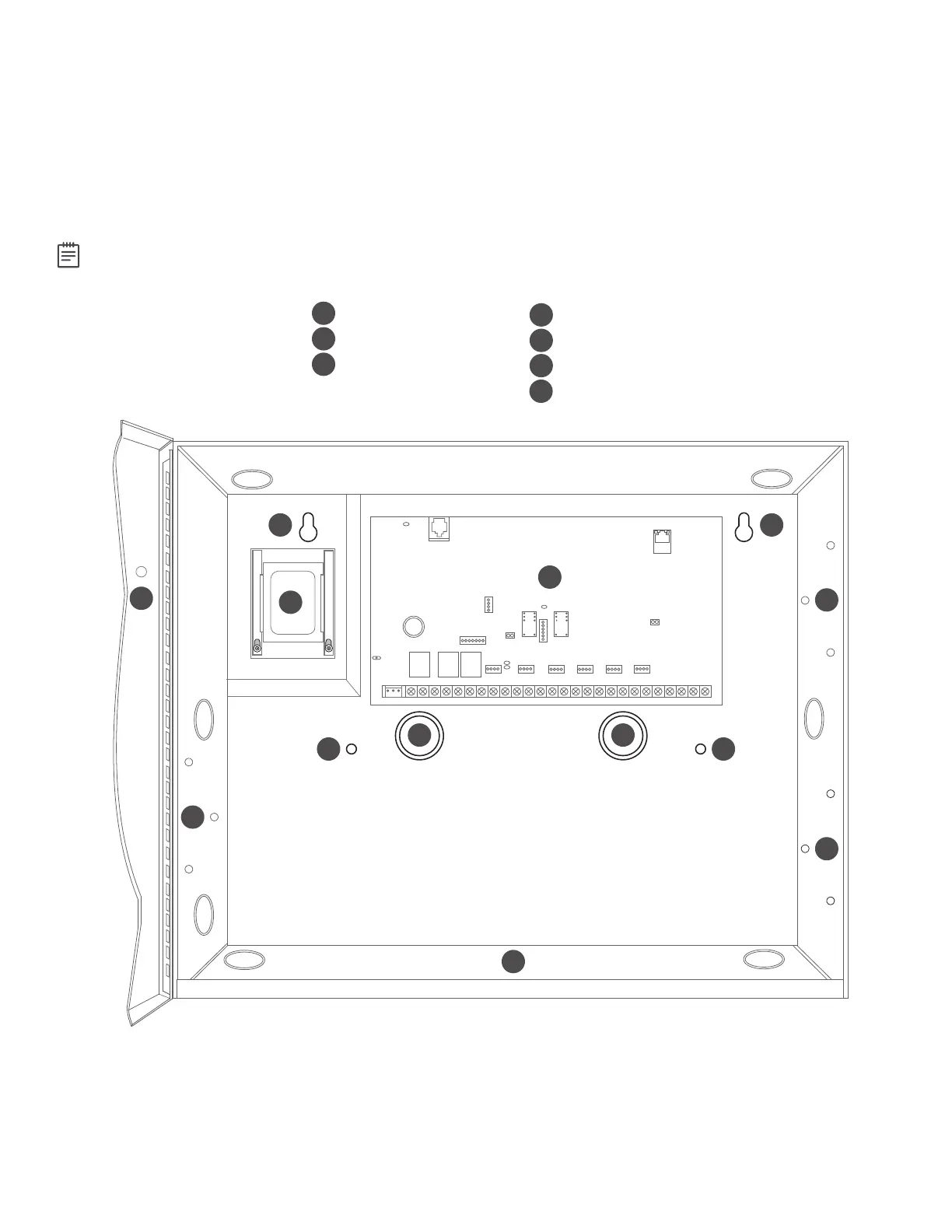
The XF6 Series Series panel enclosure must be mounted using the four mounting holes shown in the image below.
Mount the enclosure in a secure, dry place to protect the panel from damage from tampering or the elements. It is not
necessary to remove the panel PCB when installing the enclosure.
The enclosure dimensions are13.44” H X17.1” W X4.8” D.
Note: For additional standby batteries, use the Model350, 349, or352S enclosures.
Battery shelf holds up to two batteries. Maintain
minimum spacing of 1/4” between the batteries
and any modules mounted in enclosure.
A
B
C
Panel
Transformer
Enclosure Mounting Holes
D
E
1-3/4” Knockouts
Module Mounting Holes
F
Battery Shelf
E
E
E
DD
C C
C C
A
F
B
G
Ground
G



 To Next Page