Dobot CR A Series User Guide
Issue V1.3 (2023-09-14) User Guide Copyright © Yuejiang Technology Co., Ltd.
53
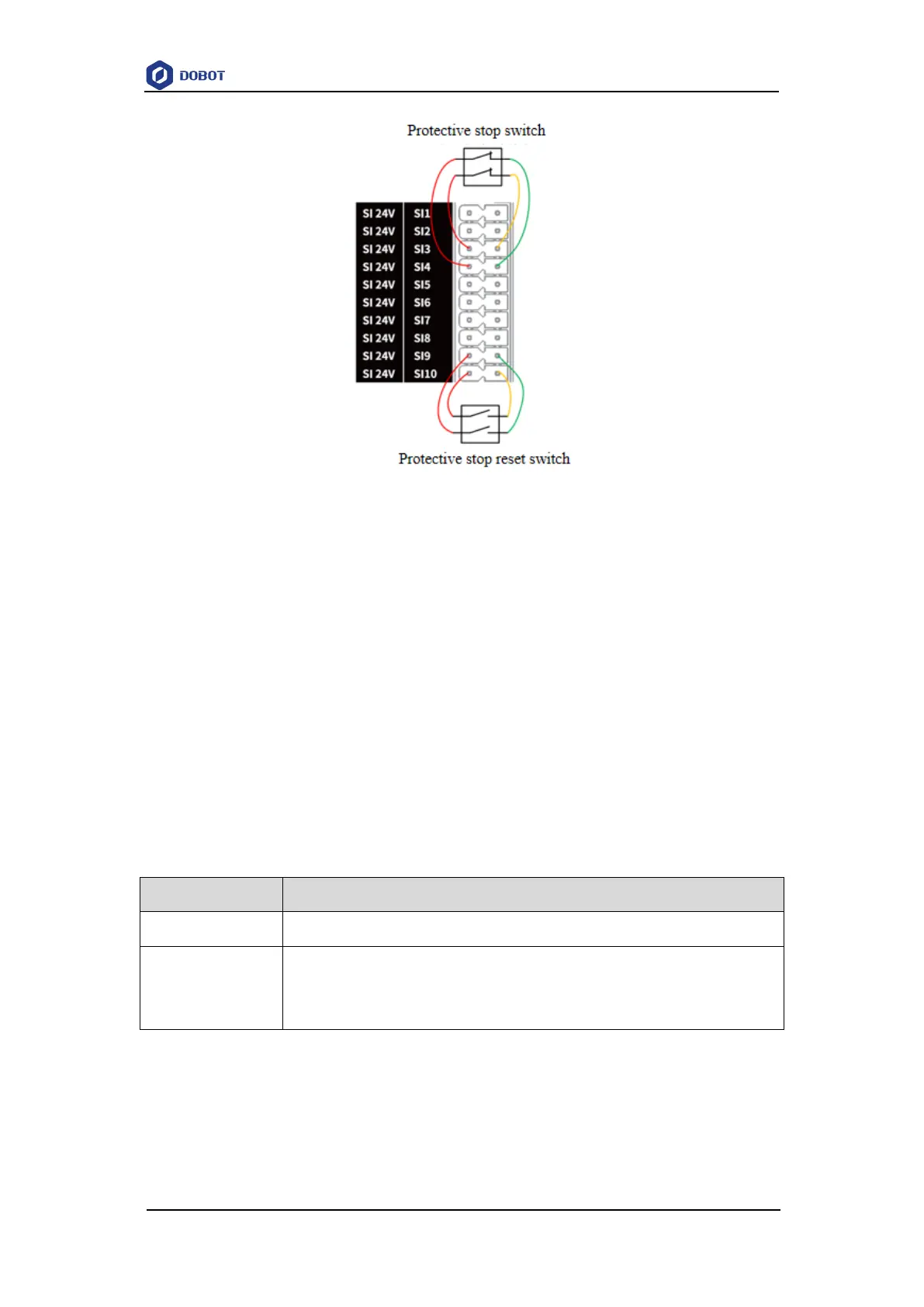
Figure 6.14 SI connected to protective stop device (with reset switch)
Reduced mode input
The reduced mode interface is used to control the robot to enter reduced mode. In the reduced
mode, the motion parameters of the robot arm (joint speed, TCP speed) are limited within the range
of the user-defined reduced mode.
The default reduced mode input is the normally closed signal of high level, and low-level input
triggers the robot to enter the reduced mode. If the high-level input is restored, the robot exits the
reduced mode and enters the normal mode.
The wiring of connecting reduced mode switch is the same as that of connecting emergency
stop switch or protective stop switch.
Safety output
SO1~SI10 interfaces are described below.
You can configure in dual circuits to protective stop status output, reduced mode status
output, non-stop status output, running status output and initial posture status output
through the software (no configuration by default).
Emergency stop status output
When the robot is in emergency stop status, the output voltage is low level, otherwise, the
output voltage is high level.
SO1 and SO2 are Emergency stop status outputs, and the wiring of connecting external load is



 To Next Page