14
WN 059677 45532 - 11/2023
ES 250 PRO/ES 250 PRO FST
ES 400 PRO/ES 400 PRO FST
Mounting instructions
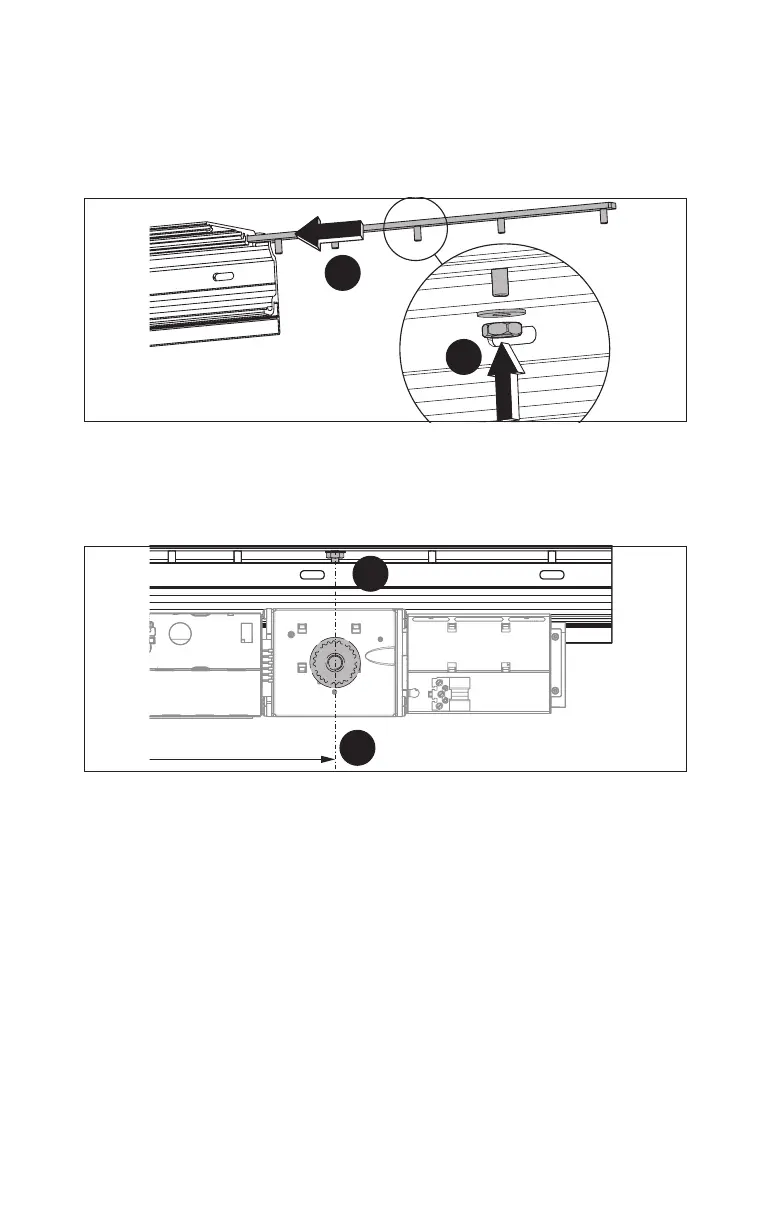
4.3.2 Prepare the operator profile
1. Push the attachment strip for the DRIVEUNIT into the slot in the operator
profile from the right.
Fig.6
1.
2.
2. Screw the enclosed washer and nut onto the middle threaded bolt.
3. Position the attachment strip so that the middle threaded bolt is on the
position for the center of the operator wheel, see Fig.3, Fig.4 and Fig.5.
Fig.7
3.
4.
see Fig. 3, 4, 5
4. Screw the attachment strip tight.













 To Next Page