61
WN 059677 45532 - 11/2023
ES 250 PRO/ES 250 PRO FST
ES 400 PRO/ES 400 PRO FST
Mounting instructions
Display
6. Press to exit the parameters menu.
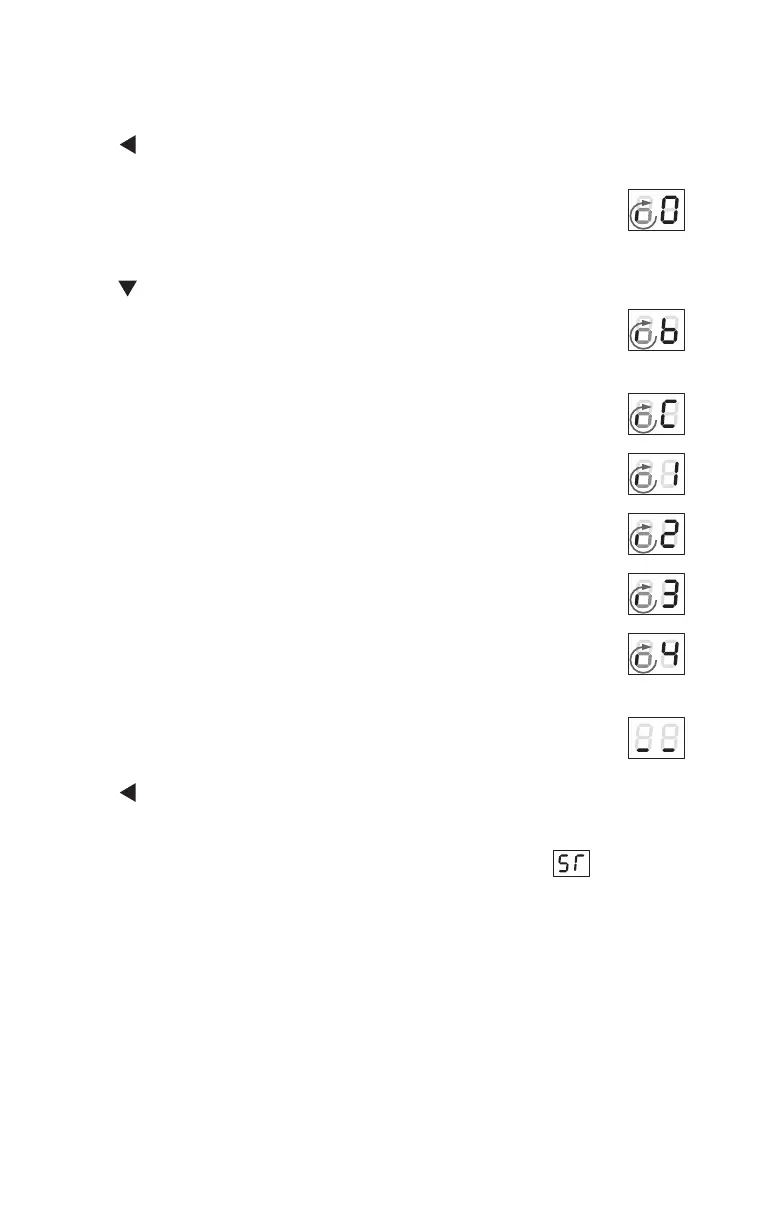
The small, spinning “o” and the “O” show that a teach-in run is
required.
7. Press for 3seconds.
The door moves in closing direction to determine the closed
position.
The door carries out a teach-in run.
The door closes.
The door is pushed into closed position.
An existing interlock is taught in.
The door leaf weight is calculated.
The door moves at crawl speed in opening direction.
The opening width and the door leaf weight are saved.
The operator moves into closed position.
The teach-in run is finished, the control unit switches to
ServiceMode1.
8. Press for 3seconds to exit Service Mode 1.
→ Commissioning is complete, the operator is ready for operation.
9. If safety sensors are to be connected to theSiAKextension module,
then connect the safety sensors and adjust the parameters
accordingly.













 To Next Page