For alarm settings, refer to P.20 – Micro-interruption duration (Chap. 7.6). For further information on alarm
management, refer to Chap. 8.5.2.10 - Micro-interruption alarm.
The alarm cannot be manually reset. Now press one of keys , or to scroll the pages or one of keys
or
to scroll pages back.
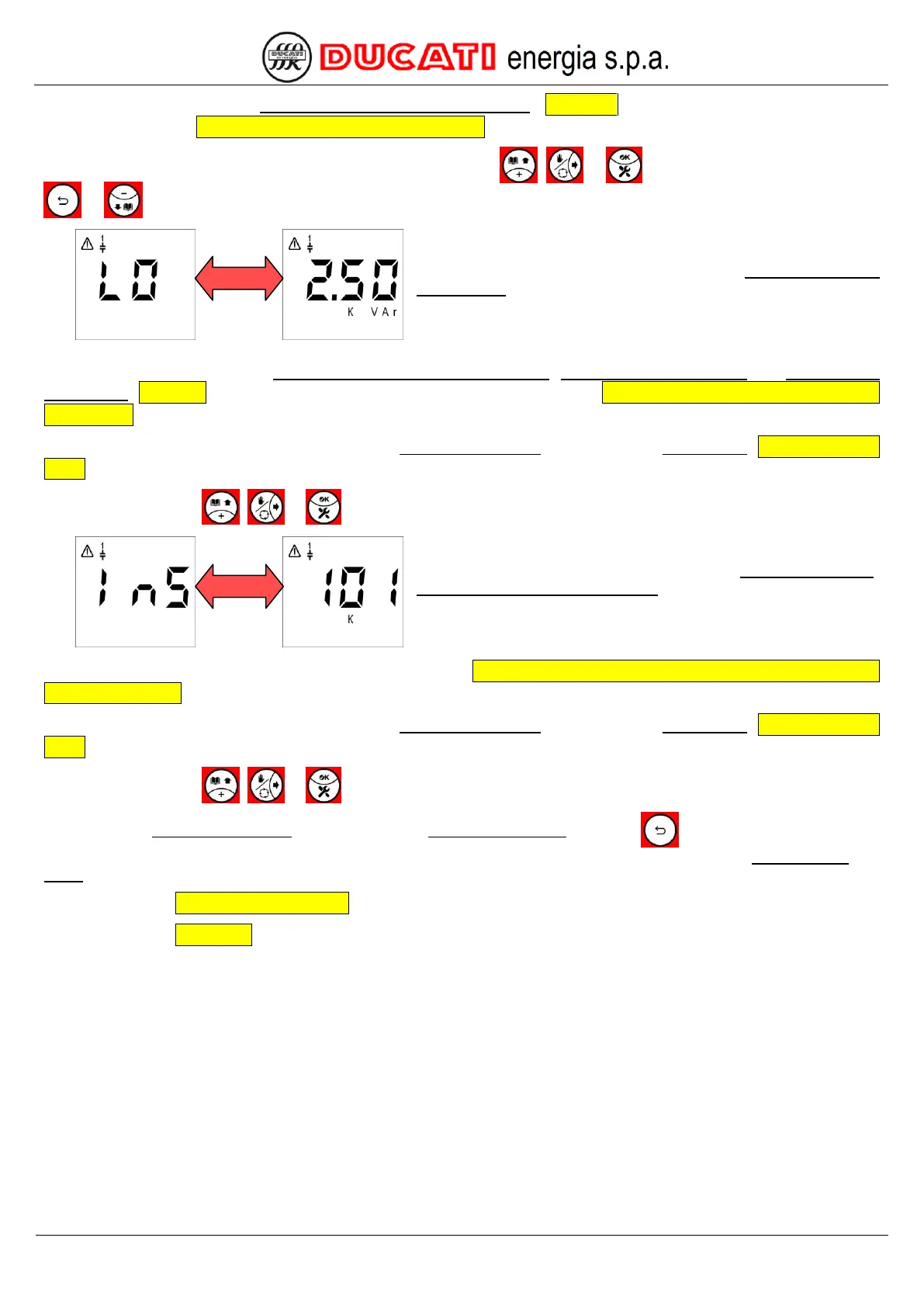
The next 5 displayed pages relate to the bank n breakage
(n=1,2,3,4,5) alarm. At first the screen relating to bank 1 will be
displayed and it will be alternately shown with the numerical value
corresponding to the bank estimated reactive power (2.50kVAr in
the example shown).
For alarm settings, refer to P.8 – Presence of blocking reactors, P.10 – Fault threshold 1 and P.12 – Fault
threshold 2 (Chap. 7.6). For further information on alarm management, refer to Chap. 8.5.2.11 - Bank n breakage alarm
(n=1,2,3,4,5).
This alarm cannot be manually reset from the Current Alarm Menu, but through the Reset Menu (Chap. 8.6 - Reset
menu).
Press one of keys , or to scroll the screens of banks from 2 to 5.
The next 5 displayed pages relate to the alarm maximum number
of bank n insertions (n=1,2,3,4,5). At first the screen relating to
bank 1 will be displayed and it will be alternately shown with the
numerical value (truncated to the thousands) corresponding to the
number of bank insertions (101000 in the example shown).
For further information on alarm management, refer to Chap. 8.5.2.12 - Maximum number of bank n insertions
(n=1,2,3,4,5) alarm.
This alarm cannot be manually reset from the Current Alarm Menu, but through the Reset Menu (Chap. 8.6 - Reset
menu).
Press one of keys , or to scroll the screens of banks from 2 to 5.
To quit the Current Alarm Menu and go back to the Measurement Menu press key for more than 2sec. The
cosphi value and the alarm icon will be displayed on the top left. The alarm will be anyway active in the Current Alarm
Menu.
GO BACK TO USING THE CONTROLLER
GO BACK TO CONTENTS


 To Next Page