82
How to operate iPod
®
Operating the iPod
When an optional iPod interface adaptor (iPC-106) is connected, it is possible to operate the
iPod
®
with this main unit.
• iPod is for legal or rightholder-authorized copying only. Don't steal music.
• iPod is a trademark of Apple Computer, Inc., registered in the U.S. and other countries.
Listening to iPod
Press .
Tou c h .
• Playback will begin
Selecting a song
You can select a song you want to hear.
Press or .
• (up): Selects next song
(down): Selects previous song
Restarts current track. Pressing the down button once more continu-
ously plays previous tracks.
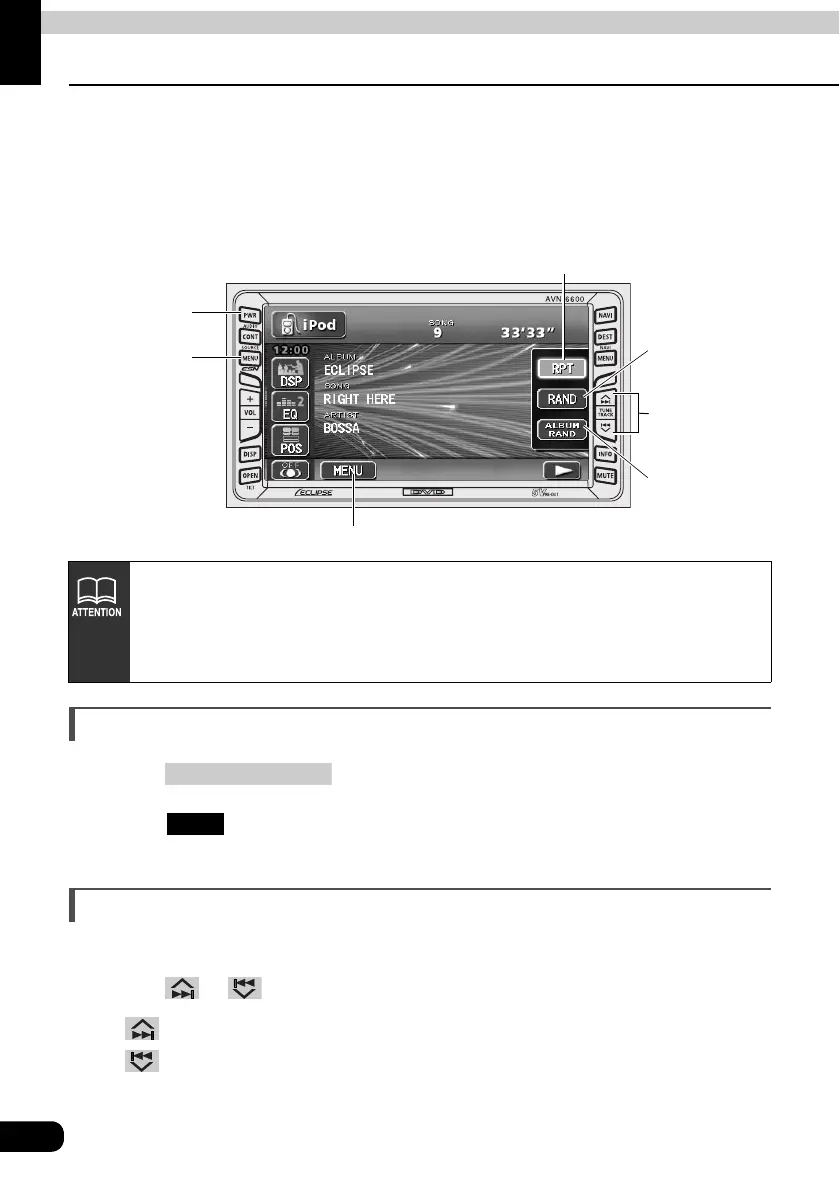
PWR
Button
(SOURCE) MENU
Button
MENU switch
Track selection
(Track startpoint)/
Fast-forward
(rewind) Button
Random switch
ALBUM
Random
switch
Repeat Switch
• For the functions of the iPod, refer to the iPod User's Guide.
• For the specific details of the iPod operation and connection, refer to the
Instruction Manual of the optional iPod interface adaptor (iPC-106).
• It is assumed here that the iPod has already connected to this main unit with an
optional iPod interface adaptor (iPC-106).
(SOURCE) MENU
iPod



 To Next Page