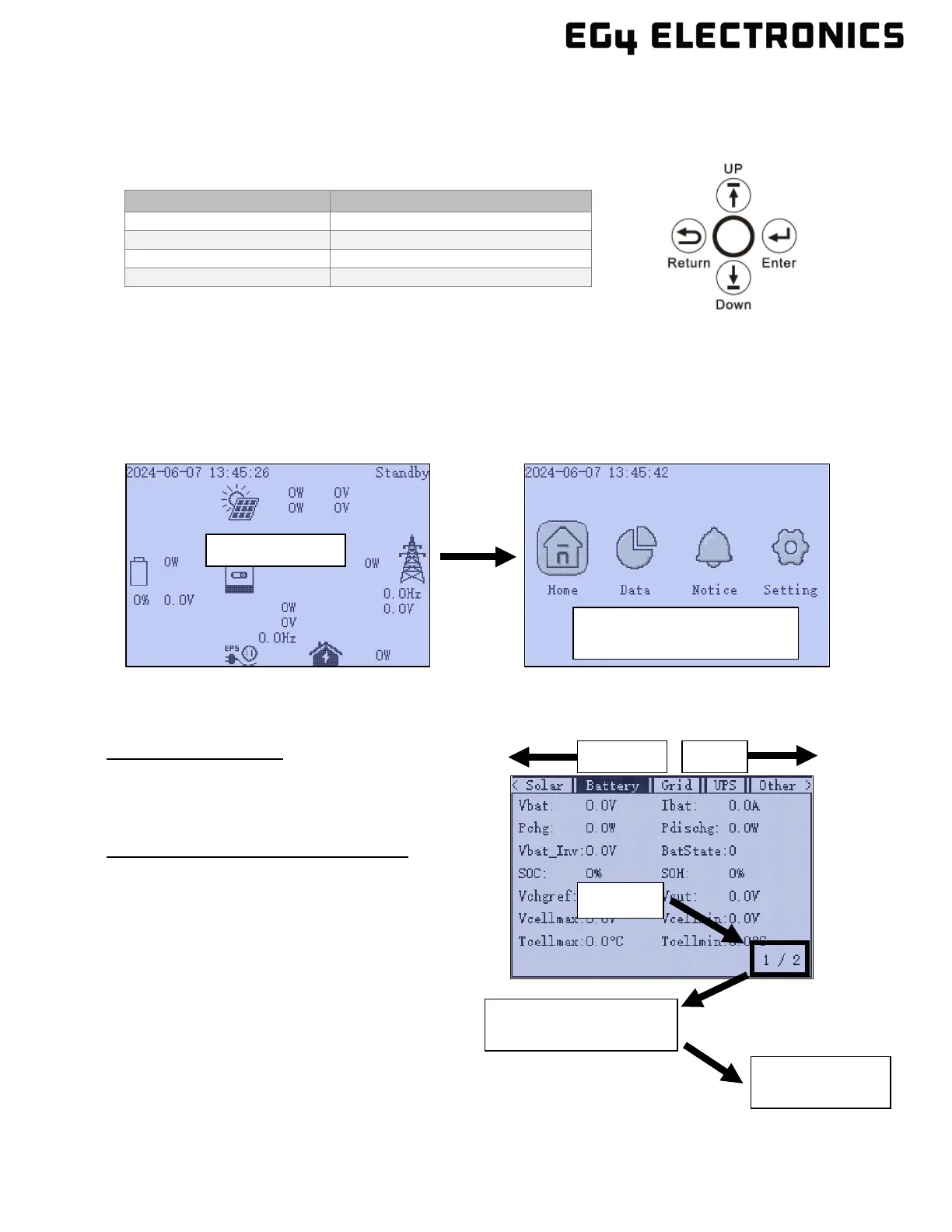
11.4 LCD MENU NAVIGATION
There are four buttons on the front panel LCD screen used for navigation and setting changes.
Pressing Enter on the home screen provides access to the main menu:
• Home
• Data
• Notice
• Setting
Press the “Down” arrow to move right, then press “Enter” to select. Once an item from the main
menu is selected, use the following for navigation:
Moving between Tabs
• “UP” button to move left.
• “Down” button to move right.
Moving between pages within the tab
• ‘Enter” selects the page number area.
• “Down” moves to the next page.
• “Up” moves to the previous page.
• “Esc” exits the page selection.
• “Up” to previous tab or “Down” to next tab.
• “Esc” again goes back to the main menu.
“Up” or “Down” to move
“Enter” to select
“Down” to next pg.
“UP” to previous pg.



 To Next Page