14.6 NETWORK SECURITY
Enabling:
The following steps describe the process of configuring and enabling WPA2 security for the dongle’s
wireless network:
1. Verify the Wi-Fi LED is solid on. If the LED is not on, see
section 13.2.
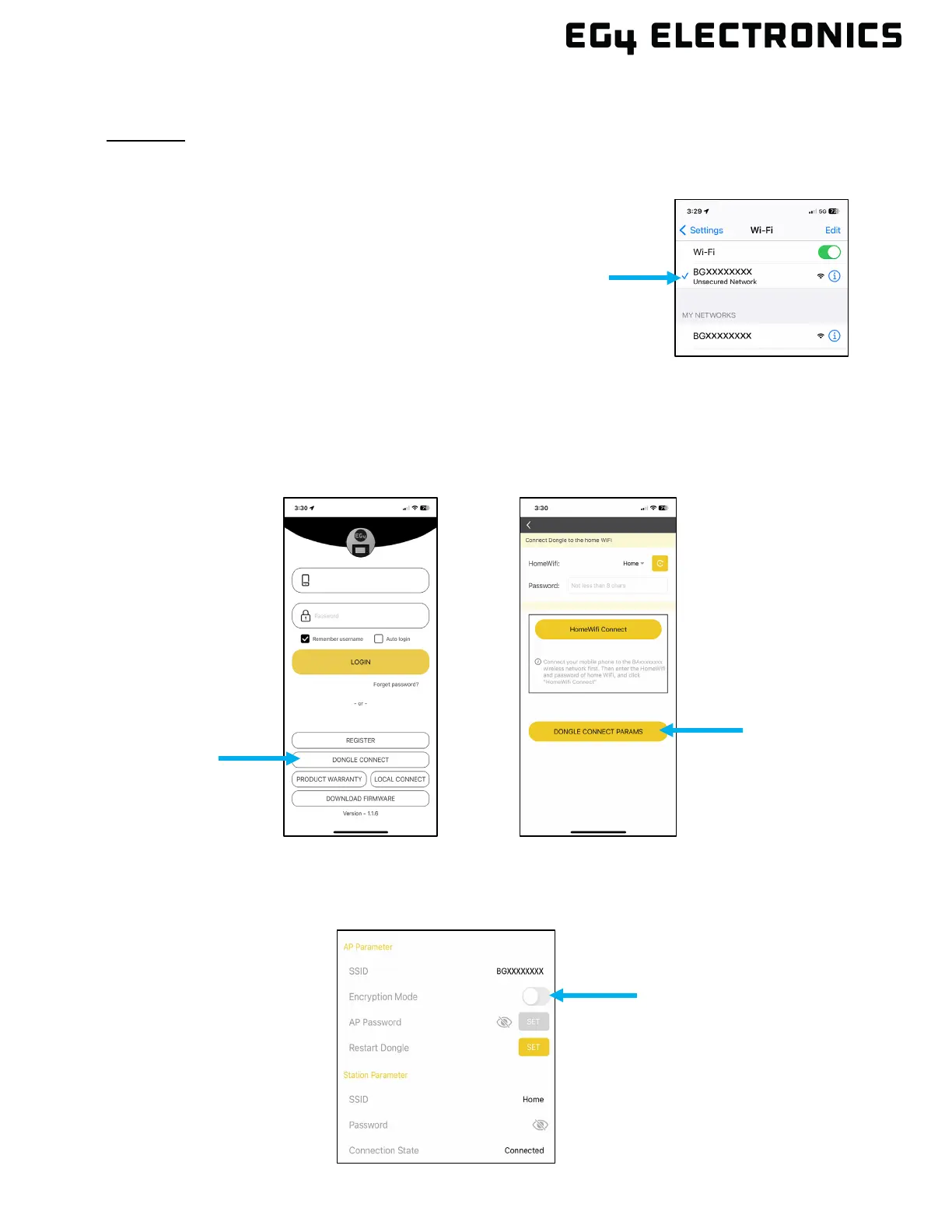
2. Using a supported device, connect the Wi-Fi network
created by the dongle, generally it's named as dongle
serial number (i.e., BEXXXXXXXX, BJXXXXXXXX,
BGXXXXXXXX).
3. Open the EG4
®
mobile app and select “DONGLE
CONNECT”. Then select “DONGLE CONNECT
PARAMS”.
NOTE: If the home screen is bypassed when opening the EG4 app, press the user icon in the upper
right of the screen and then select logout.
NOTE: After selecting “DONGLE CONNECT”, give the dongle time to respond to the Phone app.
This could take up to 60 seconds based on connectivity strength.
4. Select the Encryption Mode slider to start the configuration process. This step alone will not
enable encryption. If the app is closed or the back arrow is pressed to move to the previous
screen, this step will need to be completed again.



 To Next Page