• AC Charge: Used to charge battery bank with the grid while loads are supported by PV.
Batteries can then be used when electricity prices are high.
• AC First Mode: Used to have AC power loads before using battery or PV. PV will charge
while bypassing grid power.
• Self Consumption: The inverter will default to Self Consumption mode. Used to significantly
lower grid consumption. Solar arrays power loads, then, when PV is insufficient, batteries
power loads, and AC is only used as a last resort.
13.8 FIRMWARE UPDATE
To update the inverter firmware, follow the steps below:
1. The firmware can be updated by using the EG4
®
Electronics Monitor Center website. Contact
EG4 to ensure the files are correct.
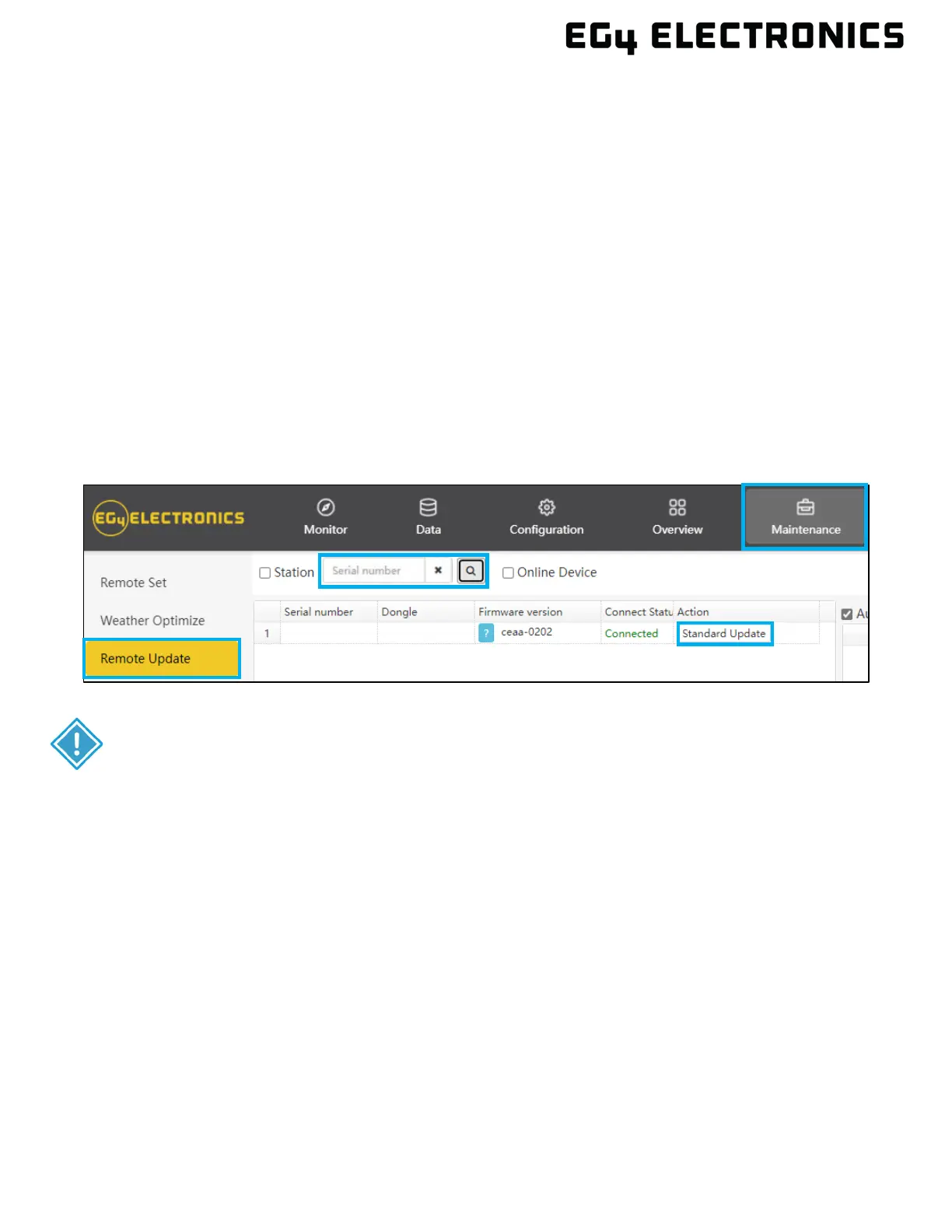
2. Log in to the Monitor Center. Select the “Maintenance” tab, and then select “Remote
Update”.
3. Choose the inverter by serial number to update and then select “Standard Update”. The
Monitor Center will begin updating both firmware files in the inverter. The latest version of the
firmware will be displayed at the bottom right of the window.
IMPORTANT:
Throughout the update, the inverter will automatically cycle power as it moves
from one update to the next, however, if at any time an “Update Failed” alert
appears, restart the full update from the first task. The “Update Failed” alert will
only appear in the Monitoring Center. The software may need more than one
attempt to update. If unable to successfully update the firmware, contact the



 To Next Page