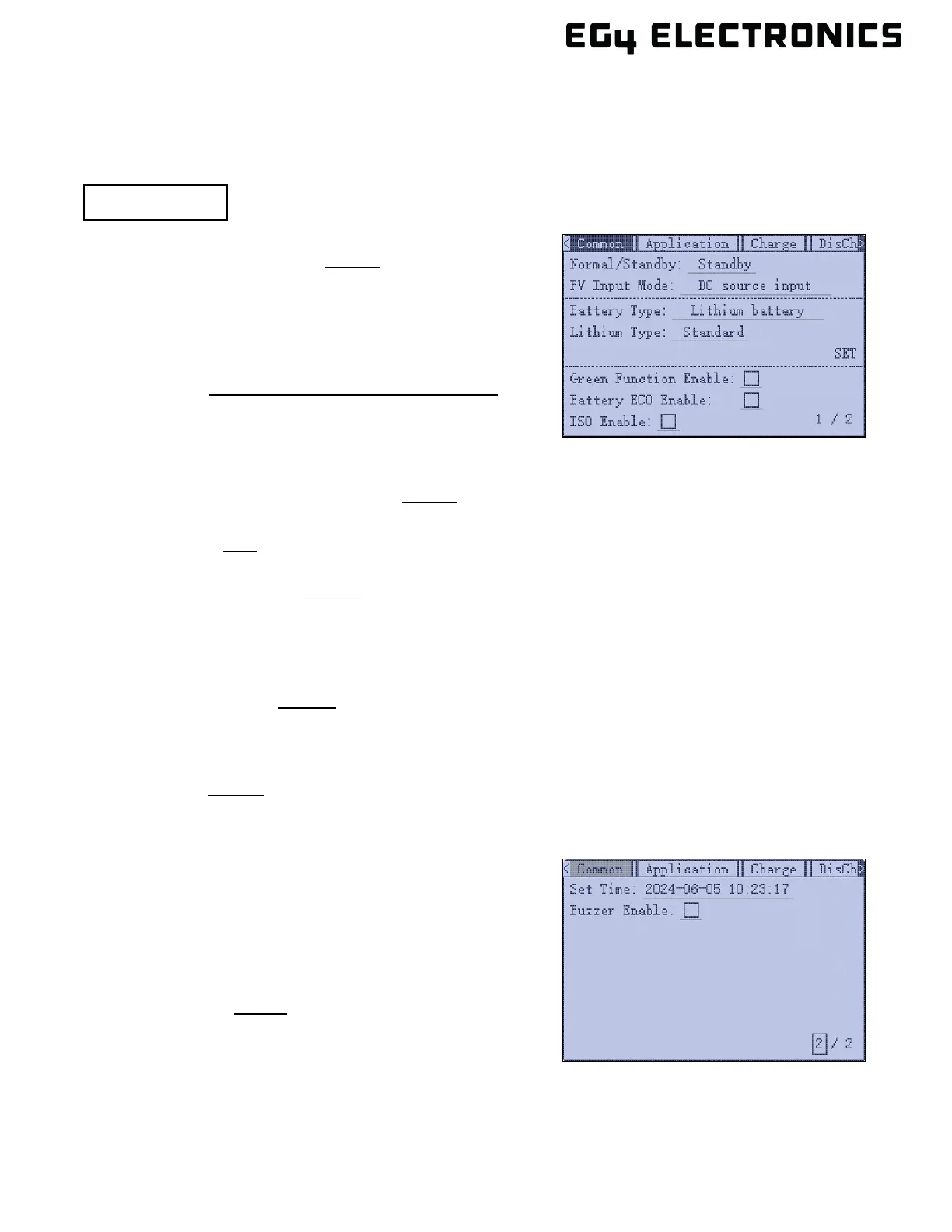
11.7 SETTINGS MENU
The information below describes each setting that can be configured by the end user. The default
value for each setting will be underlined in the examples below.
________________________________________________________________
(Page 1 / 2)
Normal/Standby: S
tandby | Normal
When the inverter is set to Standby mode, PV input and
battery charging/discharging are inoperable. If the grid power
is available, the Grid bypass relay will close, and the grid will
power the loads.
PV Input Mode: DC source input | Two MPPT connect to
same string |
Two MPPT connect to different strings
Select “Two MPPT to same string” when connecting strings
to the same MPPT. This will parallel both strings into one
at the inverter. Two MPPT connected to different strings
will keep each string as an individual string.
Battery Type: N
o battery | Lead acid | Lithium
Select the battery type connected to the inverter.
Lithium Type: E
G4 | (See battery compatibility list on EG4
®
Electronics web site for more info)
Select the battery brand to support closed-loop battery communication.
Green Function Enable: D
isable | Enable
When enabled, the inverter will work in green mode if EPS power output is less than 1W for 10
seconds. When in green mode, the EPS will only output for 200 ms every 3 seconds to save energy.
If a load is detected to be greater than 7W on a single phase or a total of 12W between two phases,
the inverter will exit green mode and return to normal EPS output.
Battery ECO Enable: D
isable | Enable
When enabled, the inverter will switch to bypass mode if the battery has reached the On-Grid EOD
value and AC charging is disabled. The inverter will stay in bypass mode until the battery is being
charged again. When enabled, switch over time may be increased up to 15 ms.
ISO Enable: D
isable | Enable
Enable or disable PV ground fault circuit interrupter.
(Page 2 / 2)
Set Time: [year–month–day] [hour: minute: second]
When the inverter is online, the time is based on the set
Time Zone. The time zone can be set using Monitor Center
by going to Configuration Tab, Station, Station
Management, Edit page, then set the time zone and
daylight savings time
Buzzer Enable: E
nable | Disable
Enable or disable the alarm (includes navigation key
presses).



 To Next Page