1. Connect the mobile device to the dongle’s wireless network.
2. Open the EG4
®
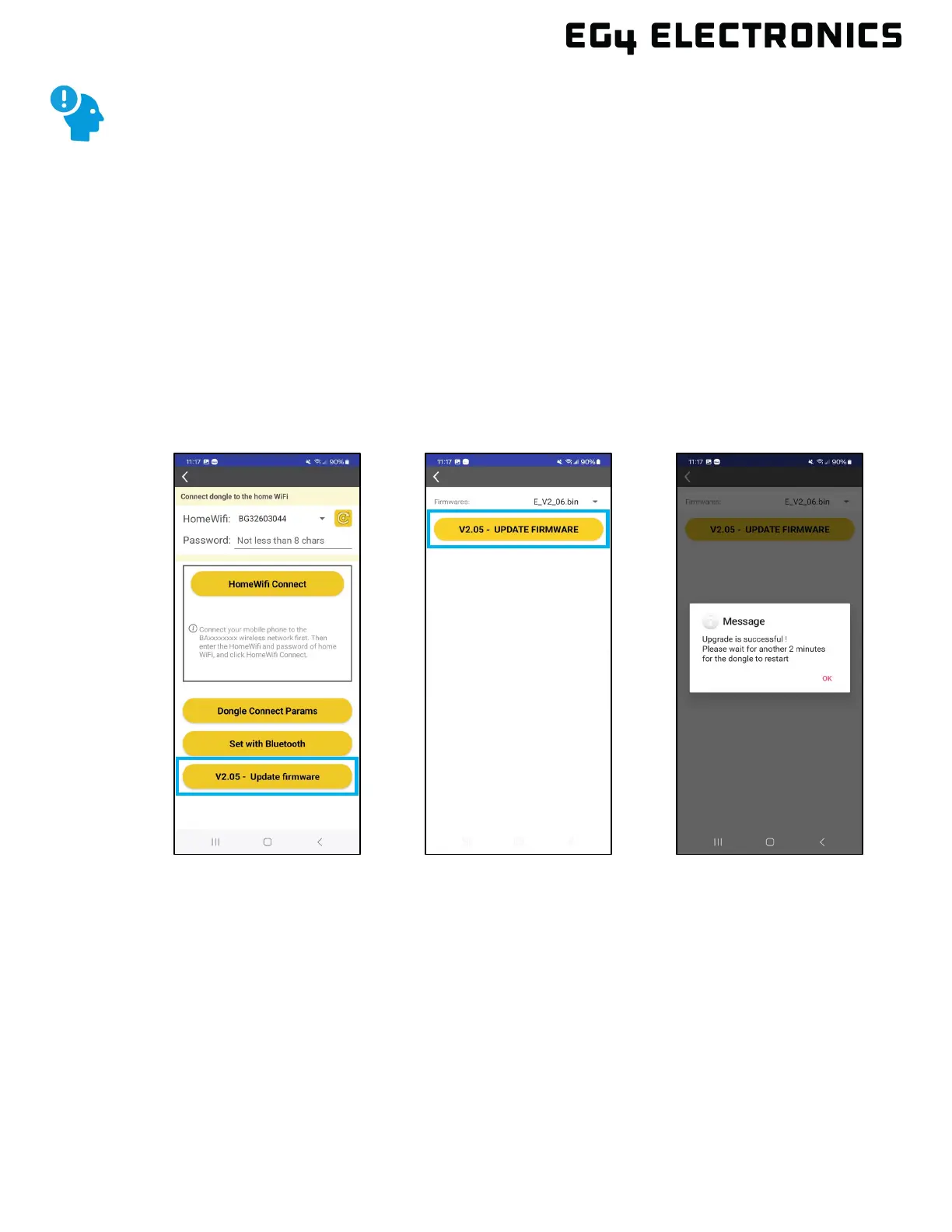
app and select “DONGLE CONNECT”.
3. The current dongle firmware will be displayed on the Update firmware button. Select the
“Vx.xx Update Firmware” button to start the upgrade process. The EG4 app will
automatically locate the latest firmware version available. At the time of this writing, the
latest version in the image below is 2.06.
4. Select “Vx.x.x UPDATE FIRMWARE” to load the new firmware to the dongle.
5. The dongle FW should immediately load to the dongle followed by the message shown
below. Press “OK” and wait for the dongle to reboot, which should not take more than a
couple minutes. Once rebooted, verify the dongle firmware was updated using the dongle
connect option in the app, or by using Monitor Center.
REMINDER:
Before starting a dongle firmware update, verify all 3 LEDs are ON, the dongle
is online, and the mobile device is connected to the dongle’s Wi-Fi.



 To Next Page