G3 Series EtherCAT
TM
Technical Manual
13-144
Subject to change without notice
www.asco.com/g3
IP Address Configuration
EtherCAT
TM
fieldbus devices do not communicate using a standard IP address. The Aventics G3 node’s IP address is
only used to access the nodes integrated web server for configuration and diagnostic information via a personal
computer’s web browser.
The IP address of the Aventics G3 EtherCAT
TM
node may only be set once EtherCAT communication is disabled (See
page 5-36).
Integrated Web Page Configuration
The Aventics EtherCAT
TM
node has an integrated web server. This server can be accessed via any standard web
browser program through a properly configured EtherCAT
TM
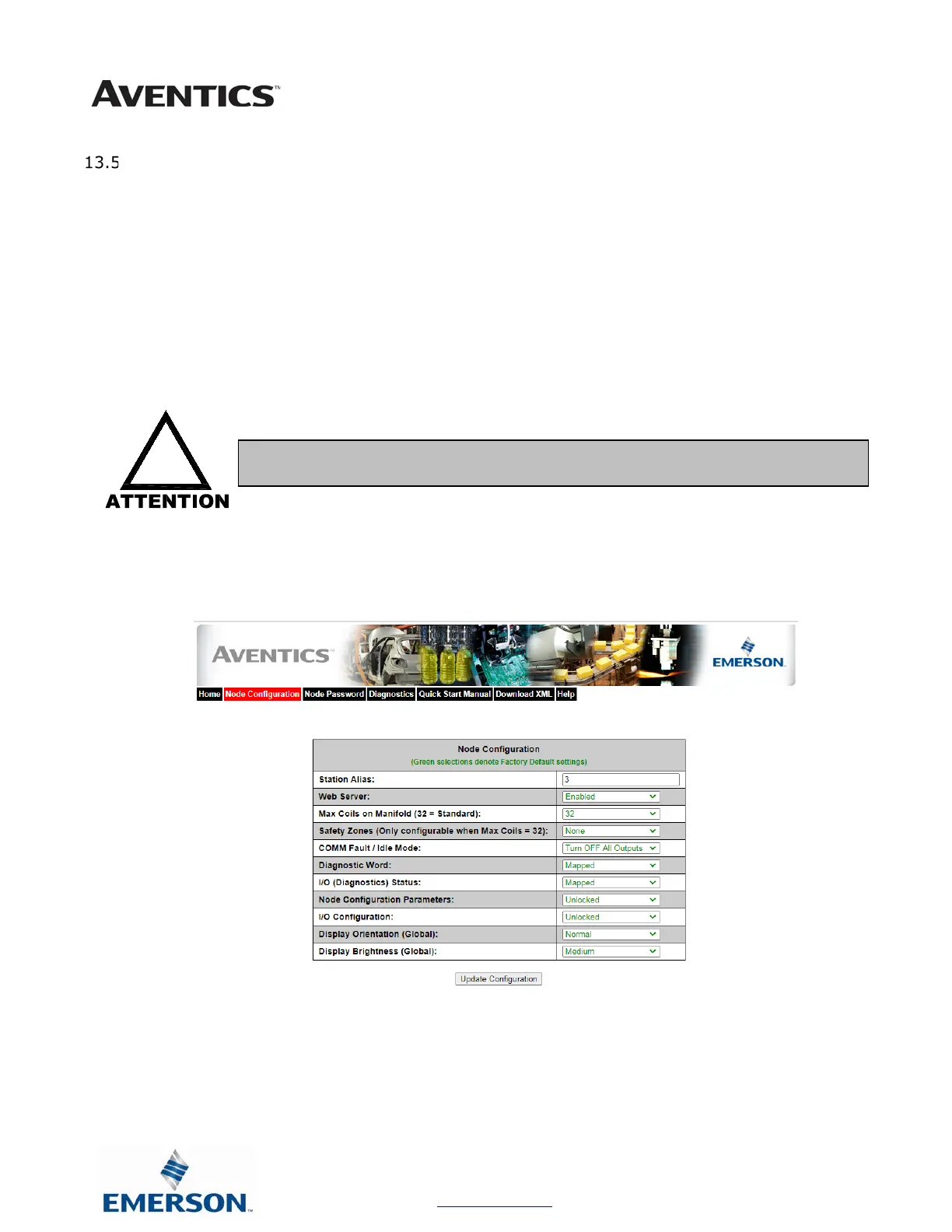
master device. With the IP Address, the “Node
Configuration” page for the node can be accessed and the configuration parameters changed. Please note that the PC,
where the web browser is installed, must be correctly configured for operation with the appropriate network IP ranges
and subnet settings that match the EtherCAT
TM
master device configuration.
Below is a representation of the “Node Configuration” page which is stored in the EtherCAT
TM
node.
The IP address and Subnet Mask selections cannot be modified from this page. These parameters will be programmed
in the node’s non-volatile FLASH memory once “Update Configuration” is clicked, and power to the node is cycled.
• Consult appropriate personnel before changing your computer’s network settings and
always record previous settings for later reversal before attempting changes.



 To Next Page
 Loading...