Enertech Global, LLC 51
AV : MD/ME - Rev. A Models
Installaon and Operaons Manual
Manual Mode
In manual mode, the system allows the technician to control
the pump, compressor, valves, and immersion heaters. This is
useful for validang the system components. Aer
compleng a vericaon of the system and installaon, the
mode can be changed back to “normal” in the system sengs.
Example: Move the diverng valve and verify ow is
achieved to the hot water tank.
To reach manual mode:
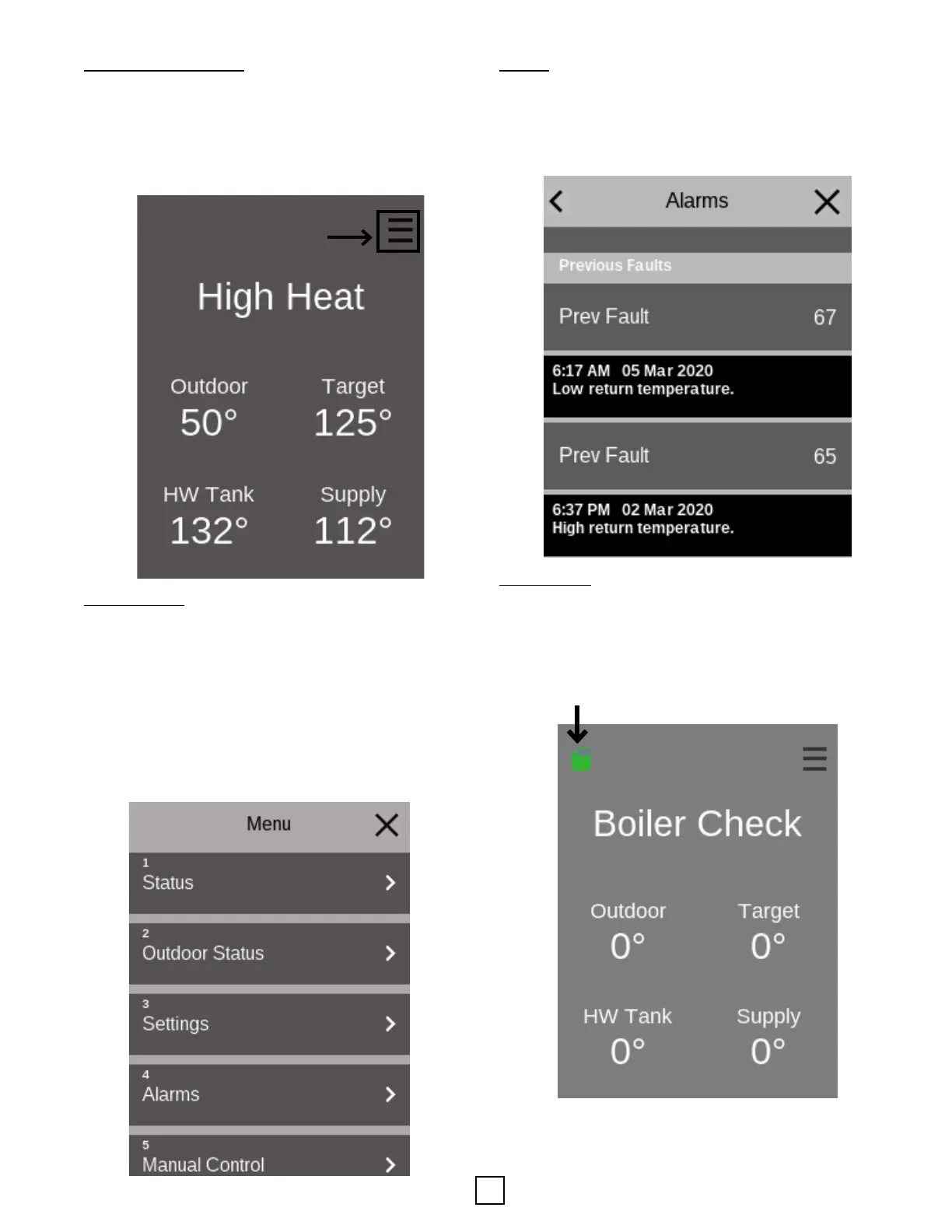
• Press the menu buon.
• Scroll to and press “5 Manual Control”
The menu structure of the touch-screen HMI provides many
customizable sengs. Not all HMI screens are shown in
this manual. The menus are very intuive. The best way to
navigate is to review the various menus aer going through
the start up Wizard. This approach will help provide familiarity
with the locaon of the various sengs. Navigate the opons
within the HMI, rst press the menu buon in the upper right
corner.
0.0 Main Menu 0.1 Menu 0.2 Menu
1.1 Status Menu 1.2 Menu 1.3 Menu
2.1 Outdoor Status Menu 2.2 Menu 2.3 Menu
Menu
0.0 Main Menu 0.1 Menu 0.2 Menu
1.1 Status Menu 1.2 Menu 1.3 Menu
2.1 Outdoor Status Menu 2.2 Menu 2.3 Menu
Secon 8: Controls
Alarms
The system contains an advanced network of sensors for
system monitoring of opmal running condions. If a problem
should occur, these sensors will quickly idenfy the issue.
In such a situaon, the HMI displays a red LED, and ashing
“ALARM” text on the screen. Addional details about an alarm
can be viewed in “Alarm Info” under the menu.
Data Logging
If the SD card icon is not present, this means that the user
must insert the SD card for data to be logged. The SD card icon
will be green if the SD card has been inserted & is successfully
logging data.
Note: If the SD card icon is red the SD card must be re-
inserted to log data.


 To Next Page