Enertech Global, LLC 53
AV : MD/ME - Rev. A Models
Installaon and Operaons Manual
3.1.1 Before Code 3.1.2 Before Code 3.1.0 Advanced Passcode
3.2.0 3.2.1 Heat Curve 3.3.0
3.4.1 Heat Min Temp 3.4.2 Heat Max Temp 3.4.3 Cool Setpoint
3.1.1 After Code (note: le name is 3.1.0.BMP) 3.1.1 Aux Heat Delay
3.3.1 Heat Setpoint 3.4.0
3.5.0 3.5.1 Aux HW Delay
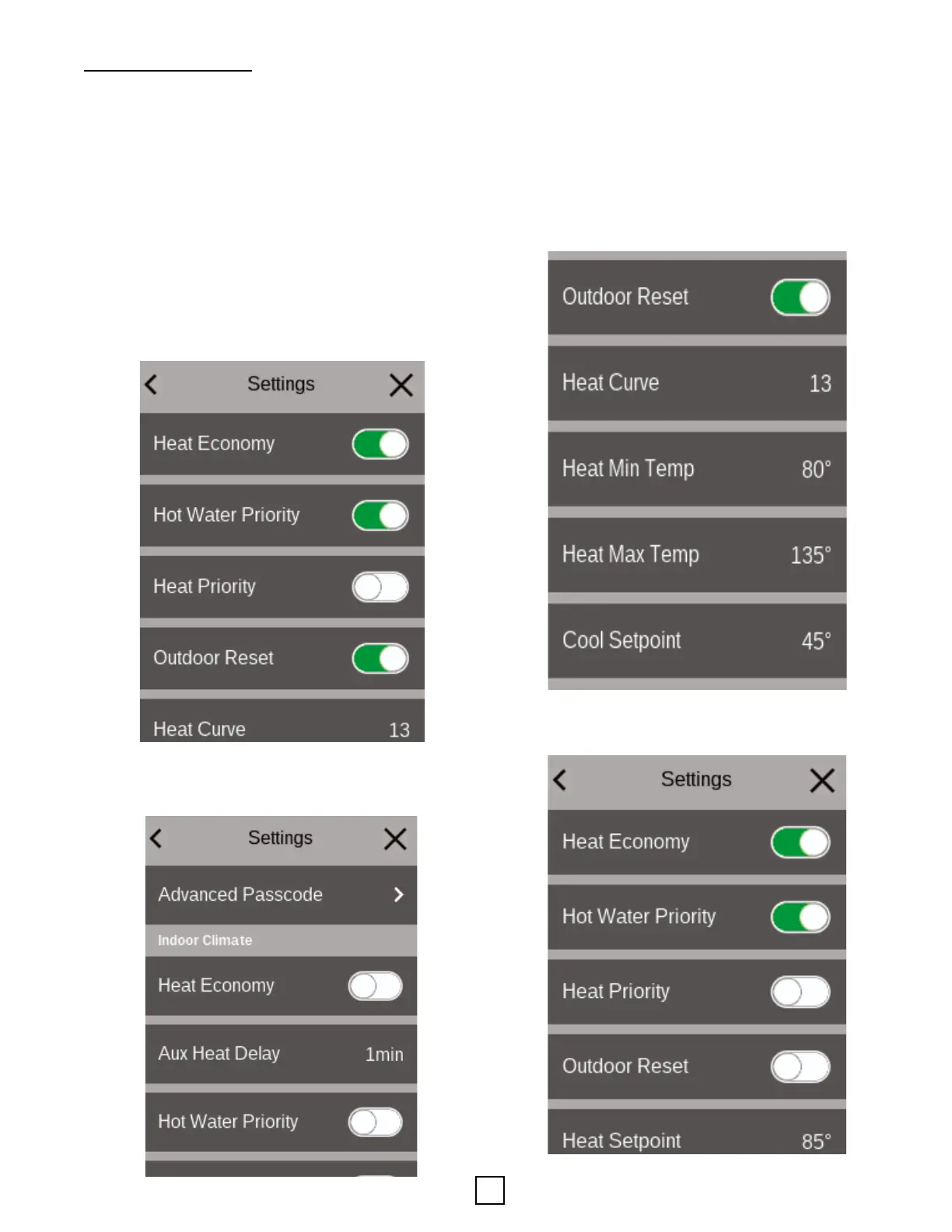
• Heat Curve: If Outdoor Reset is on, the control will use
the heat curve selected.
• Heat Max/Min Temps: Maximum temperature allowed in
heang mode is used to ensure ooring manufacturer’s
specicaons for radiant heang. Minimum temperature
is used if Outdoor Reset is Enabled. Note: High Heang
(HHEAT call) setpoint is adjustable from 80°F to 135°F
leaving uid temperature. (Factory default 120°F)
• Cool Setpoint: Leaving uid temperature used when
cooling call is received (Default 45°F, minimum allowable
42°F).
3.1.1 Before Code 3.1.2 Before Code 3.1.0 Advanced Passcode
3.2.0 3.2.1 Heat Curve 3.3.0
3.4.1 Heat Min Temp 3.4.2 Heat Max Temp 3.4.3 Cool Setpoint
3.1.1 After Code (note: le name is 3.1.0.BMP) 3.1.1 Aux Heat Delay
3.3.1 Heat Setpoint 3.4.0
3.5.0 3.5.1 Aux HW Delay
• Heat Setpoint: Temperature the system will target if
Outdoor Reset is OFF.
Secon 8: Controls
Under sengs, scroll down to Indoor Climate (advanced
passcode required).
• Electric immersion
heat is used under high load condions (aer compressor
runs at maximum RPMs for an adjustable period of me)
• Heat Economy ON: Electric immersion heat is not used
(not recommended)
• Hot Water Priority: If ON, a call for DHW will take priority
over heang or cooling calls.
• Heat Priority: If ON, a call for Heat will take priority over
cooling.
• Outdoor Reset: If ON, the leaving uid temperature to
the hydronic heang system will increase as the outdoor
temperature gets colder and will decrease as the outdoor
temperature gets warmer. This mode is recommended for
radiant oor systems for best eciency.
3.1.1 Before Code 3.1.2 Before Code 3.1.0 Advanced Passcode
3.2.0 3.2.1 Heat Curve 3.3.0
3.4.1 Heat Min Temp 3.4.2 Heat Max Temp 3.4.3 Cool Setpoint
3.1.1 After Code (note: le name is 3.1.0.BMP) 3.1.1 Aux Heat Delay
3.3.1 Heat Setpoint 3.4.0
3.5.0 3.5.1 Aux HW Delay
3.1.1 Before Code 3.1.2 Before Code 3.1.0 Advanced Passcode
3.2.0 3.2.1 Heat Curve 3.3.0
3.4.1 Heat Min Temp 3.4.2 Heat Max Temp 3.4.3 Cool Setpoint
3.1.1 After Code (note: le name is 3.1.0.BMP) 3.1.1 Aux Heat Delay
3.3.1 Heat Setpoint 3.4.0
3.5.0 3.5.1 Aux HW Delay
• Aux Heat Delay: Adjust the amount of me the unit
must run full speed before the electric immersion heat is
engaged (Heat Economy mode = OFF)


 To Next Page