Functions of the Control Panel 233
7
7
7
7
7
7
7
7
7
7
7
7
FX Menu
This menu allows you to make settings which affect the printer
when it is in the FX emulation mode.
* Depending on whether Letter (62) or A4 (66) paper has been selected.
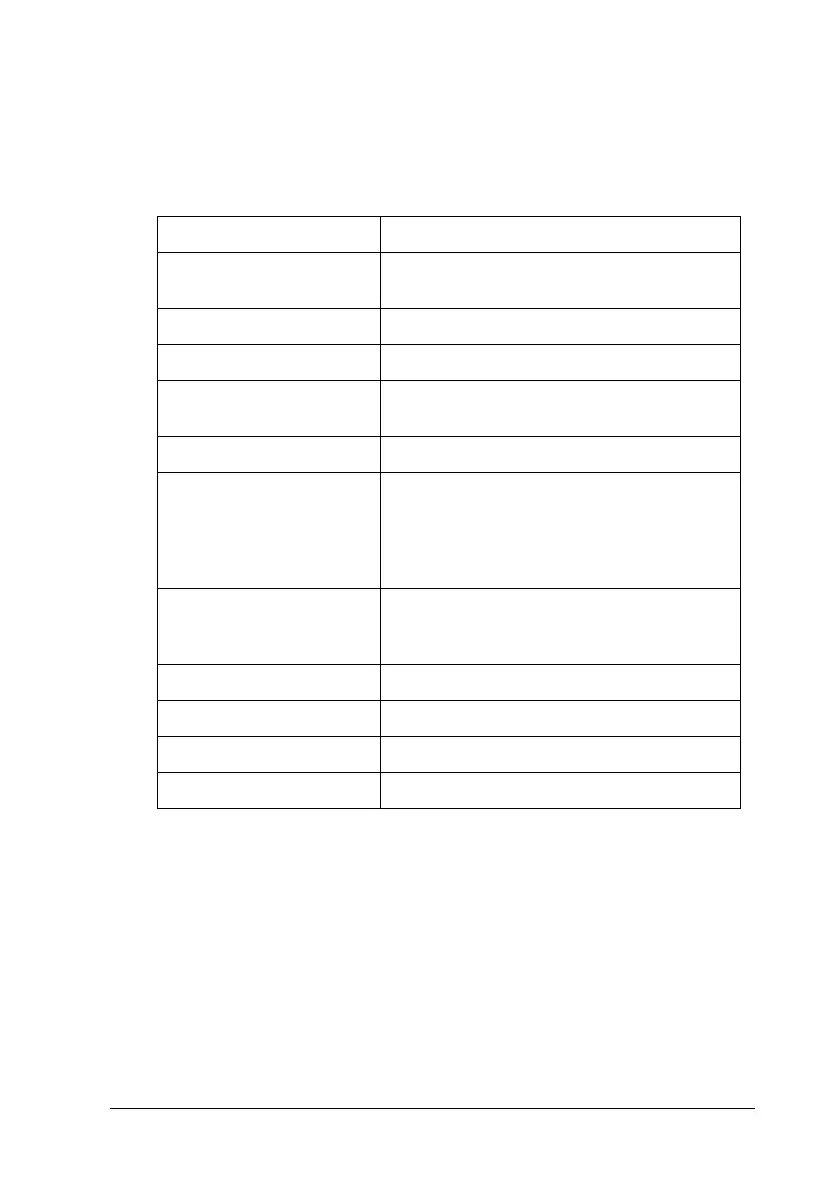
Font
Selects the font.
Item Settings (default in bold)
Font Courier, Prestige, Roman, Sans Serif, Script,
Orator S, OCR A, OCR B
Pitch 10, 12, 15 cpi, Prop.
Condensed Off, On
T. Margin 0.40 ... 0.50 ... 1.50 inches in 0.05-inch
increments
Text 1... 62/66*... 67lines
CGTable PcUSA, Italic, PcMultilin, PcPortugue,
PcCanFrenc, PcNordic, PcTurkish2,
PcIcelandic, PcE.Europe, BpBRASCII,
BpAbicomp, Roman-8, PcEur858, ISO Latin1,
8859-15ISO
Country USA, France, Germany, UK, Denmark,
Sweden, Italy, Spain1, Japan, Norway,
Denmark2, Spain2, LatinAmeric
Auto CR On, Off
Auto LF Off, On
Bit Image Dark, Light, BarCode
ZeroChar 0, (or the zero character with a slash)











 To Next Page