EPSON WorkForce 600/EPSON Stylus OFFICE TX600FW/BX600FW/EPSON Stylus SX600FW/ME OFFICE 700FW Revision A
TROUBLESHOOTING Error Indications and Fault Occurrence Causes 65
Confidential
Table 3-18. Check point for Communication error according to each phenomenon
Occurrence
timing
CR position
Detailed phenomenon
Defective
unit/part name
Check point Remedy
• Power on
• Anywhere
When turning on the power, the printer
does not operate at all.
Panel Unit
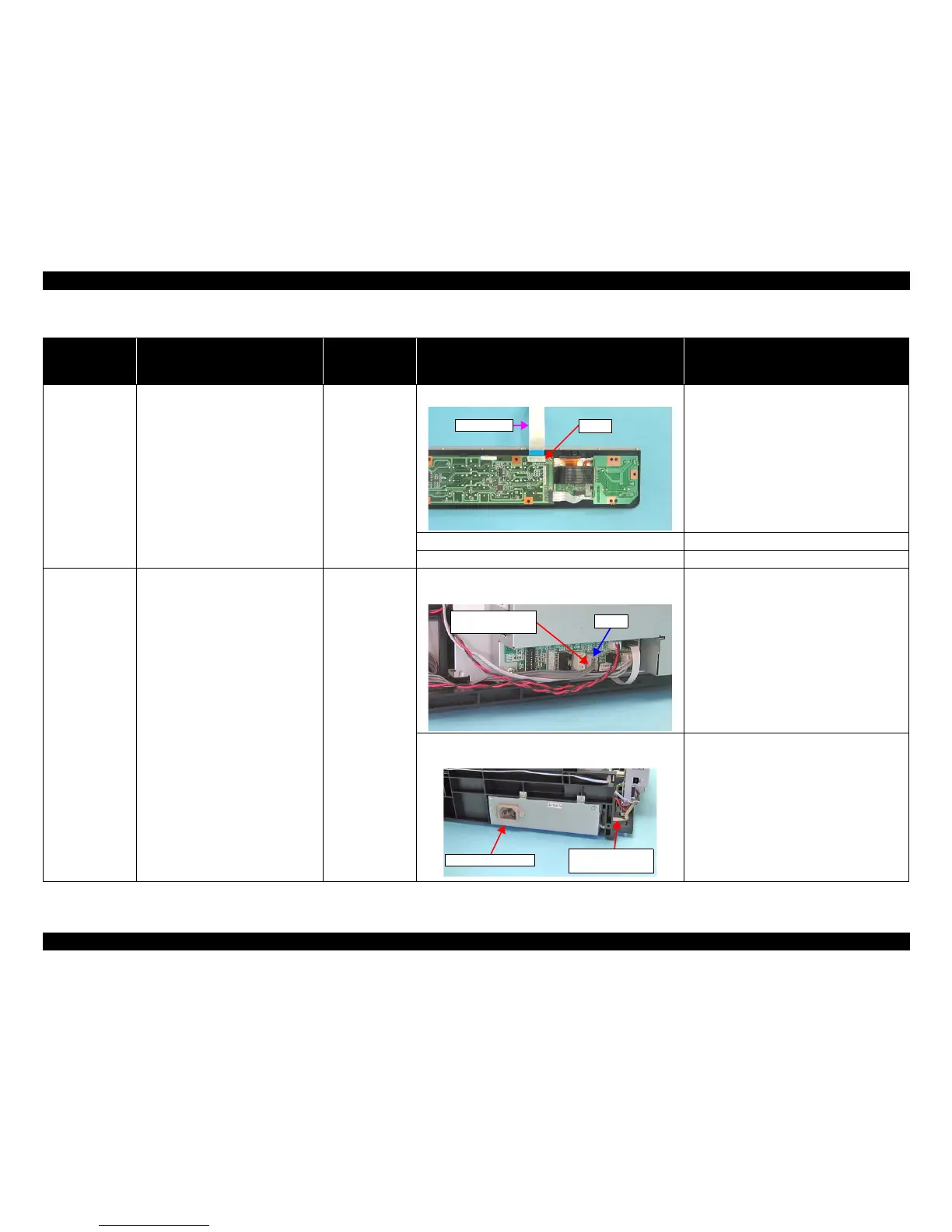
1. Check if the Panel FFC is connected to CN1 on the Panel Board.
1. Connect the Panel FFC to CN1 on the Panel
Board.
2. Check if the Panel FFC is not damaged. 2. Replace the Panel FFC with new one.
3. Check if the Panel Board is not damaged. 3. Replace the Panel Board with new one.
• Power on
• Anywhere
When turning on the power, the printer
does not operate at all.
Power Supply Unit
1. Check if the Power Supply Unit Cable is connected to
CN23 on the Main Board.
1. Connect the Power Supply Unit Cable to CN23
on the Main Board.
2. Check if the Power Supply Unit Cable/Power Supply
Unit is not damaged.
2. Replace the Power Supply Unit with a new one.
* If the problem is not solved, replace the Main
Board with new one.













 To Next Page