CP-2232E
Remote Control Panel
Page 42 Revision 1.1
7. NAVIGATING THE CONTROL PANEL
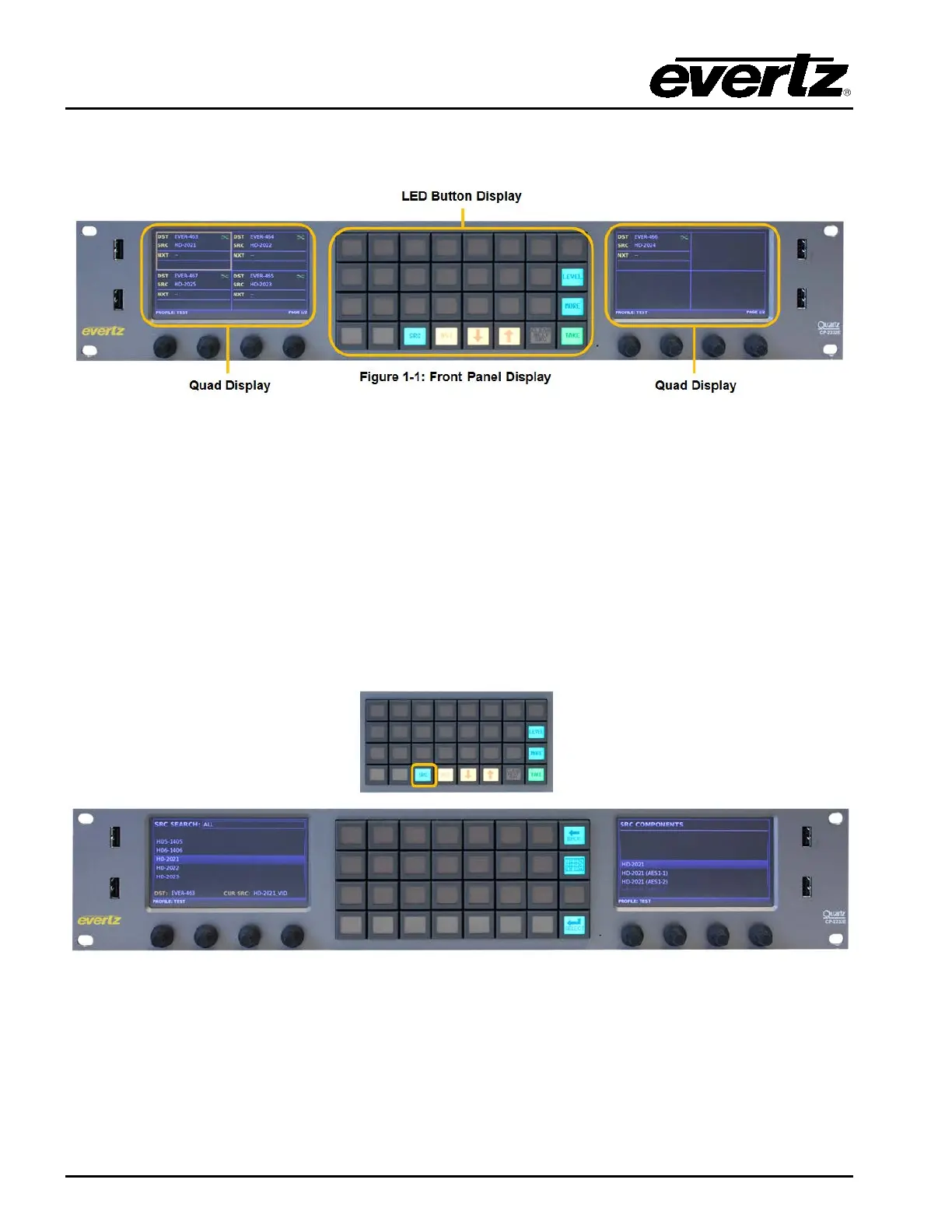
Figure 7-1: Front Panel Display
The default router control view of the CP-2232E features two touch LCD screens with a maximum of
four destinations per screen displaying the following information: Destination Name, Current Source
Name, Next Source Name, Profile Selected Name, Destination Page, and State of the Destination
(Lock/Protected/etc). The user can select a destination by touching the required destination within the
quadrant. The shaft encoders can also be used to select a destination within a quadrant. The default
button navigation pad will contain Src, Dst, Up, Dwn, Clear Next Src, Level, More, and Take buttons.
Depending on the panel configuration the default button assignments may contain more or less then
shown in Figure 7-1.
7.1. SOURCE (SRC) BUTTON
Figure 7-2: SRC Layout
The SRC button when pushed will display a list of available sources in the Left display screen and the
components that make up the source in the right screen (If the source contains video, audio, data, or
other components). The shaft encoders under the Left or Right displays are used to navigate through
the lists by turning the left shaft encoder under the respective screen. When the required source is
highlighted, the Select button is used to confirm the choice and return the user to Eight Destination



 To Next Page