CP-2232E
Remote Control Panel
Revision 1.1 Page 49
7.6. SELECTING THE “MORE” BUTTON
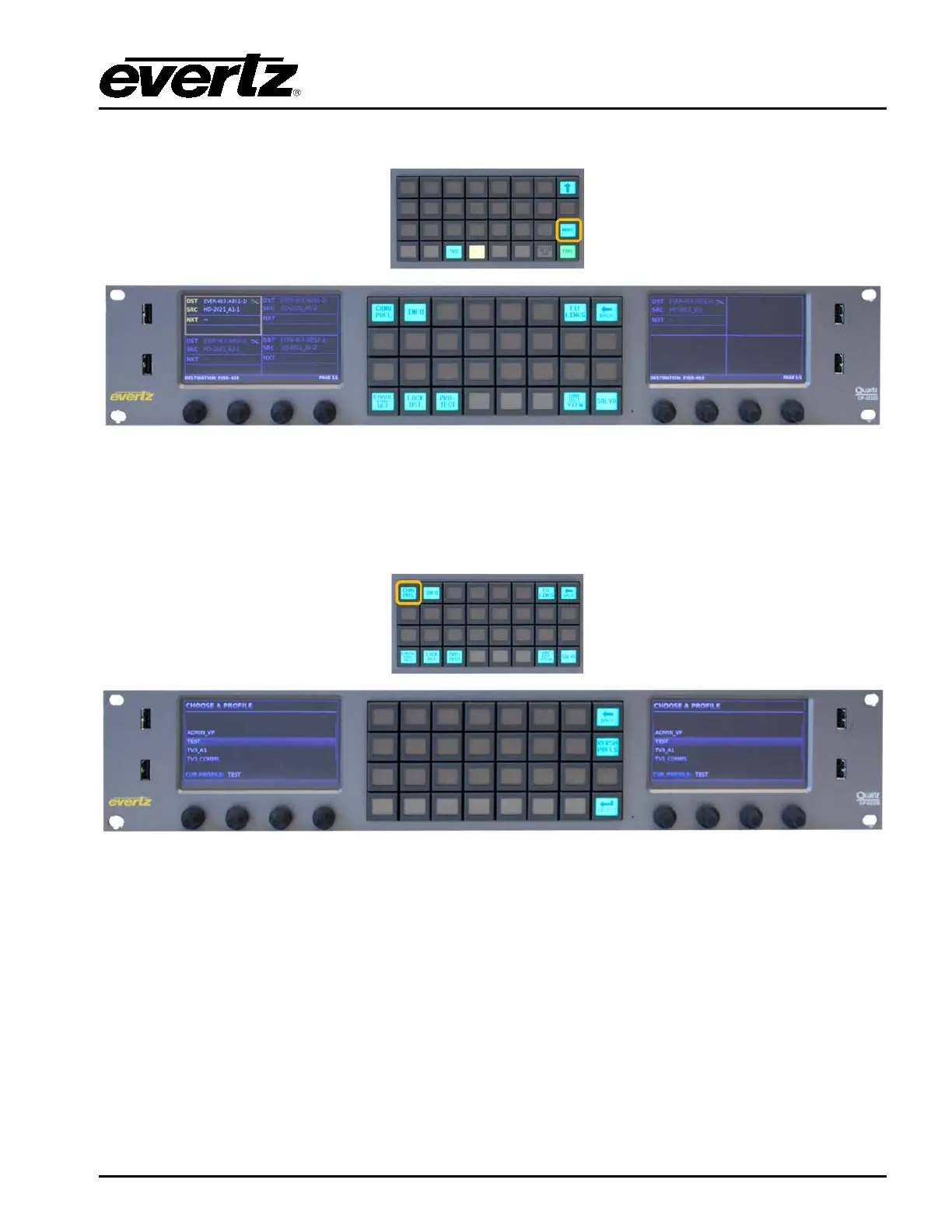
Figure 7-12: Selecting the “MORE” Button
The More button when selected will display the following button selections, Change Profile, Info,
Tielines, Back, Toggle, Lock Destination, Protect Destination, One Destination View and Salvo.
The Back button can be used to cancel the “More” function and return to the Eight Destination view.
Figure 7-13: Selecting the “CHNG PRFL” Button
The CHG PRFL button when pressed will display a list of Profiles that have been assigned to the panel
from MAGNUM. A Profile contains sources, destinations, labels, and categories. These can be
different on a per profile basis. The Left and Right screens will display the list of available profiles for
selection. The left shaft encoder under each screen can be used to scroll through the list. When the
required Profile is highlighted, the Select button is used to confirm the choice and return the user to
Eight Destination view with this profile loaded. The RFRSH PRFLS will re-query MAGNUM for any
updates in the available profiles to the panel. The Back button can be used to cancel the profile
selection and return to the Eight Destination view.



 To Next Page