Home
Fargo
Printer
DTC4500e
Page 32 (Clean Printer (Toolbox))
Fargo DTC4500e - Clean Printer (Toolbox)
90 pages
Manual
Save Page as PDF
To Next Page
To Next Page
To Previous Page
To Previous Page
Loading...
DTC4500e_
User
Guide_
EN
,
PLT
-
0166
9
,
Rev.
1.1
Page
32
April
2014
4.5
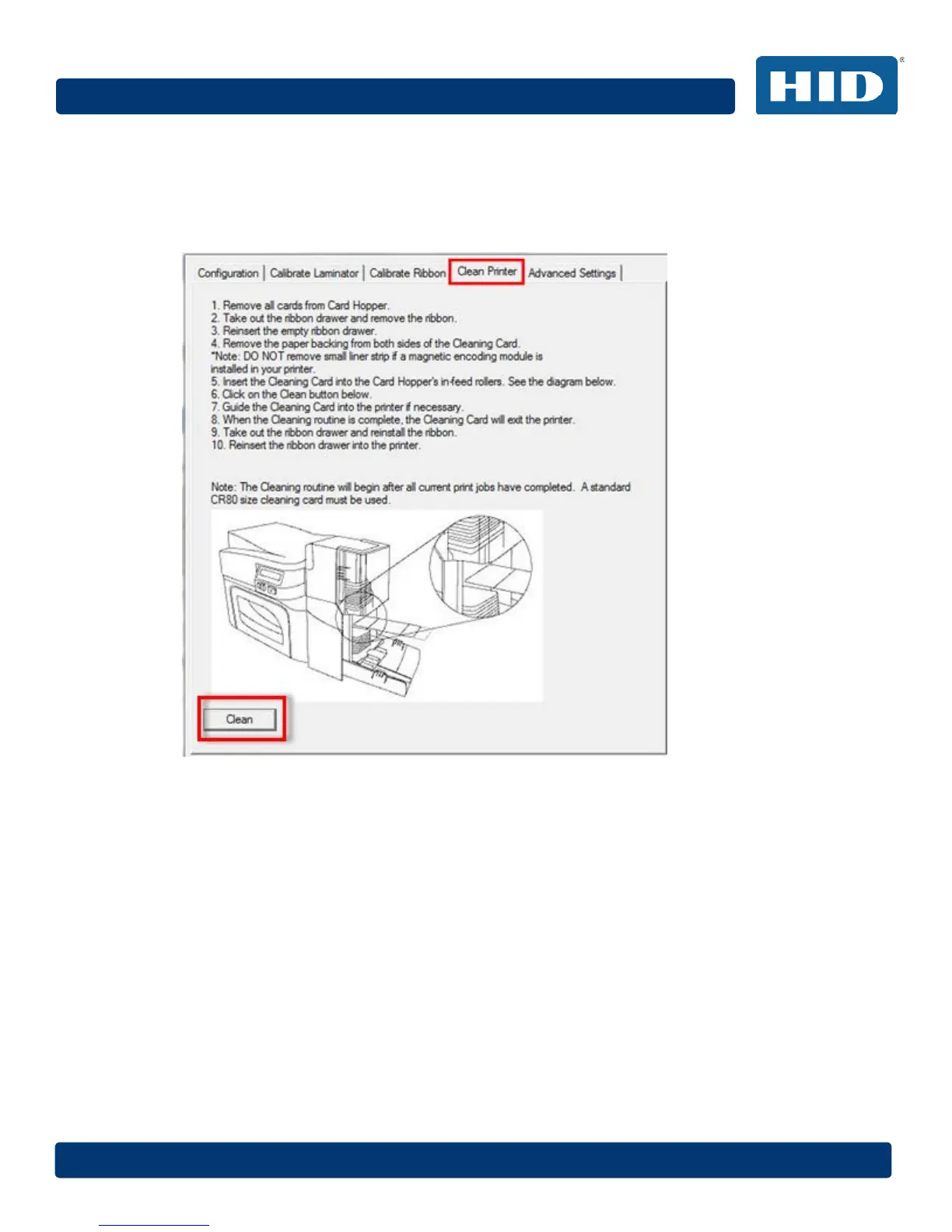
Clean Pri
nter
(Toolbox)
The Clea
n Printer t
ab inc
ludes
the Cl
ean butt
on
.
Clean Butto
n
:
Sta
rts
the c
leaning r
out
ine.
Follow th
e instruc
tion
s
on the p
age for
cle
aning
the
p
rinter.
31
33
Table of Contents
Main Page
Default Chapter
1
User Guide
1
Revision History
2
Table of Contents
3
1 Specifications
7
Regulatory Compliance
7
Agency Listings
7
United States
8
Canada
8
Taiwan
8
Japan
8
Korea
9
Safety Messages (Review Carefully)
9
Safety Messages - Unites States
9
Safety Messges - French
10
Safety Messages - Taiwan
11
Safety Messages - China
12
Technical Specifications
13
Functional Specifications
16
Printer Components: Print Ribbons
16
Ribbon Types and Print Counts
17
Printer Components: Blank Cards
18
2 Setup and Installation Procedures
19
Choosing a Good Location
19
About Moisture Condensation
19
Unpacking and Inspection
19
Installing the Print Ribbon Cartridge
20
Installing Blank Cards into the Input Card Hopper
21
Card Size Selection
22
Printer Power
24
3 Print Driver Installation
25
Driver Installation Instructions
25
4 Printing Preferences
26
Card Tab
26
Card Size
27
Orientation
27
Copies
27
Diagnostics
28
Test Print
28
Toolbox
28
Configuration (Toolbox)
29
Set Language
29
Calibrate Laminator (Toolbox)
30
Calibrate Ribbon (Toolbox)
31
Clean Printer (Toolbox)
32
Safety Messages (Review Carefully)
33
Cleaning Kit
35
Printhead Cleaning
36
Cleaning the Platen and the Card Feed Rollers
36
Cleaning the Printer's Exterior
38
Advanced Settings (Toolbox)
39
Overview of Advanced Settings
40
Device Options Tab
44
Supplies
45
Ribbon Type
45
Dual Sided
46
Print both Sides
46
Split 1 Set of Ribbon Panels
46
Print Back Image on Front of Card
46
Print Back Side Only
46
Options
46
Rotate Front 180 Degrees
46
Rotate Back 180 Degrees
46
Disable Printing
46
Write Only
47
Encrypt Job Data
47
Fluorescent Panels
48
Selecting the Fluorescent Panel Ribbon Type
48
Creating a Custom Fluorescent Image Using the YMCFKO Ribbon
49
Configuring Fluorescent Data Using the Application
49
Image Color Tab
51
Image Quality
52
Color Matching
52
Resin Dither
52
Heat
52
Dye-Sub Intensity (YMC)
52
Resin Heat, Front (K)
52
Resin Heat, Back (K)
53
Overlay Heat (O)
53
Default
53
Advanced Settings
54
Image Quality
54
Balance
55
Default
55
Image Calibrate Tab
56
Vertical
56
Horizontal
56
Magnetic Encoding Tab
57
Encoding Options
57
4.10.1.1 ISO Encoding
58
4.10.1.2 Custom Encoding or Raw Binary Encoding Mode
59
Magnetic Track Options
60
4.10.2.1 Reviewing the ISO Track Locations
60
4.10.2.2 Reviewing the Sample String
61
4.10.2.3 Sending the Track Data
61
Lamination Tab
63
Lamination Position
63
Lamination Speed
63
Lamination Side
64
Lamination Type
64
Automatically Detect Installed Laminate for Every Print Job
64
Overlay / Print Area Tab
65
Defining an Overlay or Print Area
65
Deleting a Defined Area
66
Overlay / Print Area
66
4.12.3.1 Defined Area
67
4.12.3.2 for Print and Overlay
67
4.12.3.3 for Overlay Only
67
For Print Only (no Overlay)
67
Security Options
67
4.12.4.1 Visual Security Solutions
67
4.12.4.2 Verimark
67
4.12.4.3 Holomark
67
K Panel Resin
68
Print All Black with K Panel
69
Full Card
69
Defined Area(S)
69
Undefined Area(S)
69
Print YMC under K
69
Print K Only
69
Defined Area
70
Printer Info
71
5 System Overview - Troubleshooting
72
Sequence of Operations
72
6 Troubleshooting
73
Printer Error Buttons
73
Printer Error Button and On-Screen Messages
73
Error Messages
74
Troubleshooting with the Error Message Table
75
Printer-Specific Tools
86
Additional Printer Specific Tools
87
7 Firmware Upgrades
88
8 Technical Support
89
Reading the Serial Numbers on a FARGO Printer
89
Related product manuals
Fargo DTC4500
139 pages
Fargo DTC400
341 pages
Fargo DTC4000
126 pages
Fargo DTC400e
345 pages
Fargo DTC4250e
145 pages
Fargo DTC550
420 pages
Fargo DTC300
273 pages
Fargo DTC1000
126 pages
Fargo DTC1250e
145 pages
Fargo DTC1000Me
145 pages
Fargo C50
68 pages
Fargo HDP5000
397 pages



 To Next Page