DTC4500e_User Guide_EN, PLT-01669, Rev. 1.1
4.7.4 Fluorescent Panels
Fluorescent dye color is bright when black light is applied to it. The YMCFKO/YMCFKOK ribbon is
an economical way to add a fully customizable, incremental level of security to your photo
identification cards.
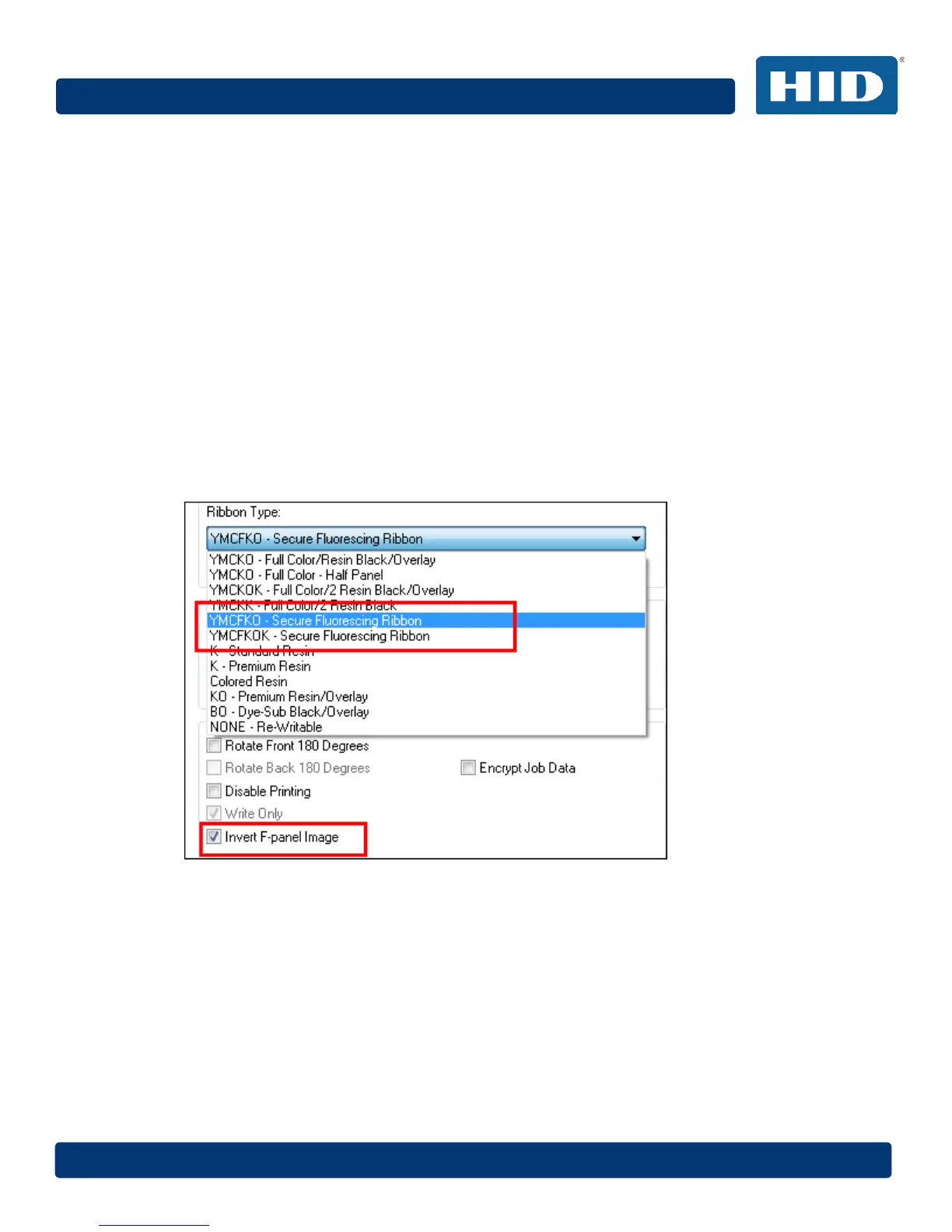
4.7.4.1 Selecting the Fluorescent Panel Ribbon Type
This process allows you to configure the data that is printed with the fluorescent panel of an
YMCFKO/YMCFKOK Ribbon.
Note: Any software program may be used to print the special florescent panel of the Ribbon to a
card once the driver and Workbench are set up correctly.
These ribbons contain a yellow (Y), magenta (M), cyan (C), and resin black (K) panels to create a
full color over-the-edge printing identification card. In addition, the ribbon contains a dye-based
fluorescing panel (F) which will allow you to print a standard or one-to-one personalized fluorescing
image that is completely invisible until exposed to ultraviolet light.
Check Invert F-Panel Image to create a negative of the fluorescent image. This option refers to the
ability to cause light or white areas of the image to fluoresce and for dark colors to remain dark on
the printed card when exposed to an ultraviolet light. By default, the dark areas of the image
fluoresce on the card. Lighter or white areas have no dye applied.



 To Next Page