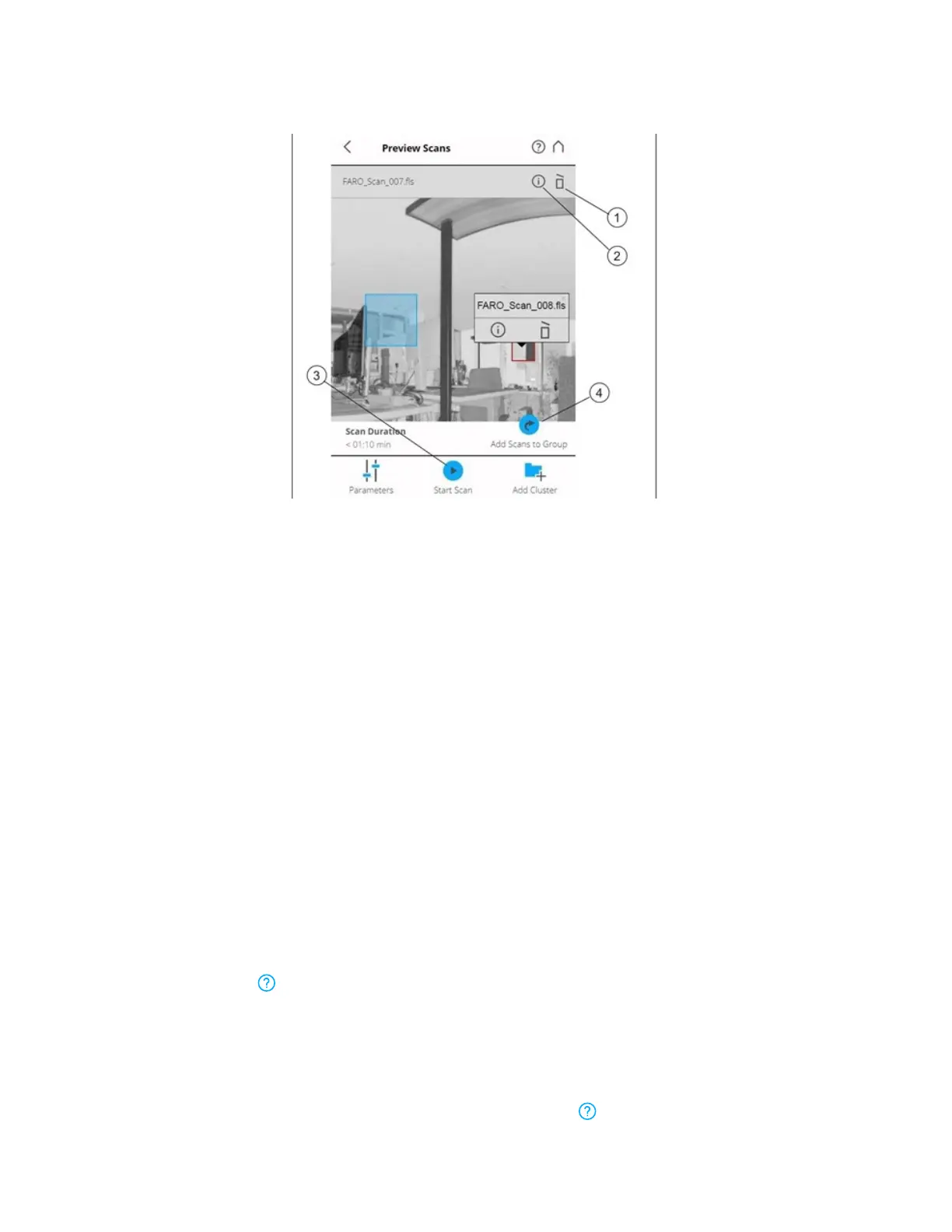
Figure 6-27 Preview of a Scan/Scan Group
①
Delete - Deletes the currently displayed scan from the SD card.
②
Info - Tap to view the scan properties.
③
Start Scan - Starts a scan, or resumes the previous scan.
④
Add Scans to Group - Adds a new detail scan to the group.
For scan groups, the detail scans are shown together with the primary scan. Zoom in using a pinching
gesture, or the mouse wheel, to enlarge the detail scan's preview. Tap or click the detail scan to display a
pop-up window with the name of the detail scan, a link to the related Scan Properties page, and the
option to delete the detail scan.
Online Help and Notifications
Notifications
Tap Notifications in the navigation bar to receive warnings and other status messages. The button is
not enabled, if there are no warnings or errors.
Help
Open a description of the currently-displayed view by tapping Help in the navigation bar.
FARO
®
Focus Premium Laser Scanner User Manual
Chapter 6: Controller Software
FARO Focus Premium (March 2022) Page103of157



 To Next Page