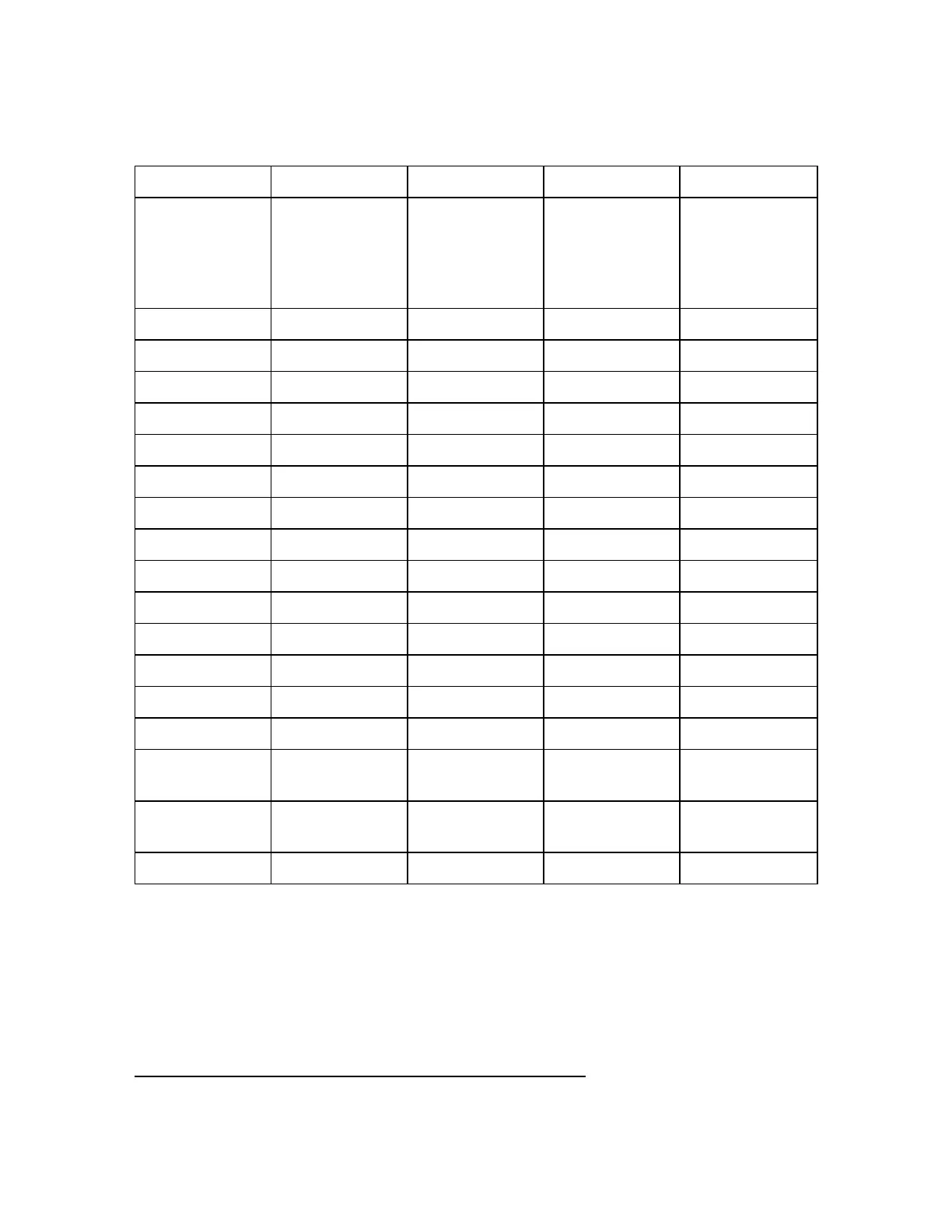
Description of Factory Profiles
Accelerated Standard Extended Object HD
Remark
Accelerated scan
with main
objects of
interests at a short
distance.
Standard scan with
main
objects of
interests at a
medium distance.
Extended scan
with main
objects of
interests at a larger
distance.
Object scan where
the details of
objects are of
interest.
Scan Resolution 1/8 1/5 1/4 1/2
Quality 3x 3x 3x 4x
Vertical area -60° to 90° -60° to 90° -60° to 90° -60° to 90°
Horizontal area 0° to 360° 0° to 360° 0° to 360° 0° to 360°
Inclinometer ON ON ON ON
Compass ON ON ON ON
Altimeter ON ON ON ON
Use GPS ON ON ON ON
Color OFF OFF OFF ON
Clear Contour ON ON ON ON
Clear Sky ON ON ON ON
Distance Range Near Normal Normal Near
Resolution [MPts] 10.9 28 43.7 174.8
Duration
1
[sec] 59 99 137 969
Point Distance
[mm @ 10m]
12 8 6 3
Scan File Size
2
(MB)
41 98 138 538
Scan Size (Pt) 5120 x 2133 8192 x 3413 10240 x 4267 20480 x 8533
As previously mentioned, the FAROFocus Premium comes with factory-predefined scan profiles (see
Service on page98 for an overview of the available factory predefined scan profiles). These scan profiles
are read-only, and thus cannot be changed or deleted, but you can add and manage your own custom
scan profiles based on these pre-defined profiles.
This view shows all scan profiles that are available on the scanner.
1
Times can vary depending on color capture settings and the objects being scanned.
2
With standard 8MPx images.
FARO
®
Focus Premium Laser Scanner User Manual
Chapter 6: Controller Software
FARO Focus Premium (March 2022) Page77of157



 To Next Page