2. Commissioning
2-22
Festo Festo P .BE CP FB13-E-EN en 9910c
Standard mode The program enters the identifiers in the mask “Configure”
automatically in standard mode.
Compact mode If you wish to use the compact mode:
S Enter the identifiers in the compact mode by o verwriting
(summary: See Fig. 2/5).
This concludes the configuration.
Configuration examples for COM PROFIBUS
Example 1:
Standard mode, highest assigned str ing = 2
String 0 = Input module, output module/valve terminal
String 1 = Input module, output module/valve terminal
String 2 = Output module/valve terminal
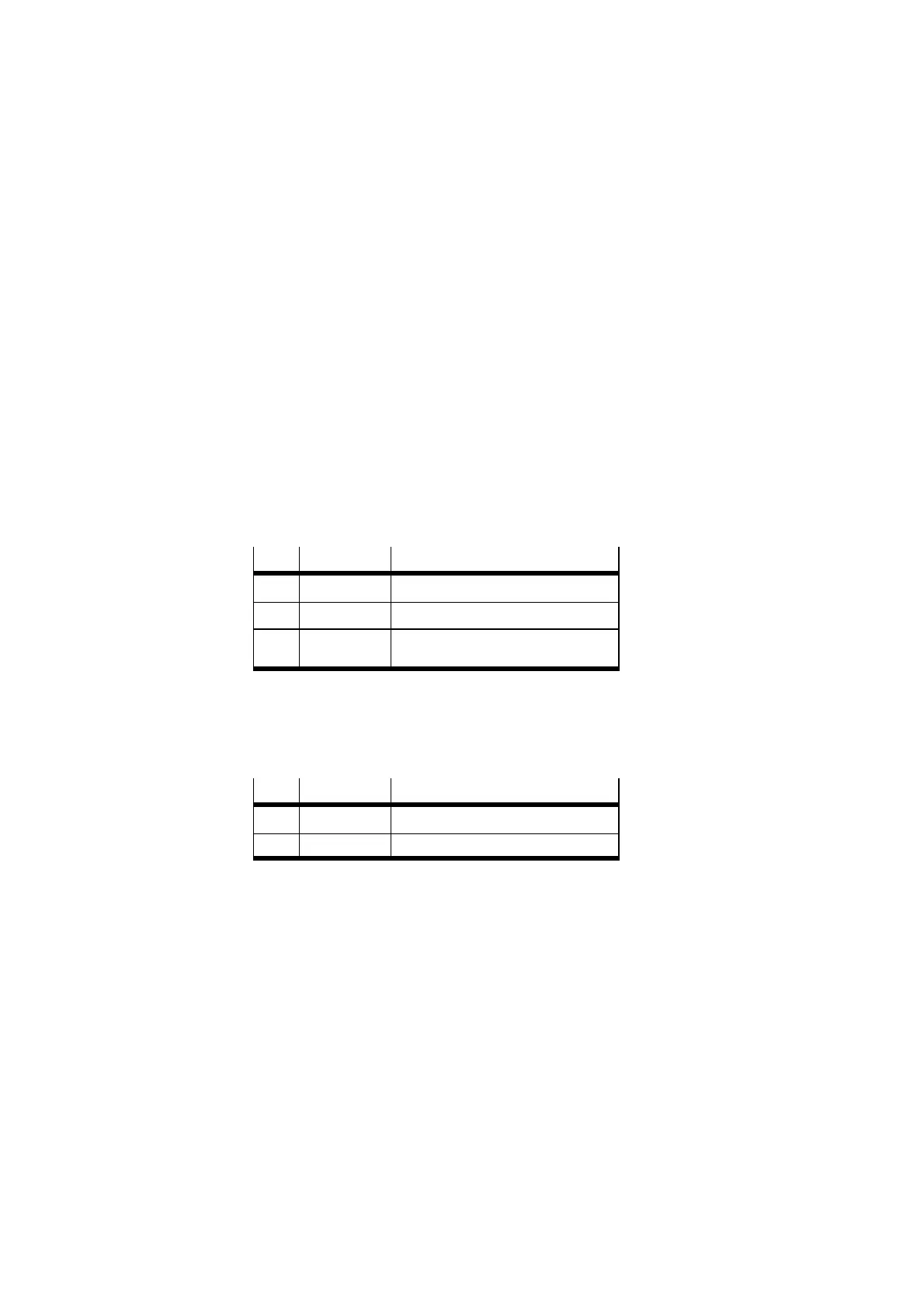
DP identifier Comment
0 16DX String 0 – 2 bytes inputs/outputs
1 16DX String 1 – 2 bytes inputs/outputs
2 16DX String 2 – 2 bytes outputs (inputs not
used)
Fig. 2/12: Example 1 Configuration
Example 2:
as example 1, but entry in compact mode
DP identifier Comment
0 019 String 1 – 4 bytes inputs
1 037 String 2 – 6 bytes outputs
Fig. 2/13: Example 2 Configuration








 To Next Page