FCP-75 Manual — P/N:LS10147-003FK-E:A 3/17/2021 41
FIK-5865-3 / FIK-5865-4 LED Annunciator Installation Control Panel Installation
4.10.1 FACP Connection
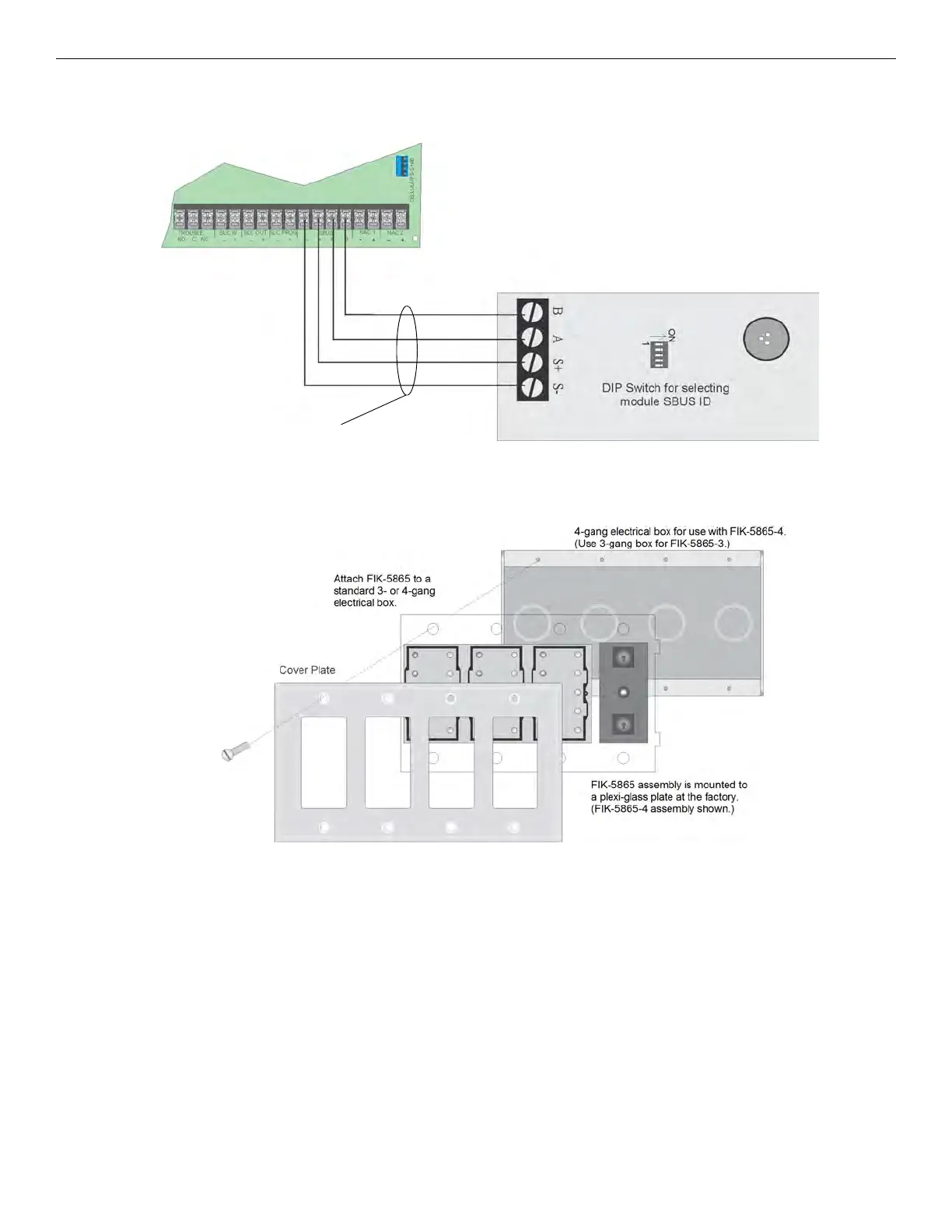
The FIK-5865 connects to the panel via the SBUS. Make connections as shown in Figure 4.36. After the FIK-5865 is connected to the panel,
it must be added to the system. This programming step is described in Section 9.
Figure 4.36 FIK-5865 Connection to the FACP
4.10.2 FIK-5865 Mounting
Mount the FIK-5865-4 to a standard 4-gang electrical box. Mount the FIK-5865-3 to a standard 3-gang electrical box. In Figure 4.37, the
FIK-5865-4 attached to a 4-gang box is used as an example.
Figure 4.37 FIK-5865 Mounting Example
The FIK-5865 ships with a set of zone description labels that can be inserted into the FIK-5865 board assembly. These labels can be used in
a typewriter or can be written on by hand.
Slide the labels under the plexiglass as shown in Figure 4.38. The LEDs will show through the label when illuminated.



 To Next Page