FCP-75 Manual — P/N:LS10147-003FK-E:A 3/17/2021 43
Telephone Connection Control Panel Installation
4.12 Telephone Connection
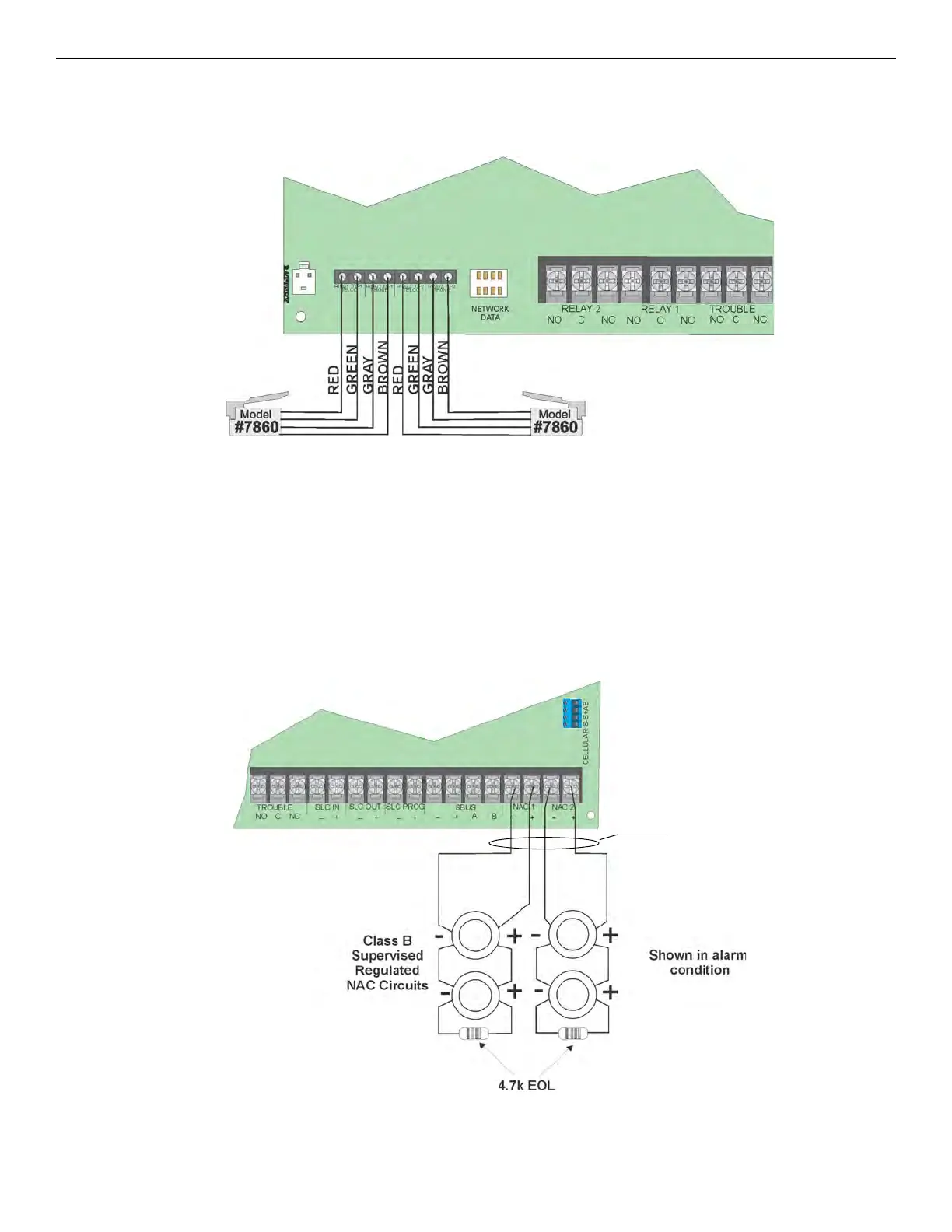
Connect the telephone lines as shown in Figure 4.40. The Model 7860 phone cord is available from Fike for this purpose.
A number of programmable options are available for customizing telephone lines. These options are described in Section 9.6.
Figure 4.40 Connection of Telephone Lines
4.13 Notification Appliance/Auxiliary Power Circuits
Two outputs are built-in to the FCP-75 FACP which can be programmed to be used as NACs (Class A or Class B) or as Aux power. This sec-
tion of the manual explains how to install conventional notification appliances and how these terminals can be used for auxiliary power.
4.13.1 Conventional Notification Appliance
This sub-section of the manual explains how to install conventional notification appliances for Class A and Class B configurations.
Class B Notification Wiring
You must use an appliance from the list of compatible appliances in the Appendix A at the back of this manual.
To install a Class B notification appliance circuit:
1. Wire Class B Notification appliances as shown in Figure 4.41.
2. Configure the circuit through programming (see Section 9.5).
.
Figure 4.41 Class B Notification Appliance Circuit Wiring
supervised
power-limited
Notification Wiring



 To Next Page