36
2.17 Delivery
The Delivery tab functions to transmit data from the VDR to a PC via Ethernet LAN. Do
not use this function during "live" connection.
The basic procedure for using the Delivery tab is as follows:
1. Click the Delivery tab.
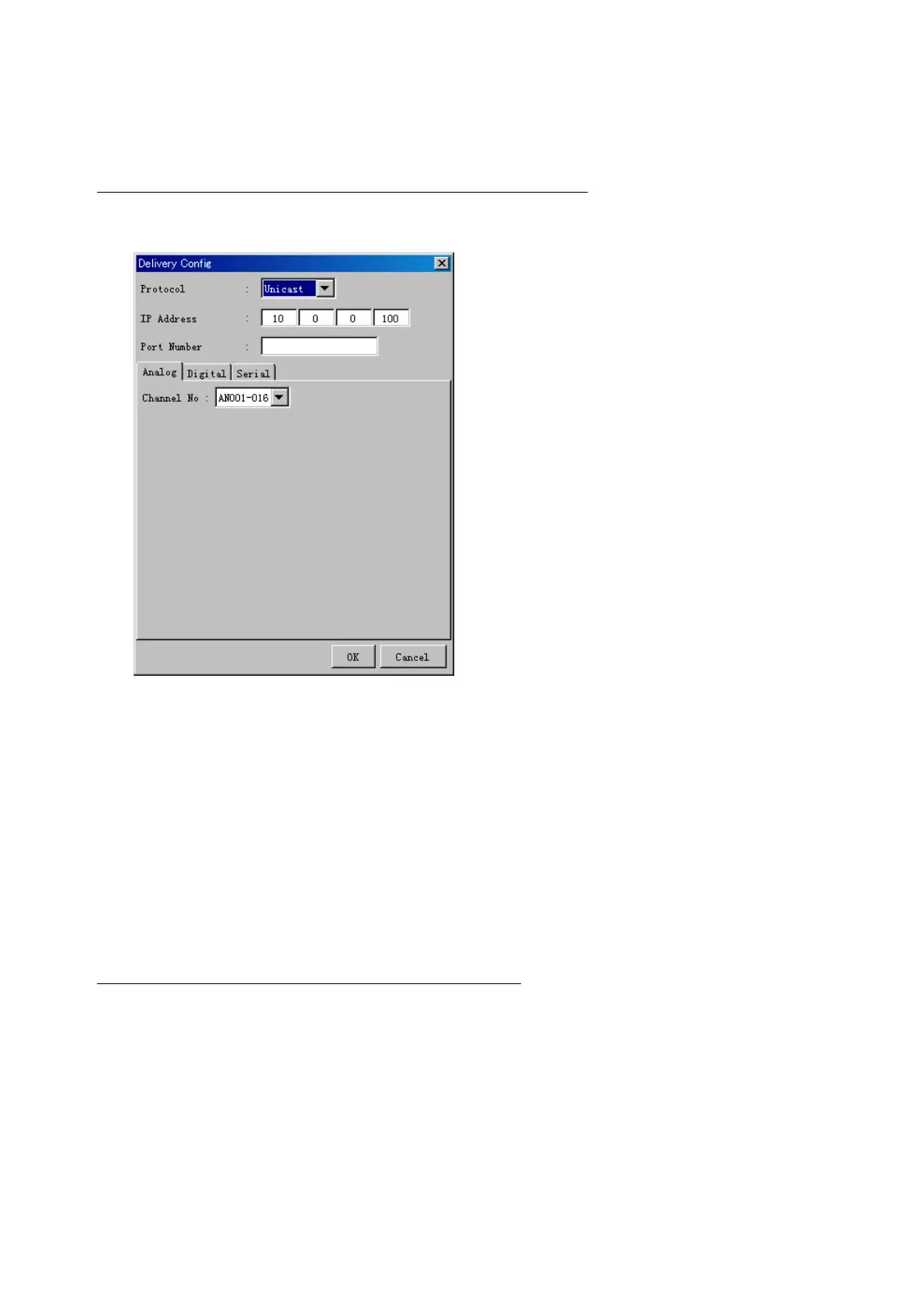
2. Click the Add button to show the Delivery Config window.
3. Select protocol from the Protocol drop-down box (Unicast or Multicast).
4. Enter IP address in the IP address input box.
5. Enter port number in the port number input box.
6. Click the tab of the data to send. (Analog, Digital or Serial)
7. Select the channel of the data to send.
8. If Serial was selected at step 6, select applicable data sentence from the Inactive
window. Click the right arrow to move the data sentence to the Active window.
9. Click the OK button to close the Delivery Config window
10. The settings are listed in a table in the Delivery window. Check the checkbox in the
Active column, and then click the Set button.
The buttons in the Setting window works as follows:
Set: Save edited settings.
Add: Create new delivery settings.
Modify: Modify selected delivery settings.
Delete: Delete selected delivery settings.



 To Next Page