49
6.4 Software History
This section shows you to save and configure software history (communications record).
How to save software history
Note: When the error dialog appears while saving the software history, restart the VDR
Maintenance Viewer.
1. Click the Maintenance menu.
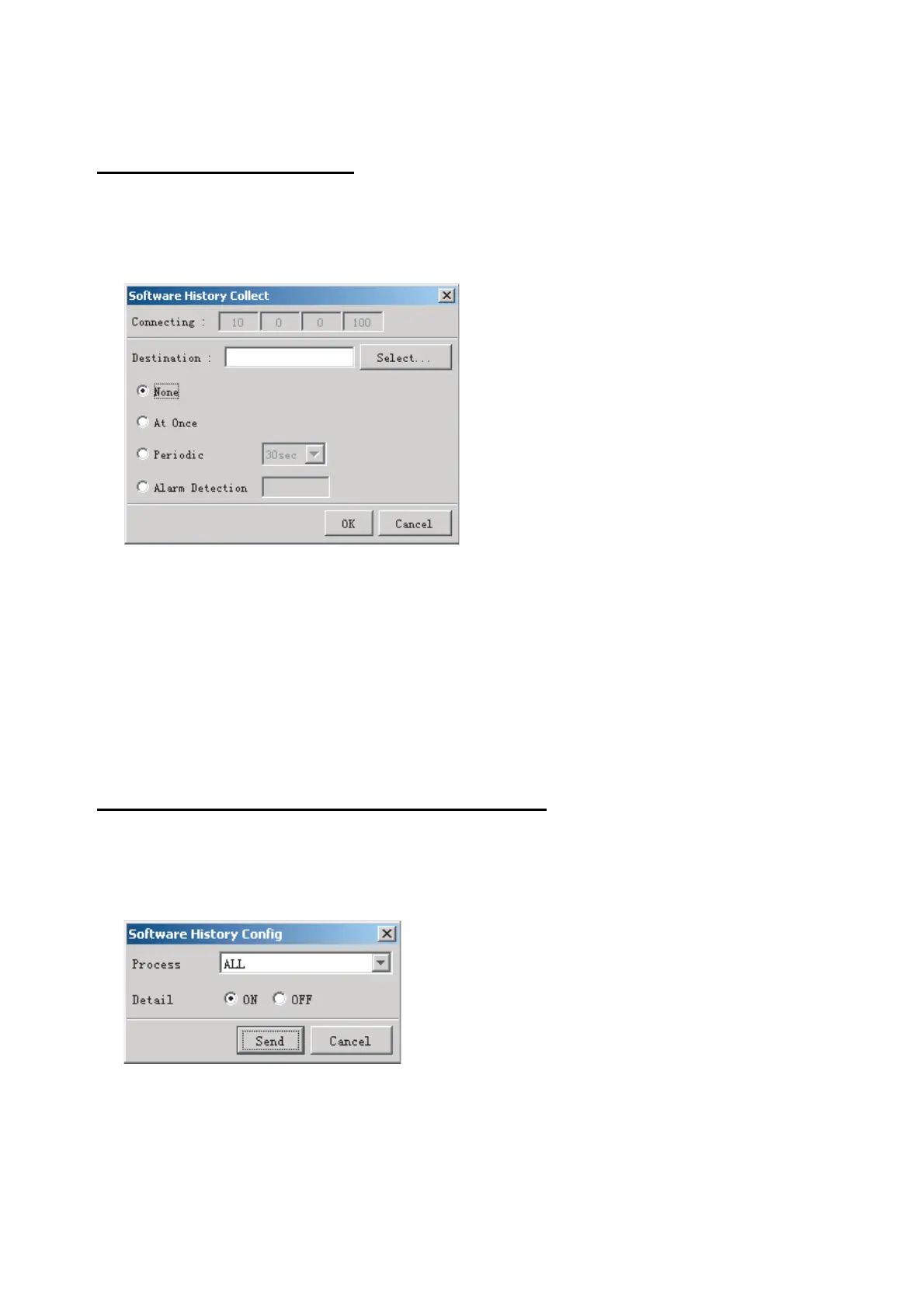
2. Select Software History Collect.
3. Click the Select button. The Open dialog box appears.
4. Select where to save the data then click the Open button.
5. Select desired save condition then click the OK button.
None: No saving.
At Once: Save the software history manually. Saving begins as soon as the OK
button is clicked.
Periodic: For debugging. Do not use otherwise. The intervals are 30 sec., 60 sec.,
and 120 sec.
Alarm Detection: For debugging. Do not use otherwise. Software history is saved
when specified alarm is released. Enter alarm number.
How to configure software communications record
The R&D engineer uses this function for debugging. Do not do this procedure unless
required. Malfunction can result.
1. Click the Maintenance menu.
2. Select Software History Config.
3. Do the following:
Process: Select the type of communications record to save. "ALL" saves all
communications records.
Detail: Hide or show detailed information.
4. Click the Send button.



 To Next Page