163
Multicopter
Function
Method
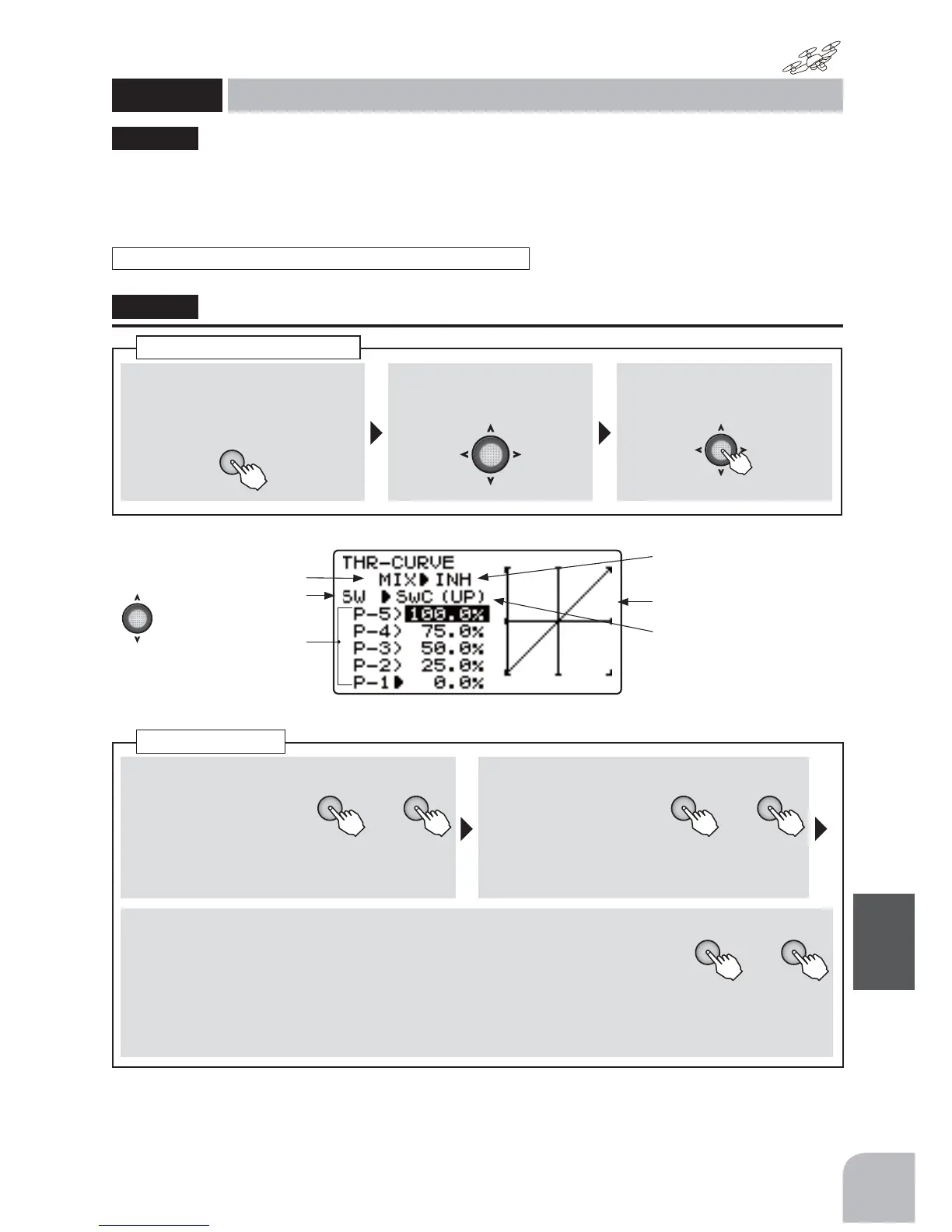
①Callthemenuscreenfromthe
homescreenbypressingthe+
keyfor1second.
+
②Select
fromthemenuwiththe
Jogkey.
③Openthesettingscreenby
pressingtheJogkey.
(1second)
Callingthesettingscreen
THRCRV
Throttlecurve
(MULTICOPT)
Whenthisfunctionisset,thethrottleEXPfunctioncannotbeused.
This function sets a 5 point throttle curve so
that the motor speed relative to movement of the
WKURWWOHVWLFNLVWKHRSWLPXPYDOXHIRUÀLJKW
ŏ$FXUYHFDQEHVHWIRUHDFKVZLWFKSRVLWLRQ
"THRCRV"
■ Activatingthefunction
+ −
or
①Selectthe"MIX"item
andthenselectthe
"ON"bypressingthe+
keyor‒key.
● Whenyoudonotuseafunction,settothe
"INH"side.
■ Switchselection
+ −
or
②Selectthe"SW"item
andthenselectthe
switchbypressingthe
+keyor‒key.
Range:SwA-SwDDefault:SwC
■ 5pointcurveset
+ −
or
③ByJogkey,eitherofP-1toP-5ischosen.The+keyor-keyispressedanda
rateissetup.
Range:0-100%
Default:P-1:0%,P-2:25%,P-3:50%,P-4:75%,P-5:100%
Throttlecurve
Activatingthefunction
Switchselection
5pointcurve
set
● Selectthesettingitem
withtheJogkey.
● Whennotusingthisfunction,
selectINH.
● Theset-upcurveisshown
(Presentswitchposition)



 To Next Page