GEK-106426B MIB High Impedance Bus Differntial Relay 7-7
7 KEYPAD AND DISPLAY 7.4 OPERATIONS
7
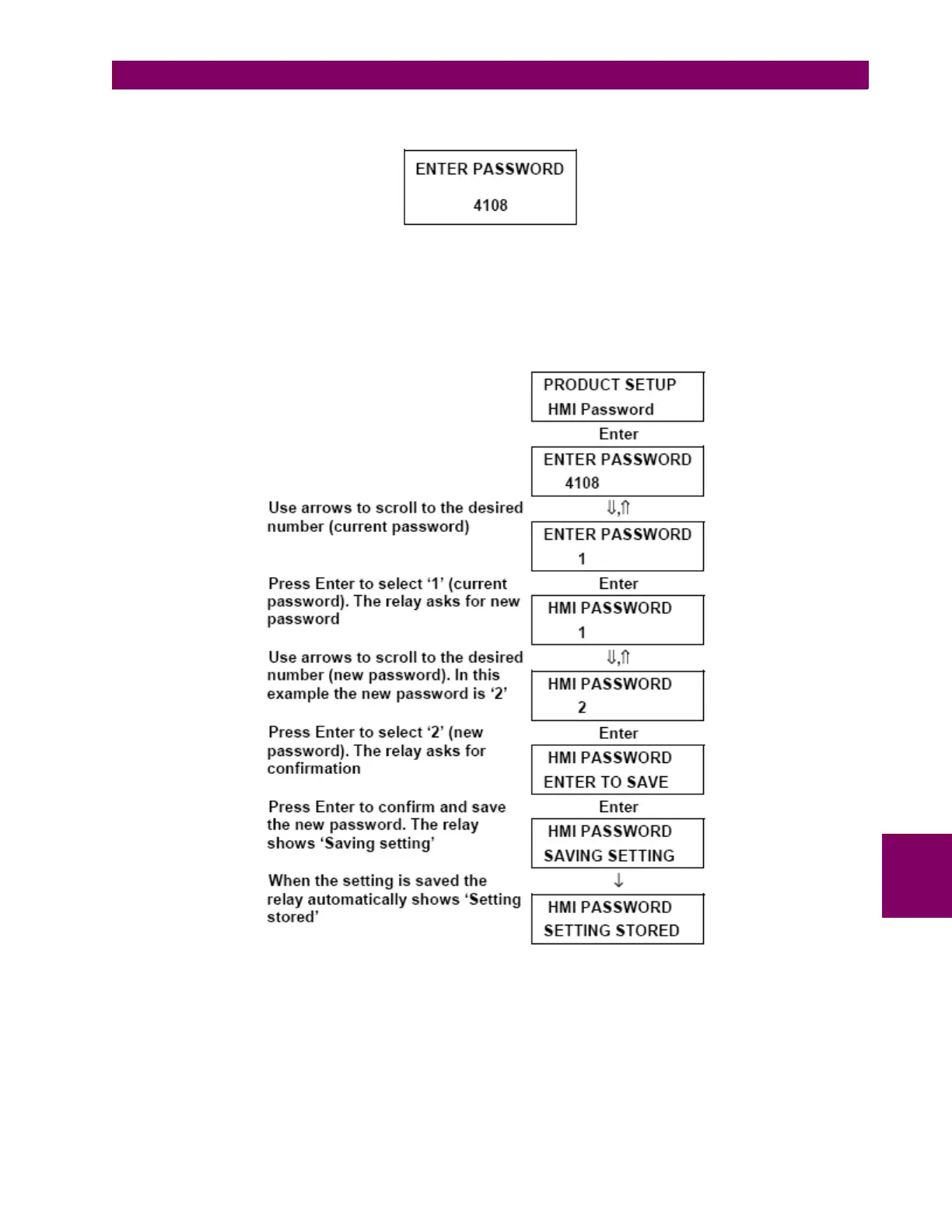
When a setting is being changed, after pressing the Enter key to store the modified value the relay shows the following
screen:
Scroll up and down with the arrow keys until the screen shows the desired password; next, press enter for confirmation
and the relay will accept and store the setting change. The setting password protection will then be disabled for 15
minutes after the last setting change is made to the relay, or until a reset operation (the same as to reset LEDs,
pressing Esc for more than 3 seconds from the main screen) is performed.
The password can be modified in the Main Settings > Product Setup > HMI password menu. The relay then asks for
the current password. Once it has been entered, the relay asks for the new password. Here is an example of how to
change from HMI password value 1 to 2:
If you don’t know the programmed password please contact GE Multilin Technical Service and have the encoded
password value shown in Main Settings > Product Setup > HMI handy.







 To Next Page