GEK-106426B MIB High Impedance Bus Differntial Relay 8-7
8 RELAY COMMISSIONING 8.7 COMMUNICATIONS
8
8.7COMMUNICATIONS
The communication test checks that the 2 communications ports (the front RS232 and the rear RS485) work properly. To
perform this test is necessary to establish the connection between the PC and the relay (refer to figure 3-10). If the front
port is used, a straight through cable is needed. If the rear RS485 port is used, an RS485/RS232 converter is needed. GE
Multilin offers DAC300, F485 or RS232/485 converters.
The communications parameters that have to be set in the computer should match the relay communication settings.
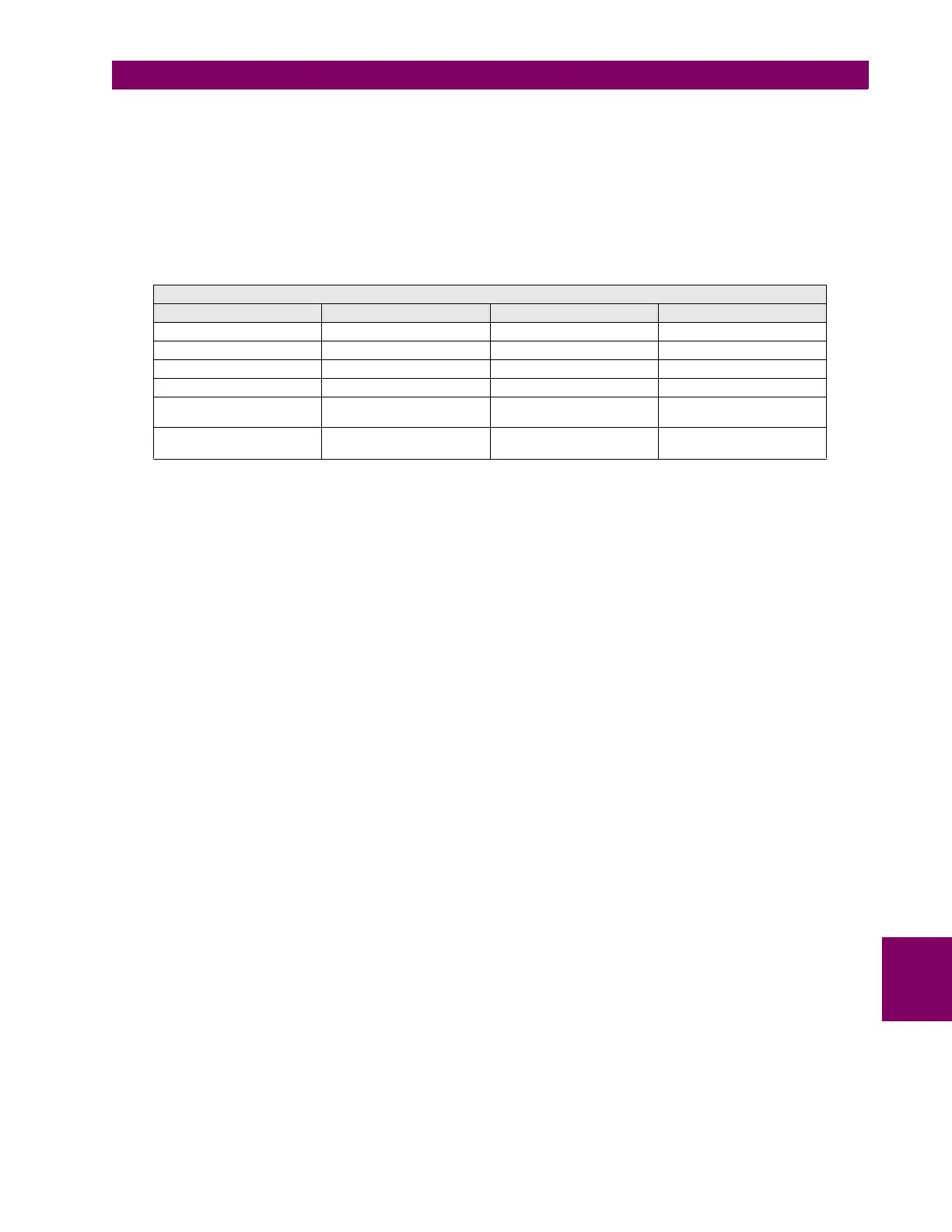
The factory default settings for the MIB relay are
Using the ENERVISTA MII SETUP program, communicate with the relay and in the Status window check that the
communications are not lost at any time. Perform this test on both communications ports.
COMMUNICATIONS
NAME VALUE UNITS RANGE
Slave Address 1 1 - 255
Communication Port COM1 COM1 – COM*
Baud Rate 9.600 Bauds 300 – 19 200
Parity NONE NONE – ODD - EVEN
Control type No control type
No control type, Modem
connection, MODBUS/TCP
Start up mode File Mode
Communicate with relay –
File mode







 To Next Page