4-2 MIB High Impedance Bus Differntial Relay GEK-106426B
4.1 ENERVISTA MII SETUP SOFTWARE 4 COMMUNICATIONS
4
4.1.2 STARTING COMMUNICATION
Before the physical connection to the relay, it is important that the user reviews the safety instructions detailed in section
This section explains the importance of connecting both relay ground terminal and computer to a good grounding.
Otherwise, communication may not be possible, or the relay and/or the computer could be damaged.
To work online, the relay communication parameters (e.g. baud rate, relay address and password) must match the
parameters in the computer.
The computer parameters can be modified, in the Communication – Computer menu. Refer to the appropriate section in
this same chapter for more details.
4.1.3 MAIN SCREEN
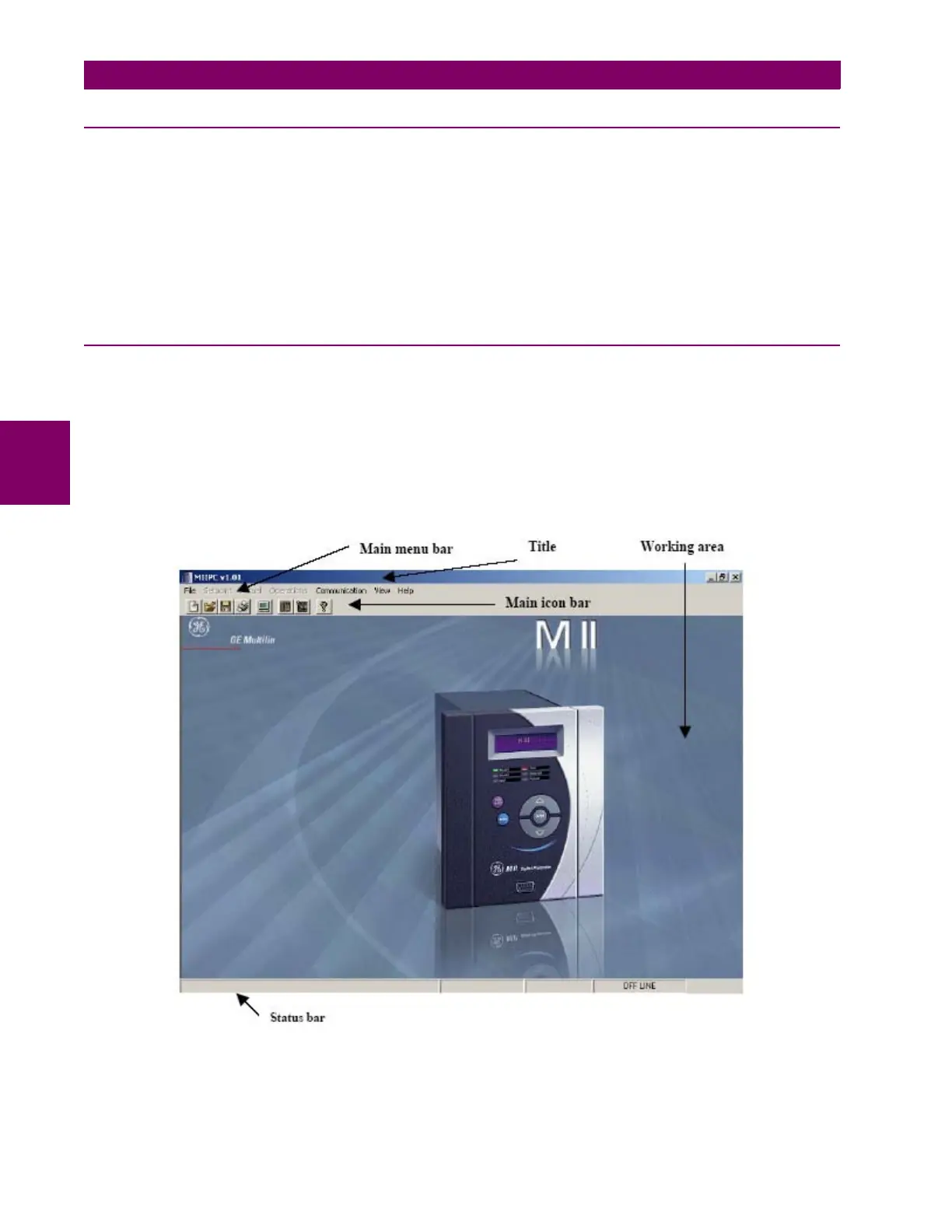
The main screen of ENERVISTA MII SETUP software includes the following components:
• Title
• Main menu bar
• Main icon bar
• Working area
• Status bar
Figure 4–1: ENERVISTA MII SETUP MAIN SCREEN







 To Next Page