98
Note: SNMP response changed: Now only those SNMP requests are
answered, which are present at this UPS or other device. Missing data
does no longer cause a return value "0" or "-1". An SNMP Walk will now
no longer return any OIDs, which are not supported by this UPS.
7. Troubleshooting – FAQ
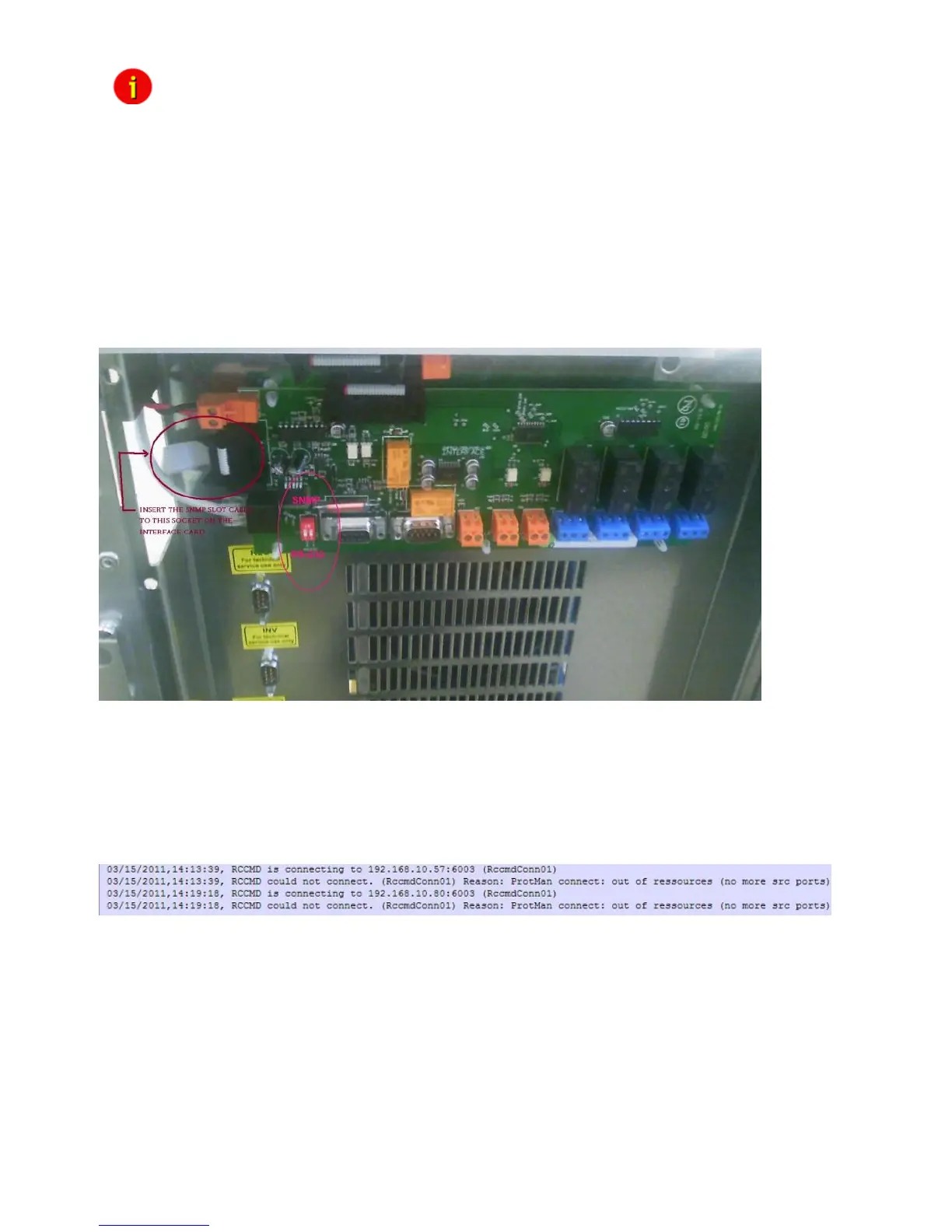
Problem: Inform Pyramid DSP Series Communication with UPS Slotcard inside does not start
the UPS communication or if the external RS232 communication does not work.
Solution: It is required to put the DIP switches onto the UPS mainboard into the position “ON”,
if you are using a CS121 SNMP slot card! Put the DIP switches into the position “OFF”, if you
are using an external CS121 via RS232 interface!
Figure 123: Mainboard Inform Pyramid DSP
Problem: CS121 reboots again and again after a few time into company´s network
environment.
Solution: The network monitoring software “WhatsUp Gold” is started. We do not support this
software, stop the service, problem solved.
Problem: Sending of RCCMD signals, the following error is logged into the CS121 AlarmLog:
Figure 124: CS121 AlarmLog, ProtMan Connection
Solution: Set the “Network Card Speed” into the CS121 menu “Network & Security” to
“100FULL”.



 To Next Page