20
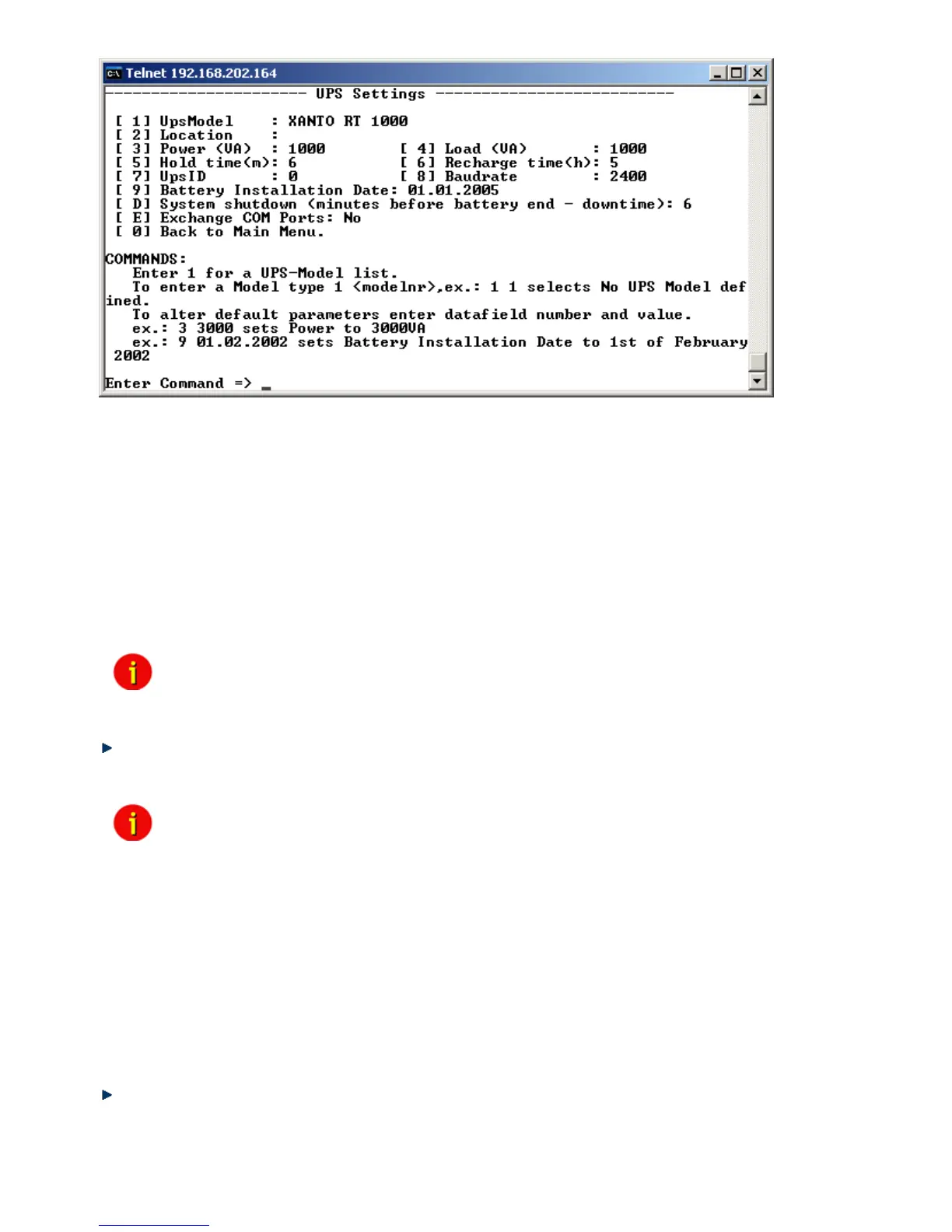
Figure 10: Telnet - UPS Settings
The CS121-adapter distinguishes here generally between Cable- and Serial-models. With
Cable, the adapter and the contact interface of the UPS are connected with a special cable.
Using Serial, UPS models connect to the adapter via the serial UPS-cable. (Part of the UPS
package). Serial is default, when the user selects a UPS model name from the drop-down list.
When Cable is used, please search the list for the corresponding UPS model and cable type.
The CS-121 supports serial models with its own RS-232 protocol as well as contact UPS
models with the cable types O,C,1-10. Those contact cables are UPS or alarm system specific
and should be provided by the corresponding manufacturer. Our Cable documentation shows
examples of those cables if they are individually made cables.
Please choose the corresponding Serial UPS model or Cable-model communication
parameters. Parameters like baud rate etc. are preset for the corresponding UPS model.
Note: By selecting the UPS model, the communication protocol is selected at
the same time. If your UPS does not appear in the list, ask your UPS
dealer if another model from the same series can be substituted.
Select Option 1 to get a variety of possible UPS models. After chosen a model, the default
values of the corresponding UPS model can be configured by typing the number of the option
followed by the value.
Note: Please do not change parameters except of UPS-model unless you want
to choose specified configuration according your UPS-model!
Please note option “D”: “System shutdown (minutes before battery end – downtime)“: This
value determines how many minutes before a complete battery unload the event “System
shutdown” from event menu is executed.
The shutdown time interval needs to be set large enough, so that adequate time for a system
shutdown is allocated before the UPS runs out of power. Please calculate this value
generously e.g. if the battery time of the UPS is 10 minutes and the event procedure takes 2,5
minutes, ensure you start (configure) the shutdown (or other event action) 3 minutes before the
UPS is switched off, so that more than enough time is available to complete the corresponding
event action.
2.1.4.4 Save configuration
Call “Save, Exit and Reboot”-command from the main menu. (The communication to the
adapter will be lost).
ATTENTION: Keep the Telnet, Terminal, Webbrowser window open until the device has been
lost or you see a message that reboot is under progress. If you close the configuration window



 To Next Page