32
providing this function or are password protected. Activate this function into the BIOS settings
of the motherboard.
Send Periodic Email: This is a function to send the log files via email periodically (from
firmware 4.xx and higher).
3.2.8 Email
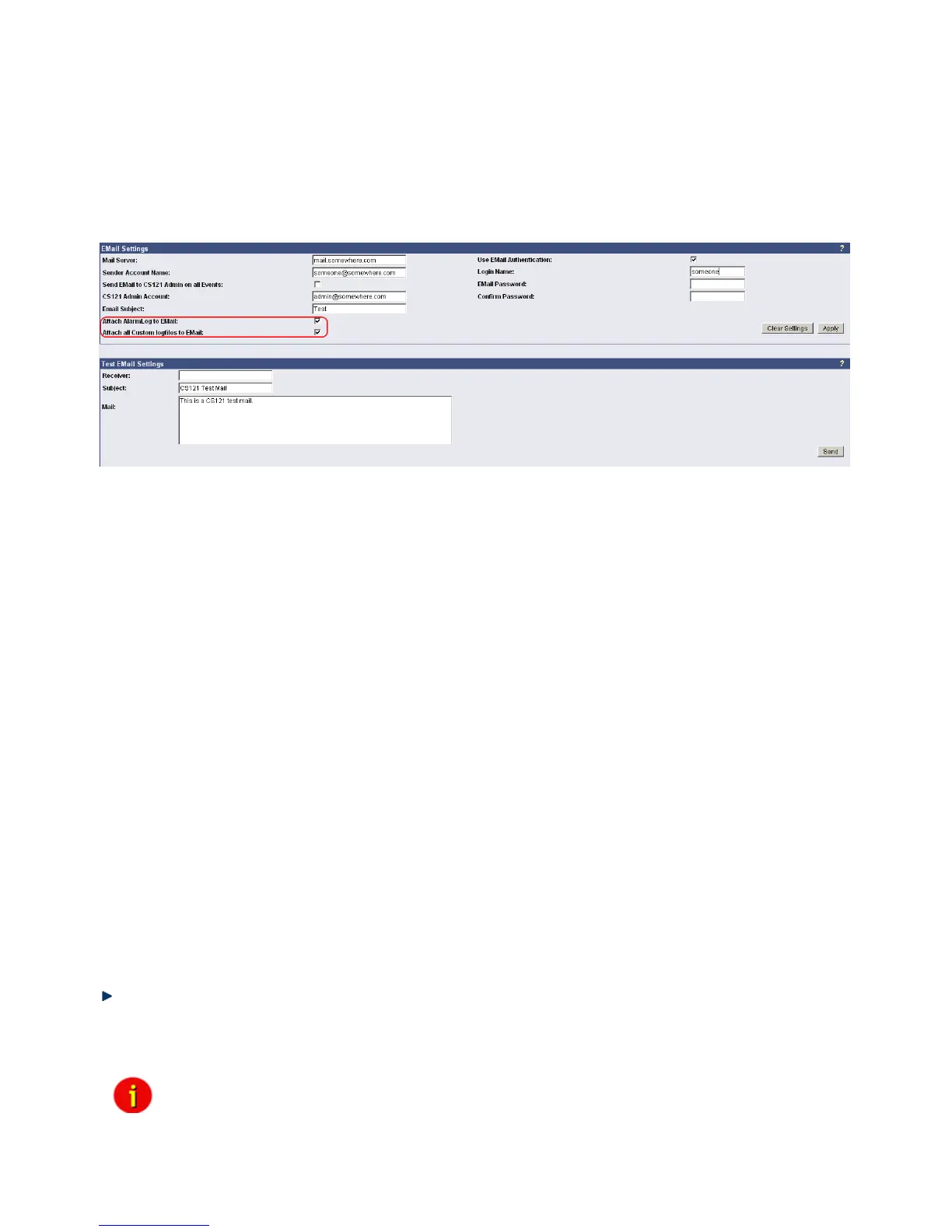
If you wish to define actions to send Emails depending on specified events you need to
configure the Email settings.
Figure 24: HTTP - Email Settings
In this menu the internet name of your SMTP mail client is required. If DNS is not configured,
the actual mail server name’s IP-address has to be entered. Please also note that the sender
account name (e.g. ups@mailserver.de) should not be a random name since some
Emailservers do not allow this. We recommend to use an existing account e.g.
ups@mailserver.de. Most servers require matching account name and mail server names. E.g.
someone@somewhere.com would be correct, whereas just “someone” would not be sufficient.
If the server name and account name do not match, the following error message will be
displayed in the CS121 alarm logfile (after some minutes): “Mail: bad answer from mail server:
501 UPSIP204@wrong server.com sender domain must exist.”
The user can check the logfile if the email transfer works. The logfile (text.log under the
adapter’s root directory ../Flash/text.log) can be viewed using FTP, via the UPSMON tool or via
the Webbrowser “Alarm log”.
The firmware version 4.xx provides the function „Attach AlarmLog to Email“. Enable it and
every email, that will be send from the CS121, will contain the AlarmLog. If you enable the
function „Attach all Custom log files to email“, every email will contain the AlarmLog,
UPSData.log and ExternalDeviceLog. Additionally the email contains the parameters UPS
Model, UPS Location, IP-Address of the CS121, System Time and Actual Event.
Mailservers outside the LAN require a username and password. For this function please use
“email authentication” and enter a username and the corresponding email password (twice).
Note: Do not use email authorization if this is not required by your mailserver !
If authorization is required, the email function “AUTH LOGIN” (the CS121 adapter supports
only this function) needs to be supported. (e.g. Freemail.de). This changes the protocol from
SMTP to ESMTP and a password is required.
The length of the password should be a minimum 3 and a maximum of 63 characters.
Send a test-mail to validate your settings after you have applied the mail-settings. A short
message on the menu indicates whether the test-mail could be sent or not.
The usage of the settings in the live operation requires the reboot of the CS121 via the “Save,
Exit & Reboot” function!
Note: Please ensure that you have specified a DNS-server in menu “Network
& Security” if the mail-server could not be reached.



 To Next Page