19
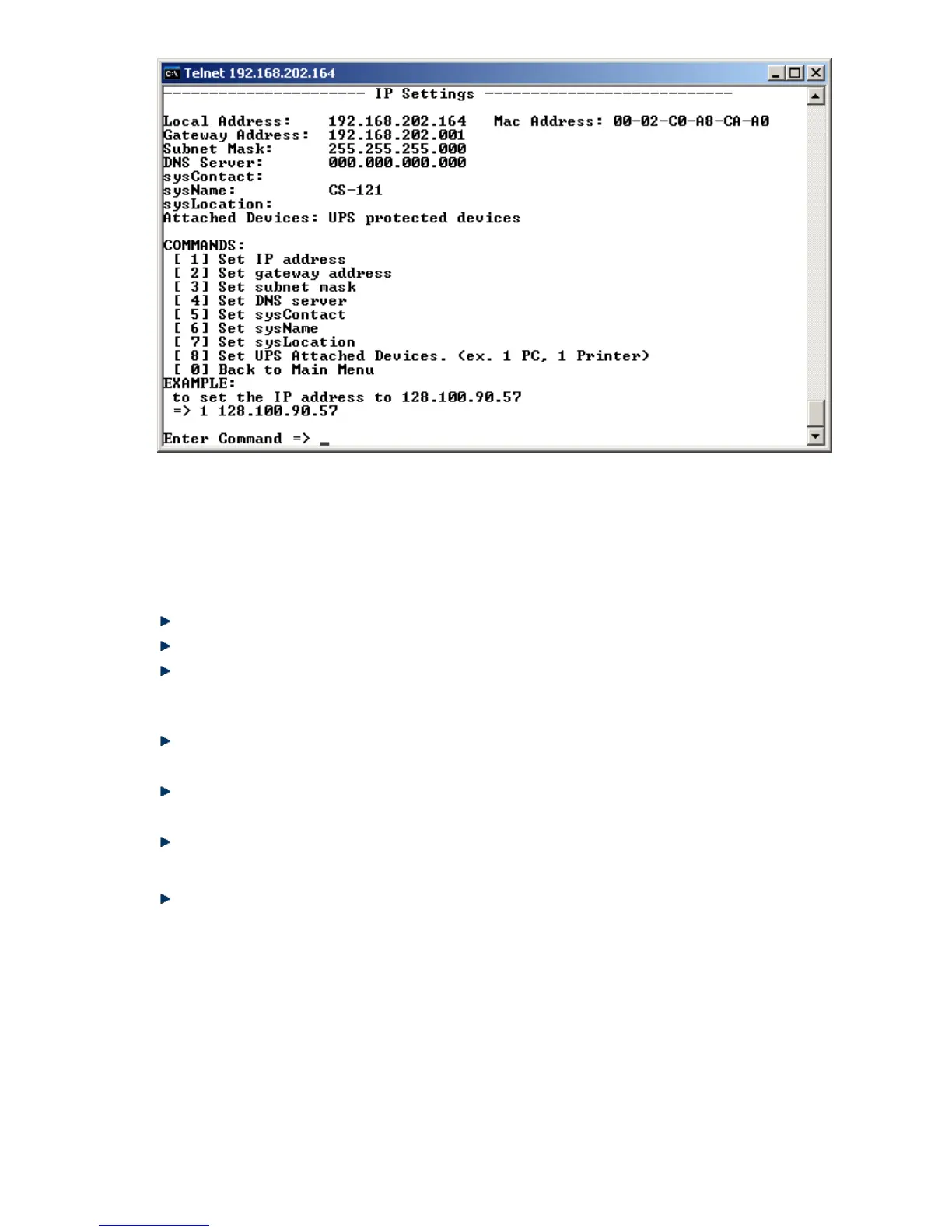
Figure 9: Telnet - IP Settings
To change values, enter the number of the option, type <space> and enter the name. Press
<enter>. Your new value displays next to the field heading on the top of the screen. If you want
to return to the main menu, press 0 (zero) and <enter>.
For example: To assign the IP-address of the SNMP-adapter, the gateway and the subnet
mask type at the prompt:
1, <space>, the IP address of the SNMP adapter, <enter>
Enter Command => 1 192.10.200.0
Enter Command => 2 192.10.200.254
Enter Command => 3 255.255.255.0
To assign the system contact name, type 5 and enter the name of the person to contact about
the SNMP adapter.
Enter Command => 5 Mr. Harry Hirsch
To assign the UPS name SysName, type 5 and enter name of the UPS:
Enter Command => 6 USV 1
To assign the UPS location SysLocation, type 6 and enter the location name:
Enter Command => 7 Building 12
2.1.4.3 UPS Settings
Choose option 4 from the main menu and you enter the menu “UPS Settings”. Within this
menu the user needs to select the UPS model the CS121-adapter is connected to (usually at
COM1).



 To Next Page