86
CHAPTER 8
Maintenance
illustration. Do not soak the pad with alcohol or you may damage the print head. Dry the print
head with a clean, lint-free cloth.
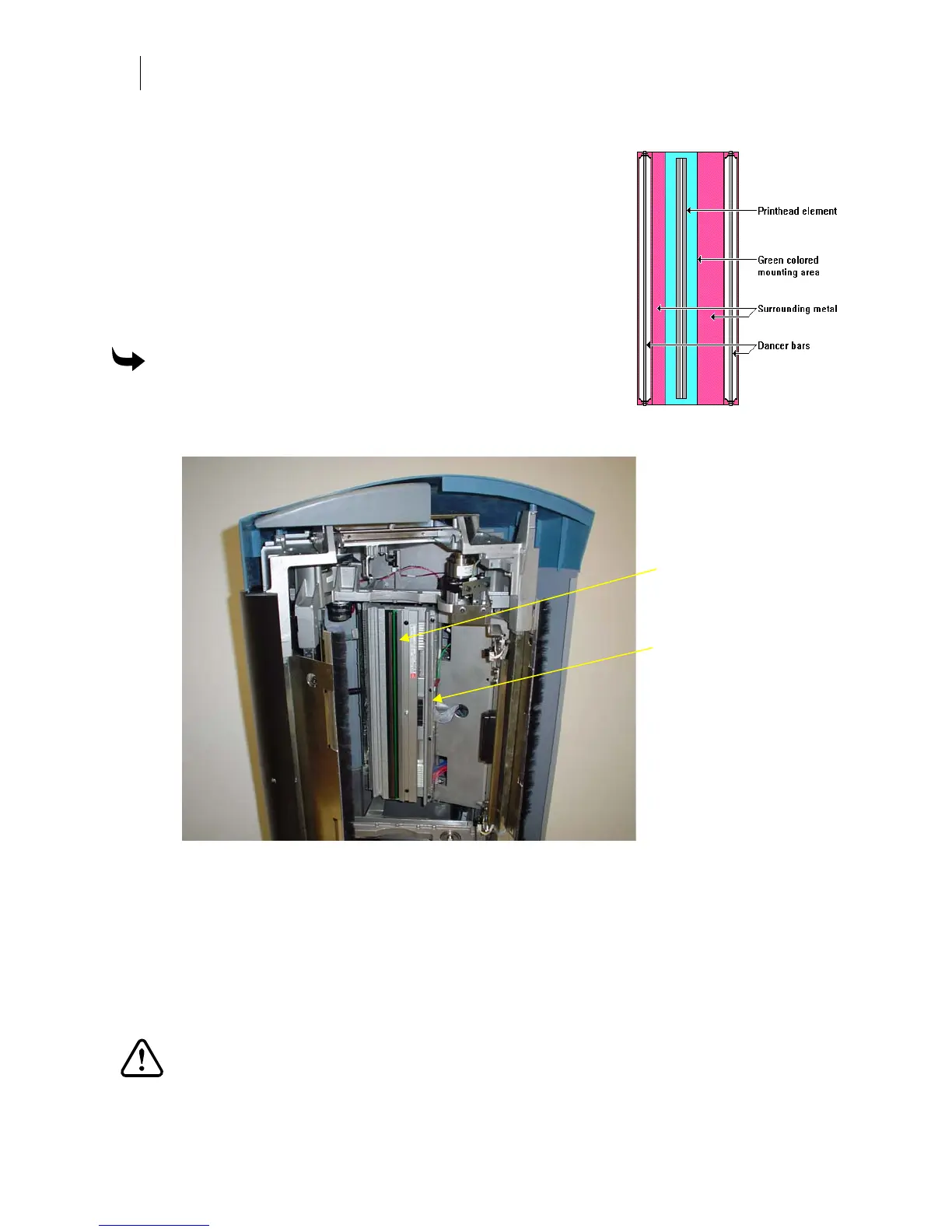
Contamination buildup occasionally occurs on the print head
element itself (the brown strip surrounded by the green mounting
area in the print head). When this happens, printing quality is
degraded and a more thorough cleaning is necessary. We suggest
you thoroughly cleaning the print head element weekly or as
required.
If you need additional ThermApprove cleaning cards, contact your
Gerber distributor or the GSP Customer Service.
To clean the print head
1 Gently rub the entire length and width of the printing
element with a ThermApprove cleaning card or lint-free
cloth moistened with 99% isopropyl alcohol.
.
2 Dry the printing element with a clean, lint-free cloth.
Cleaning the sprockets, bail arms, and squeegees
Wipe the bail arm squeegees and bail arm with ThermApprove cleaning cards or a clean, lint-
free cloth moistened with 99% isopropyl alcohol.
If there is excessive build up of material adhesive on the sprockets (especially around the teeth),
scrape it off using a small pick or brush, such as a toothbrush.
CAUTION: Do not dip the nylon brush in alcohol because excess alcohol can drip
into the GERBER EDGE FX and cause damage.
Print head
Foil squeegee



 To Next Page