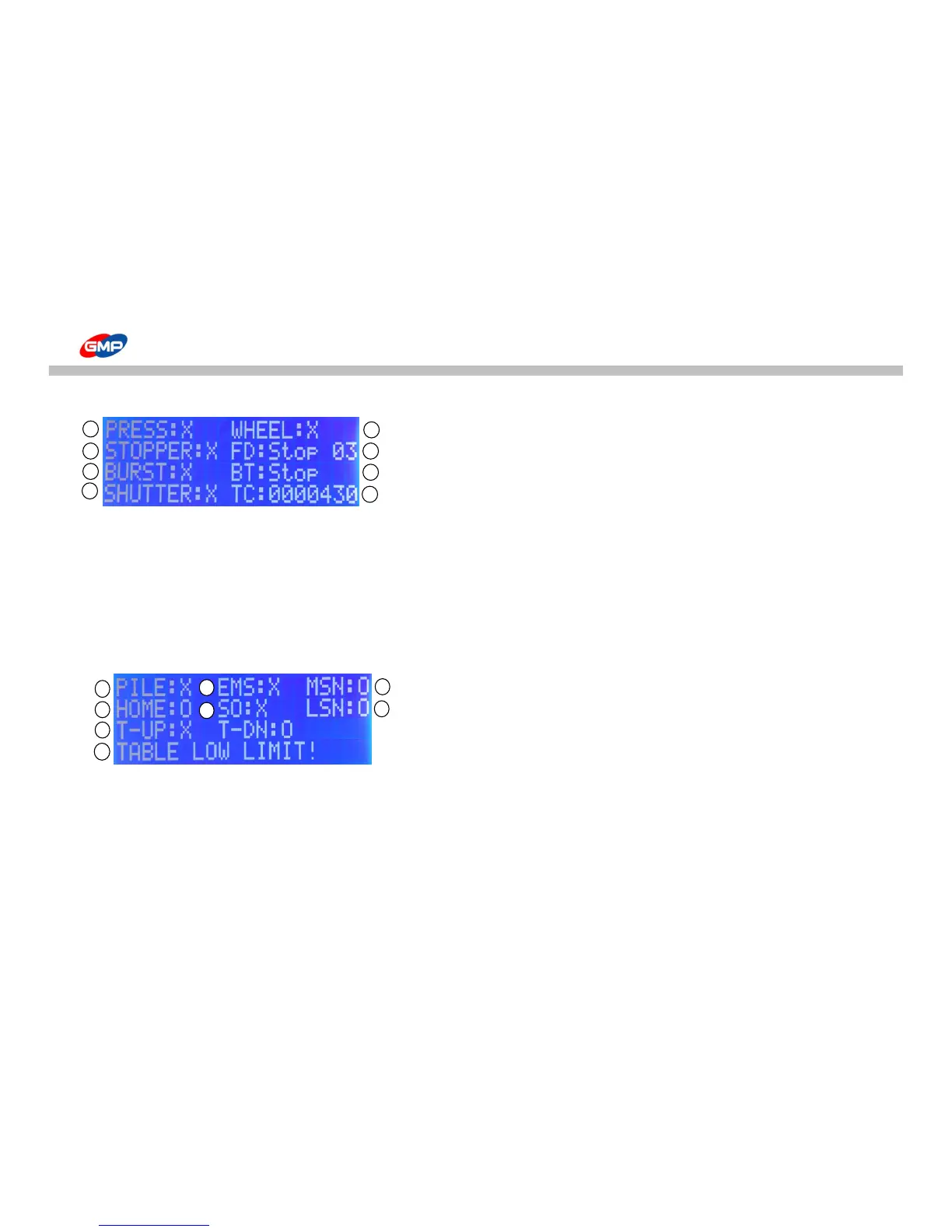
☞ Sub-Screen 1 : To check cylinders & motors operation status manually.
① PRESS : Display operation status of MAIN ROLLER.
Press SPEED button to operate it manually.
② STOPPER : Display operation status of STOPPER.
Press MAIN SCREEN MODE button to operate it manually.
③ BURST : Display operation status of BURST. Press JOB button to operate it manually.
④ SHUTTER : Display operation status of SHUTTER. Press TABLE UP button to operate it manually.
⑤ WHEEL : Display operation status of WHEEL. Press TABLE DOWN button to operate it manually.
⑥ FD : Display operation status of FEEDER MOTOR. Press MANUAL RUN button to operate it manually and speed also can be adjusted.
⑦ BT : Display operation status of BURST MOTOR. Press BURST POSITION button to operate it manually.
⑧ TC : Display TOTAL COUNTER.
☞ Sub-Screen 2: Display operation status of SWITCH & SENEOR
① PILE : Display operation status of PAPER PILE DETECT MICRO SWITCH.
② HOME : Display operation status of FEEDER HOME SENSOR.
③ T-UP & T-DN : Display operation status of TABLE UP & DOWN LIMIT SWITCH.
④ NORMAL STATUS! : If an error is occurred, message would be displayed.
⑤ EMS : Display operation status of EMERGENCY SWITCH.
⑥ SO : Display operation status of MIS-FEEDING SENSOR OVERRIDE.
Press MANUAL RUN button to operate MISFEEDING SENSOR manually.
- SO(SENSOR OVERRIDE) ON status : if the sensor detect, system is not stopped.
- SO(SENSOR OVERRIDE) OFF status : if the sensor detect, system is stopped.
⑦ MSN : Display operation status of MIS-FEEDING SENSOR.
⑧ LSN : Display operation status of LOADING SENSOR.



 To Next Page