33
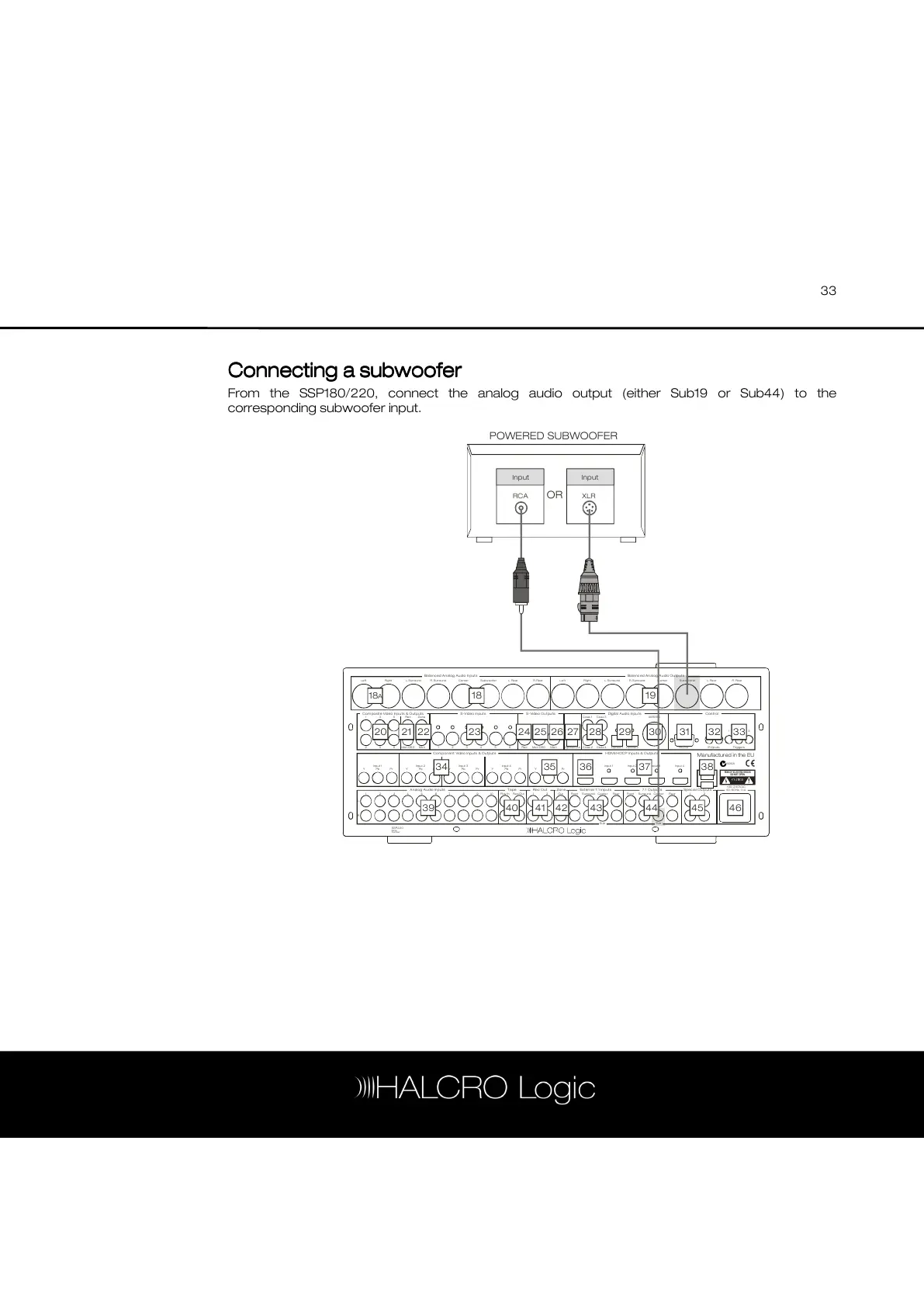
Connecting a subwoofer
Connecting a subwooferConnecting a subwoofer
Connecting a subwoofer
From the SSP180/220, connect the analog audio output (either Sub19 or Sub44) to the
corresponding subwoofer input.
Ba lan ced An alog A udio Inpu ts Ba lanc ed An alog A udio O utpu ts
Com posit e Vide o Inpu ts & O utpu ts
An alog A udio Inp uts Tape Rec Out Zo ne Ext ern al 7. 1 Inp uts 7.1 O utput s Spec ial Ou tpu ts
C ompo nen t Vid eo In puts & Out puts H DMI/H DCP Input s & O ut puts
S-V ideo In put s S- Video Ou tputs Digita l Aud io Inp uts Con tro l
Le ftRigh t Rig htL. Surro und L. Surro undR. Surroun d R. Surro und
3 4 5 6 7 8 9 10 Pl ay/In Rec/Out 2 2Out Front S urround C ente r Re ar
1 2 3 4 5 6 Rec Mon O SD Mo n RS2 32 IR Inputs Trig gers
3 5 Re c Z one Co ax 1 Co ax 3 AES EBU
Cente r C enterSubw oo fer Sub woof erL. Rear L. RearR. Rear R. Rear
4
Sub
6 Mon OS D Mo n C oax 2 Co ax 4 Opti cal 1 Opti cal 2
1
Input 1 Input 2 Inp ut 3 Input 4 Outpu t
Pr P r Pr Pr PrPb Pb Pb P b PbY Y Y Y
Outp ut Inp ut 1 Input 2 I nput 3 Inp ut 4
US B
2 1 1Front S urround Cen ter R ear
Sub
RISK OF ELECTRIC SHOCK
DO NOT OPEN
Manufactured in the EU
Opti cal Out
Serial
Number
SSP 220
N95 8
100 -24 0VAC
50- 60H z, 1.1A
Lef t
1
1
L
R
2
2 3
Y
18
A 18
20 21 22 23 24 25 26 27 28 29 30 31 32 33
34 35 36 37 38
45 46444341 424039
19
POWERED SUBWOOFER
RCA XLR
Input Input
OR



 To Next Page