59
To change the ‘Preset’:
o Make sure the correct source is
highlighted in the Source Setup menu.
o From the Source Setup menu, use the
UP or DOWN keys to highlight ‘Preset’.
o Use the LEFT RIGHT keys to change
the setting.
o Once the setting is correct, use the
UP DOWN keys to highlight the next setting
to be adjusted or highlight EXIT to save and
return to the Main Menu.
Analog monitor
Analog monitorAnalog monitor
Analog monitor
Analog Monitor is a link to a special screen
mode, which can be seen only using On
Screen Display (OSD). Analog sensitivity
adjusts the input gain of the analog to digital
converter for each input source.
Note: The adjustment range is from –5 dB to
+10 dB with 1 dB steps.
For CD players and other sources with a
similar signal level we recommend a value
below 0 dB, since many players have
relatively high output levels. The 0 dB gain
setting ensures that a 2 V input signal level
does not distort.
Note: Always use the Analog Monitor mode
when setting up the analog sensitivity values.
To adjust the Analog monitor:
To adjust the Analog monitor:To adjust the Analog monitor:
To adjust the Analog monitor:
o Play some music that has high peak
levels and see if the signal clips.
o Make sure the correct source is
highlighted in the Source Setup menu.
o Make sure the correct source is
highlighted in the Source Setup menu.
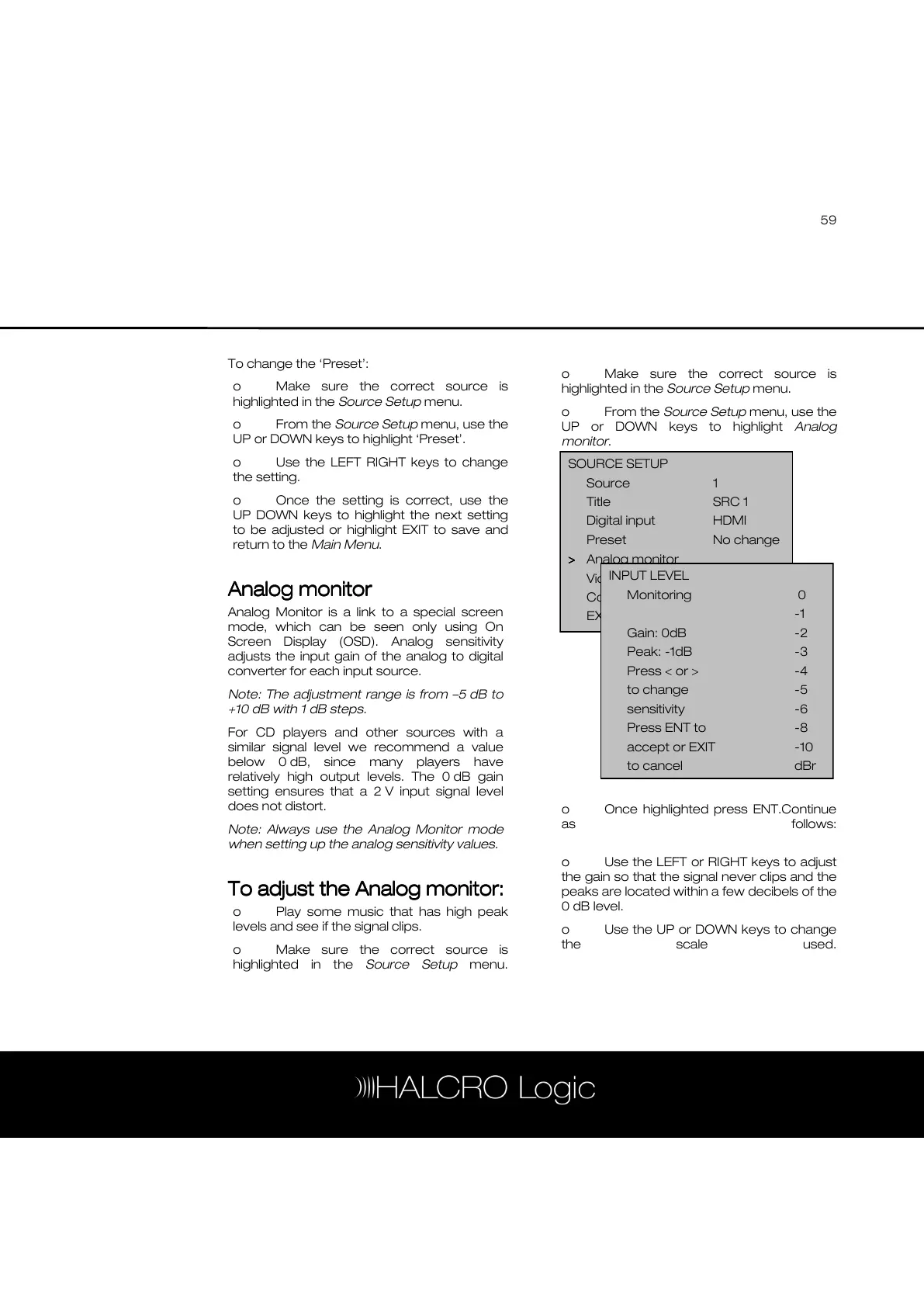
o From the Source Setup menu, use the
UP or DOWN keys to highlight Analog
monitor.
o Once highlighted press ENT.Continue
as follows:
o Use the LEFT or RIGHT keys to adjust
the gain so that the signal never clips and the
peaks are located within a few decibels of the
0 dB level.
o Use the UP or DOWN keys to change
the scale used.
SOURCE SETUP
Source 1
Title SRC 1
Digital input HDMI
Preset No change
>
>>
> Analog monitor
Video type HDMI1
Component bypass On
EXIT
INPUT LEVEL
Monitoring 0
-1
Gain: 0dB -2
Peak: -1dB -3
Press < or > -4
to change -5
sensitivity -6
Press ENT to -8
accept or EXIT -10
to cancel dBr



 To Next Page