34
Connecting a TV monitor
Connecting a TV monitorConnecting a TV monitor
Connecting a TV monitor
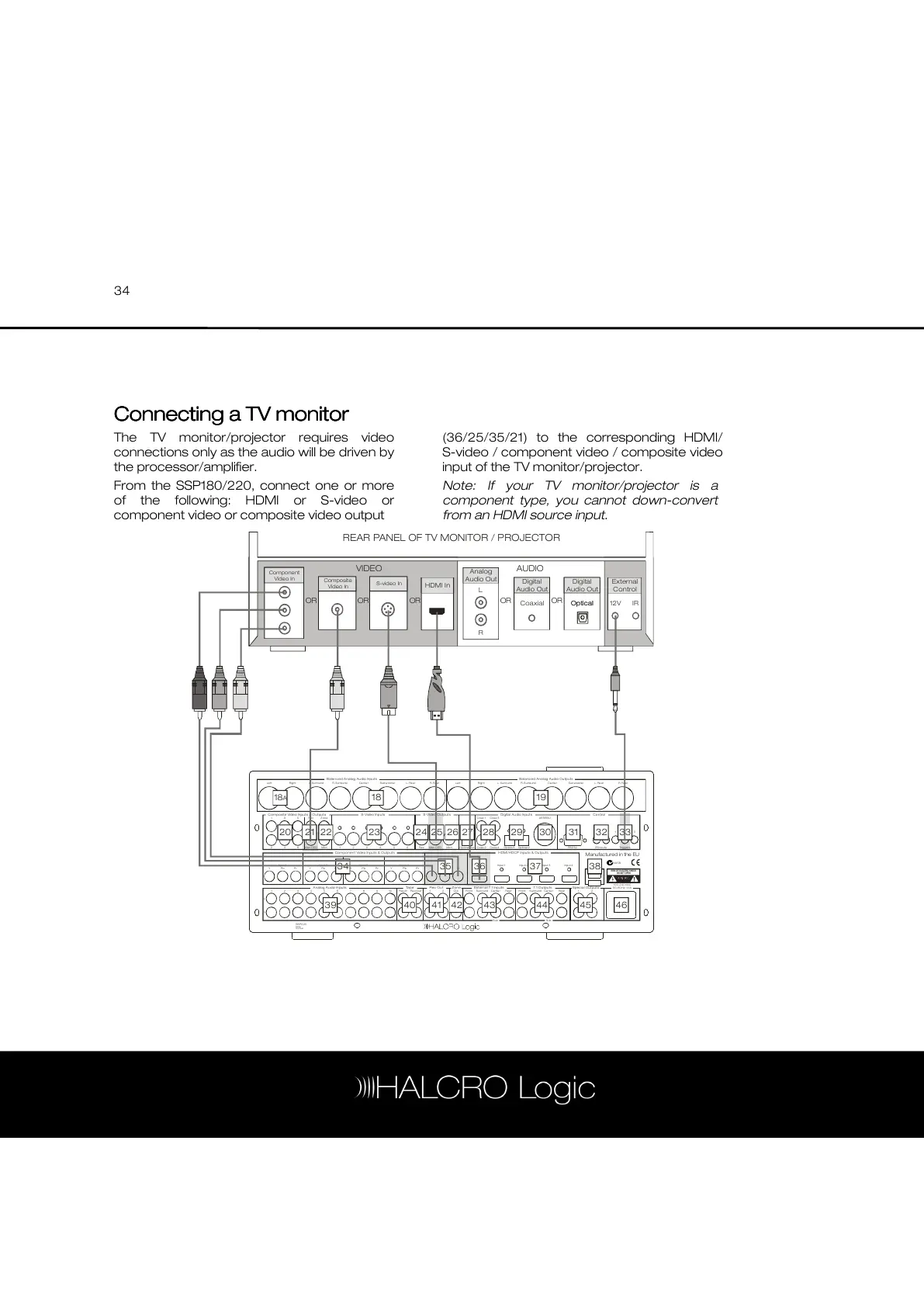
The TV monitor/projector requires video
connections only as the audio will be driven by
the processor/amplifier.
From the SSP180/220, connect one or more
of the following: HDMI or S-video or
component video or composite video output
(36/25/35/21) to the corresponding HDMI/
S-video / component video / composite video
input of the TV monitor/projector.
Note: If your TV monitor/projector is a
component type, you cannot down-convert
from an HDMI source input.
Ba lan ced A na log A udio Input s Ba lanc ed A na log A udio Outp uts
C ompos ite Vide o Input s & O utpu ts
An alo g Au dio In put s Tape R ec Out Z one Exte rna l 7.1 Inpu ts 7 .1 O utpu ts Spec ial O utp uts
Co mpon ent Vi deo In puts & Outp uts HDM I/HDCP Inpu ts & O ut puts
S-Vide o Input s S-Vide o Ou tput s D igita l Au dio Input s Co ntrol
LeftRigh t Rig htL. Surround L. Surro undR. Surround R. Surro und
3 4 5 6 7 8 9 1 0 Play /In Rec /Out 2 2Out F ront S urround Cente r Rea r
1 2 3 4 5 6 Re c Mon OSD Mo n RS2 32 IR Input s Trig gers
3 5 R ec Z one C oax 1 C oax 3 AES EBU
Ce nter Ce nterSub woof er Subw oof erL. Rea r L. Rea rR. Rear R. Rea r
4
Sub
6 Mo n OSD Mon Coa x 2 C oax 4 Optica l 1 Op tical 2
1
Input 1 Input 2 Input 3 Input 4 O utput
Pr Pr P r Pr PrPb Pb P b Pb P bY Y Y Y
Output Inp ut 1 Input 2 Input 3 Input 4
US B
2 1 1Front S urround C ente r Re ar
Sub
RISK OF ELECTRIC SHOCK
DO NOT OPEN
Manufactured in the EU
Opti cal Out
Serial
Number
SS P220
N9 58
100 -240 VAC
50 -60H z, 1.1A
Lef t
1
1
L
R
2
2 3
Y
18
A
18
20 21 22 23 24 25 26 27 28 29 30 31 32 33
34 35 36 37 38
45 46444341 424039
19
REAR PANEL OF TV MONITOR / PROJECTOR
IR12V
Coaxial
External
Control
Analog
Audio Out
Digital
Audio Out
Digital
Audio Out
OpticalOptical
HDMI In
VIDEO AUDIO
Component
Video In
Composite
Video In
S-video In
OR OR OR OR OR
L
R



 To Next Page