20
UTSR1 (Remote Control)
U
TSR1 (Remote Control)UTSR1 (Remote Control)
UTSR1 (Remote Control)
The Universal Touch Screen Remote (UTSR1)
supplied with the SSP180/220 is used to
control the SSP180/220. It is used during
installation and setup procedures, and for
controlling normal operations. It will need to be
charged overnight before operation.
Please refer to the Universal Touch Screen
Remote (UTSR1) Docking Station Owner’s
Manual for full instructions on using the
remote control.
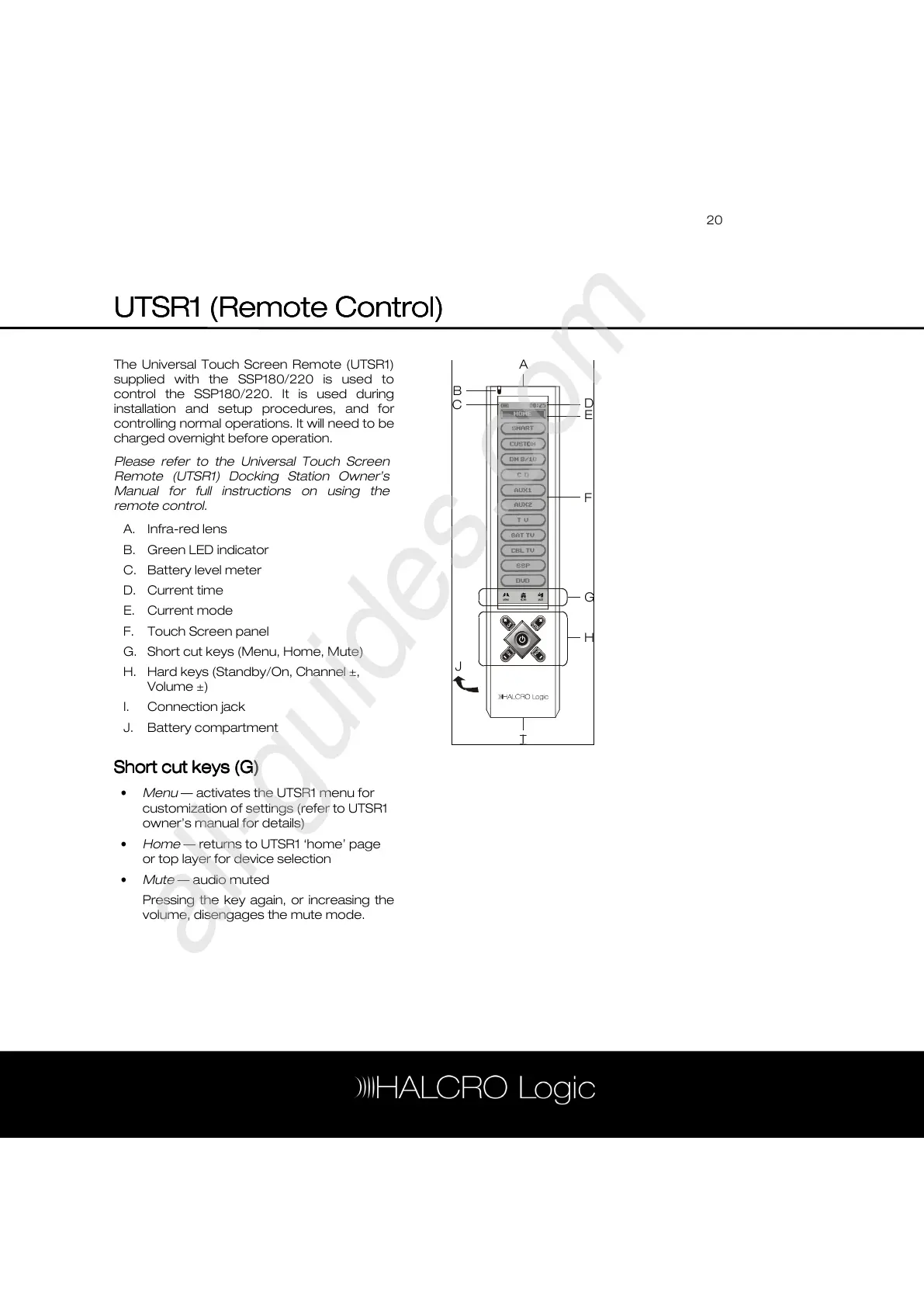
A. Infra-red lens
B. Green LED indicator
C. Battery level meter
D. Current time
E. Current mode
F. Touch Screen panel
G. Short cut keys (Menu, Home, Mute)
H. Hard keys (Standby/On, Channel ±,
Volume ±)
I. Connection jack
J. Battery compartment
Short cut keys (G)
Short cut keys (G)Short cut keys (G)
Short cut keys (G)
• Menu — activates the UTSR1 menu for
customization of settings (refer to UTSR1
owner’s manual for details)
• Home — returns to UTSR1 ‘home’ page
or top layer for device selection
• Mute — audio muted
Pressing the key again, or increasing the
volume, disengages the mute mode.
A



 To Next Page