After setting up DDNS, ensure that the NVR is connected to the WAN to
access the device through the DDNS domain name.
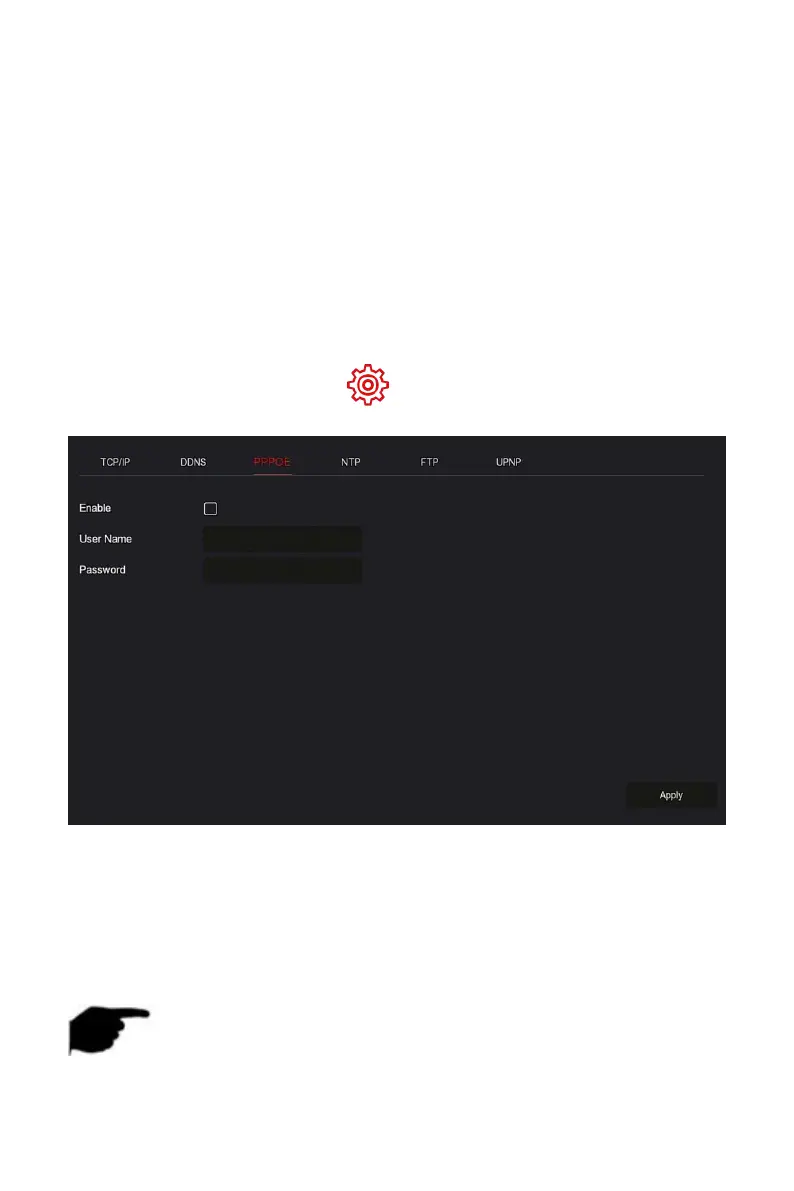
PPPoE(Point-to-Point Protocol over Ethernet) is one of the ways in which XVR
devices access the network. After obtaining the PPPoE user name and
password provided by the Internet Service Provider, you can establish a
network connection through PPPoE dialup. After the connection is successful,
the XVR device automatically obtains a dynamic IP address of the WAN.
The specific operation steps are as follows:
Step 1: In the main menu, click " →TCP/IP→PPPOE" to enter PPPOE to
set the interface, as shown in Figure 5-45 below.
Figure 5-45
Steps 2: Select "Enable", input the user name and password of the PPPoE.
Steps 3: Click "Apply" to save the configuration.
Enable: Turn on/off the device PPPoE function.
User Name: The PPPoE user name provided by the ISP (Internet Service
Provider).
Password: The password corresponding to the user name.
NOTE



 To Next Page