After setting the email information and enabling the alarm linkage email
function, when the NVR triggers an alarm, the system sends an alarm email
to the user mailbox.
The specific operation steps are as follows:
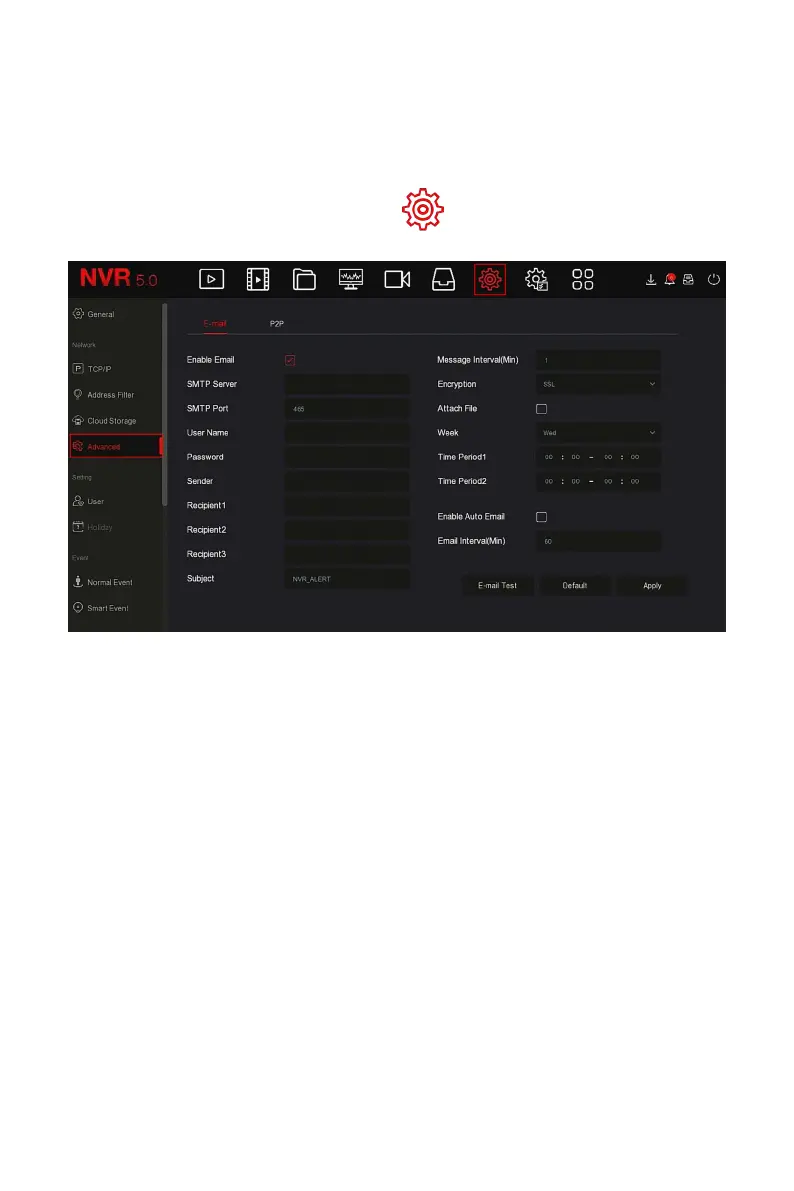
Step 1: On the main menu page, click " → Advanced→ E-mail" to enter
the E-mail setting interface, as shown in Figure 5-52.
Figure 5-52
Steps 2: Enable e-mail alarm notifications, configure SMTP server, SMTP port,
user name, password, sender, subject, message interval, and select
encryption type, attach file and other parameters.
Steps 3: Click "E-mail test" and the message "Success. Check the inbox." is
displayed. Then the mail configuration is successful. If the message "E-mail
can’t be delivered!" is displayed, the mail configuration fails.
Steps 4: After the email is sent successfully, click "Apply" to save the email
configuration.
Enable E-mail: Enable / disable mail sending.
SMTP Server: Select the SMTP sever type.
SMTP Port: Please input corresponding port value here.
User Name: Please input the user name to login the sender email box.
Password: Please input the corresponding password here.
Sender: Please input sender email box here.
Recipient 1/2/3: Recipient e-mail address 1/2/3.



 To Next Page