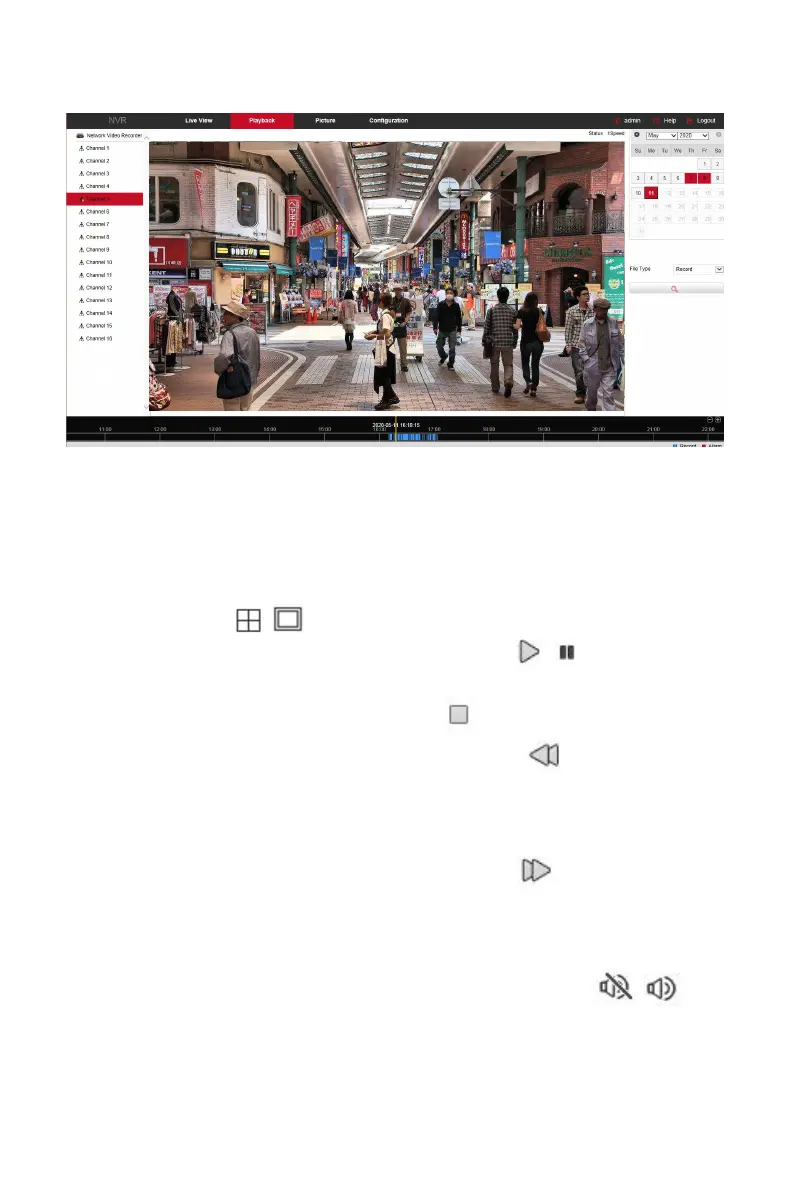
Figure 6-47
Timeline: Displays the type of recording under the current conditions and the time
period in which it is located. In the four-picture playback mode, four playback time
axes corresponding to the selected four channels can be displayed. In the other
single-screen playback modes, only one time axis is displayed. Use the mouse to
click a point in the blue area and drag to the yellow line position, that is, playback
from that point in time.
Layout: Click " / " to toggle the video playback window.
Play/Pause: After querying the video file, click " / " to start / pause
playback of the searched video.
Stop: When the video is played, press " " to stop playing the video.
Slow Forward: When the video is played, click " " video will play
slowly, the specific speed of choice 1/2, 1/4, 1/8. After switching, you
can check the current playback speed in the current status of the upper
right corner of the preview interface.
Fast Forward: When the video is played, click " " video will be slow
to play, the specific speed of choice 2, 4, 8. After switching, you can
check the current playback speed in the current status of the upper
right corner of the preview interface.
Mute/Open the Sound: When the video is played, click " / " to
turn on / off the sound of the recorded video.



 To Next Page