DTS-60A OPERATORS MANUAL
70
6.2 Example Using History Results
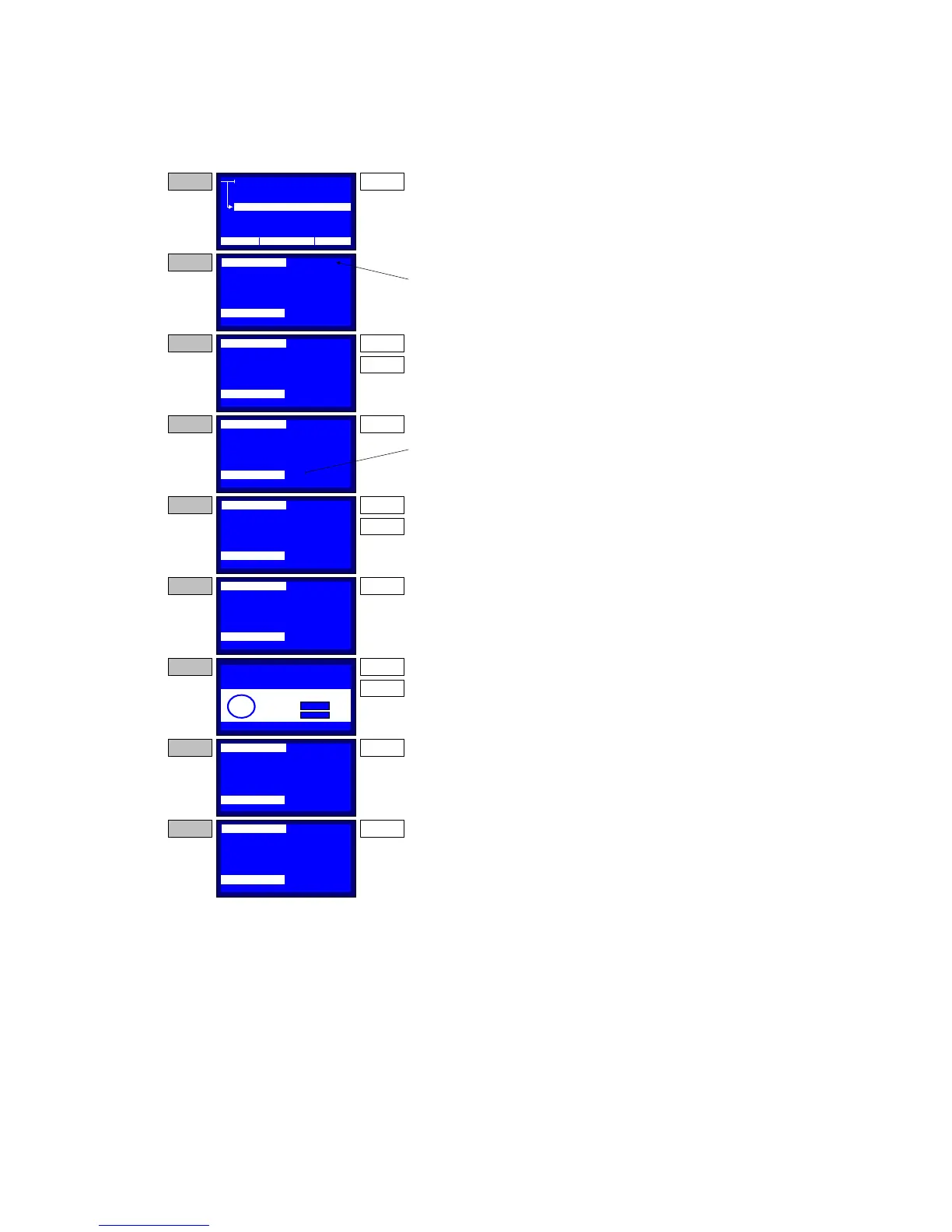
An example of the History Results operation, is illustrated in Figure 6-2.
Figure 6-2 – Example for History Browser Application
MENU
SETTINGS
TEST
TEST HISTORY
REMOTE OPERATION
STEP 1
NAME:
DATE:
TEMP.:
TIME:
BREAKDOWN:
SIMPLE_TEST
01/18/04
12:10
80·F
12, 056.2kV
00:00:48,000.0->058.4 kV,BD
STEP 2
From the MAIN MENU select the HISTORY item
and press the ENTER key.
ENTER
The systems enters to the History Browser
application. At the first line the history result id is
blinking. This indicates that the user may browse
among the stored history ids.
NAME:
DATE:
DURATION:
TIME:
BREAKDOWN:
SIMPLE_TEST
01/18/04
12:10
00:12:38
12, 056.2kV
00:00:48,000.0->058.4 kV,BD
STEP 3 UP
DOWN
Use the UP and DOWN keys to select the desrired
test result report. On every key press the system
updates all the information items below.
NAME:
DATE:
DURATION:
TIME:
BREAKDOWN:
SIMPLE_TEST
01/18/04
12:10
00:12:38
12, 056.2kV
00:00:48,000.0->058.4 kV,BD
STEP 4 ENTER
If the desired report is found, the user may press
the ENTER key. This enables the browsing among
the stages in the selected test. Now the blinking
item is the stage id.
NAME:
DATE:
DURATION:
TIME:
BREAKDOWN:
SIMPLE_TEST
01/18/04
12:10
00:12:38
12, 056.2kV
00:00:50,000.0->059.4 kV,BD
STEP 5 UP
DOWN
Use the UP and DOWN keys to select the desrired
stage id. On every key press the system updates
the information that corresponds to the selected
stage.
NAME:
DATE:
DURATION:
TIME:
BREAKDOWN:
SIMPLE_TEST
01/18/04
12:10
00:12:38
12, 056.2kV
00:00:50,000.0->059.4 kV,BD
STEP 6 ENTER
Press the MANU key. The system will prompt the
user for printing the test report of the selected test.
NAME:
DATE:
DURATION:
TIME:
BREAKDOWN:
SIMPLE_TEST
01/18/04
12:10
00:12:38
12, 056.2kV
00:00:50,000.0->059.4 kV,BD
STEP 8 BACK
Press the BACK key to exit form the history
browser and return to the MAIN menu.
NAME:
DATE:
DURATION:
TIME:
BREAKDOWN:
SIMPLE_TEST
01/18/04
12:10
00:12:38
12, 056.2kV
00:00:50,000.0->059.4 kV,BD
NOTE ENTER
After pressing the ENTER key (not holded) the
system toggles the browsing between the history
result and the stages.
12:10 01/08/05 65 °F
RESULT ID:
01 - 1016
RESULT ID:
01 - 1016
RESULT ID:
01 - 1016
RESULT ID:
01 - 1016
RESULT ID:
01 - 1016
RESULT ID:
01 - 1016
RESULT ID:
01 - 1016
STAGE ID:
01
STAGE ID:
01
STAGE ID:
01
STAGE ID:
01
STAGE ID:
01
STAGE ID:
01
STAGE ID:
01
Print Results?
Yes:
No:
?
ENTER
BACK
STEP 7 ENTER
BACK
Press ENTER to Print a receipt or
Press Back to Return to Test History Application



 To Next Page