33
33
送信機の初期設定とサーボの動作確認
Transmitter initial setting and servo movement
29
Check
チェック
サーボの動作確認
Setting and Servo Movement
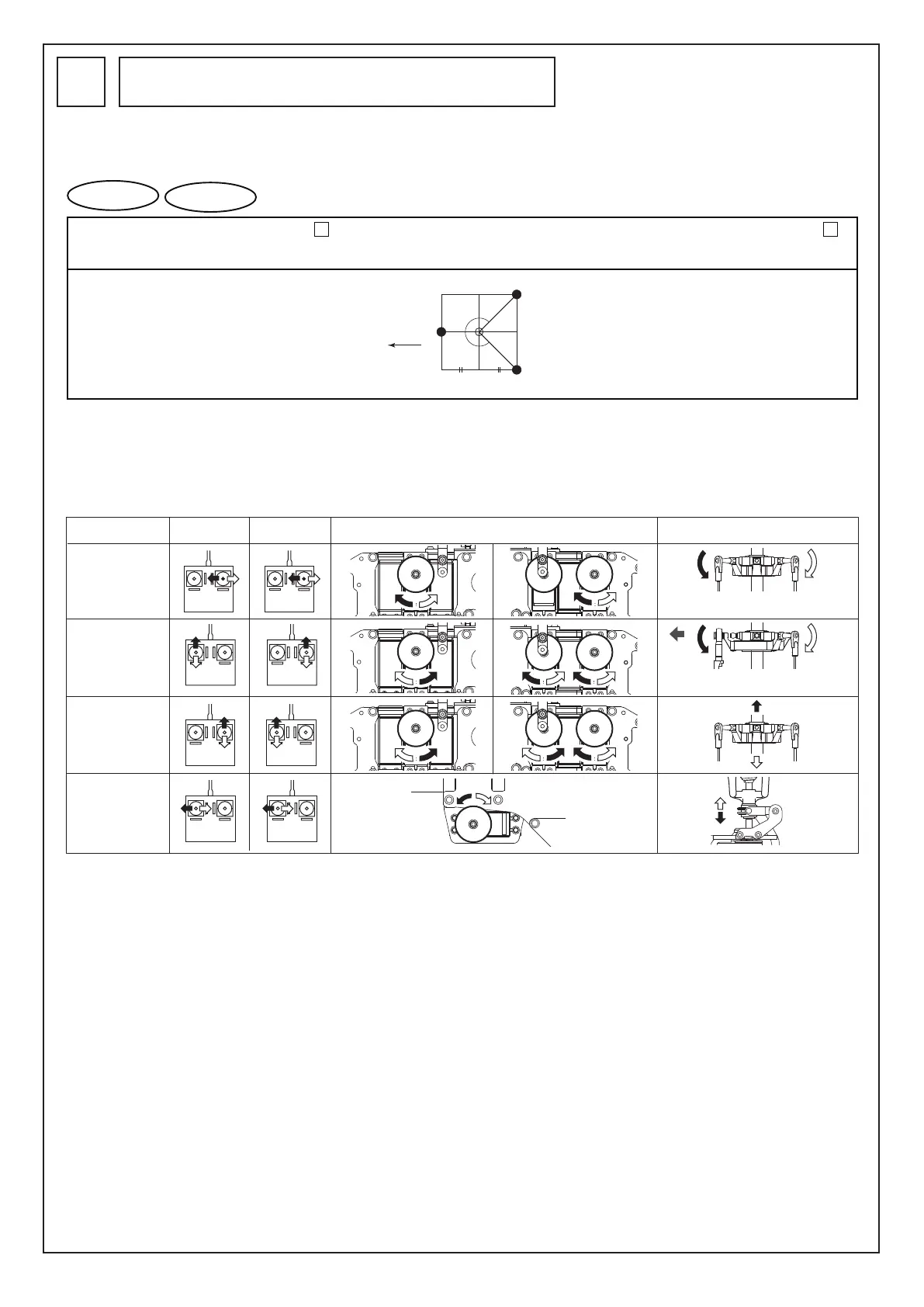
モード I
確認する箇所
Check points
サーボホーンの動き
Servo horn movement
エルロン
Aileron
エレベーター
Elevator
ピッチ
Pitch
ラダー
Rudder
MODE II
スワッシュプレートを左から見た図
Left view of the swash plate
スワッシュプレートを後ろから見た図
Back view of the swash plate
スワッシュモードでは、スワッシュミキシングのための送信機の初
期設定が必要です。
ピッチカーブ、スロットルカーブの入力は
38
でおこないます。
先にピッチカーブ、スロットルカーブを入力すると、サーボホーン
取付の際、ニュートラルがずれるおそれがあります。
Inputting the pitch curve and throttle curve is carried out in
38
Inputting the pitch curve and throttle curve first during a servo
horn installation may shift the neutral position.
送信機にデータを入力する際は、まず最初にスワ
ッシュタイプを選択して下さい。
Before inputting data to the transmitter, first
select the swash type.
本機のスワッシュタイプは図のようになっています。
The swash type this model is shown in the illustration.
Swash mode requires the initial setting of the transmitter for swash mixing.
図と動きが一致しないときは、サーボの回転方向が逆になっていま
す。その場合、送信機側でリバーススイッチの設定をしましょう。
エルロン、エレベーター、ピッチの場合はその他にミキシング量の
調整が必要となります。(各送信機の説明書を参考にセッティング
してください。)
When the movement does not agree with the figures, the rotation direction of
the servo is reversed. Adjust the rotation direction with the reverse switch of
the transmitter. Besides that, adjustment of the mixing is required for the
aileron, elevator, and pitch. (Refer to the manual of each transmitter).
プロポの初期設定が済んだら、サーボが正しい方向に動作するかチ
ェックしましょう。仮にサーボホーンを付けると、動く向きがわか
りやすくなります。
After the transmitter initial setting is completed, check to see that the
servo drives in the proper direction. Temporarily attaching the servo horn
facilitates seeing the driving direction.
機首方向
Nose
(135°)
(135°)
1:1
前
Front
前後1:1のスワッシュモード機能の付いた送信機が
必要です。(P.9参照)
A transmitter with the swash mode function having
a front and back ratio of 1:1 is required. (See P. 9)



 To Next Page