- 37 -
HLP-C
+
Inverters
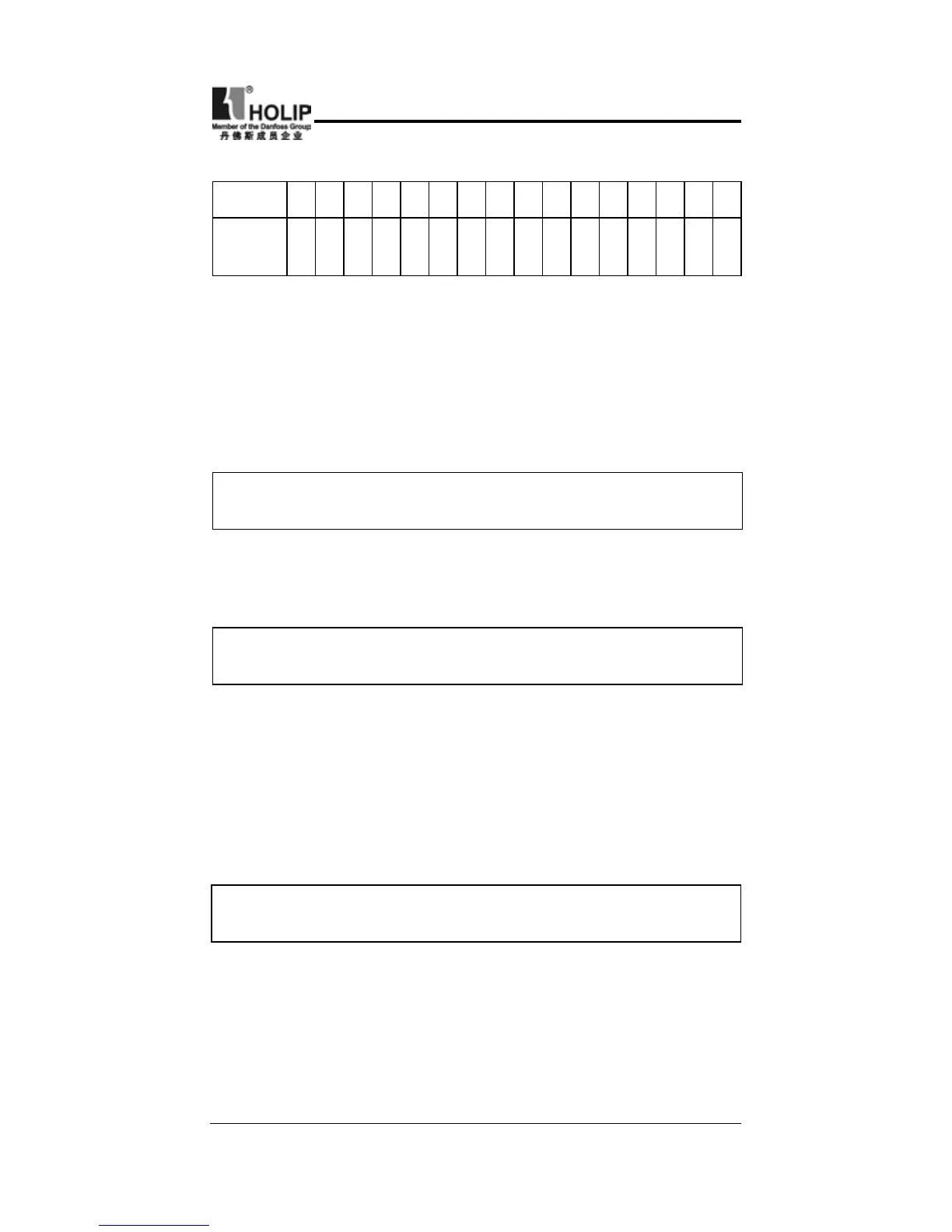
Carrier frequency corresponding table
:
Set Value 0 1 2 3 4 5 6 7 8 9 10 11 12 13 14 15
Carrier
Frequency
KHz
1.5 2 3 4 5 6 7 8 9 10 11 12 13 14 15 16
As shown in the table above, with a higher carrier frequency, the
electromagnetic noise will be lower, but the interference to other
systems must be prevented. With a lower carrier frequency, the
electromagnetic noise will be a little higher, but the heating
capacity will be small. So the carrier frequency should be set
as low as possible, especially with large power machines, if the
noice demand is not so high.
C020 Starting Frequency
Set Range
:
0.1~10.0Hz Unit
:
0.1Hz Factory Setting
:
1.5
Starting frequency is the initial frequency when the inverter is
started. If the starting frequency is set to 4.0Hz, the inverter will
begin to run at 4.0Hz,and later on run between 4.0 ~ 600Hz .
C021 Stopping Frequency
Set Range
:
0.1~10.0Hz Unit
:
0.1Hz Factory Setting
:
1.5
When the inverter receives a stop command, it will immediately
decelerate to the stopping frequency, stop output or start DC
brake to a nal stop.
If C093 is set to 0, DC brake is invalid when stopping and the
inverter will stop output.
If C093 is set to any other parameter except “0”, DC brake is
valid; the inverter will stop by DC braking.
C022 Jog Frequency
Set Range
:
0.0~600.0 Unit
:
0.1 Factory Setting
:
5.0
The parameter set can realize the jogging function when the
inverter is tested. The jog operation can be achieved only
through the external terminals, which can be set by multi-
function input terminals. Jog frequency is limited by the
lower/upper limit of the frequency. While the jog function is
implemented, other run commands are invalid. The accelerate



 To Next Page