HEATING SYSTEM CONTROL
16 4 213 563 / 03
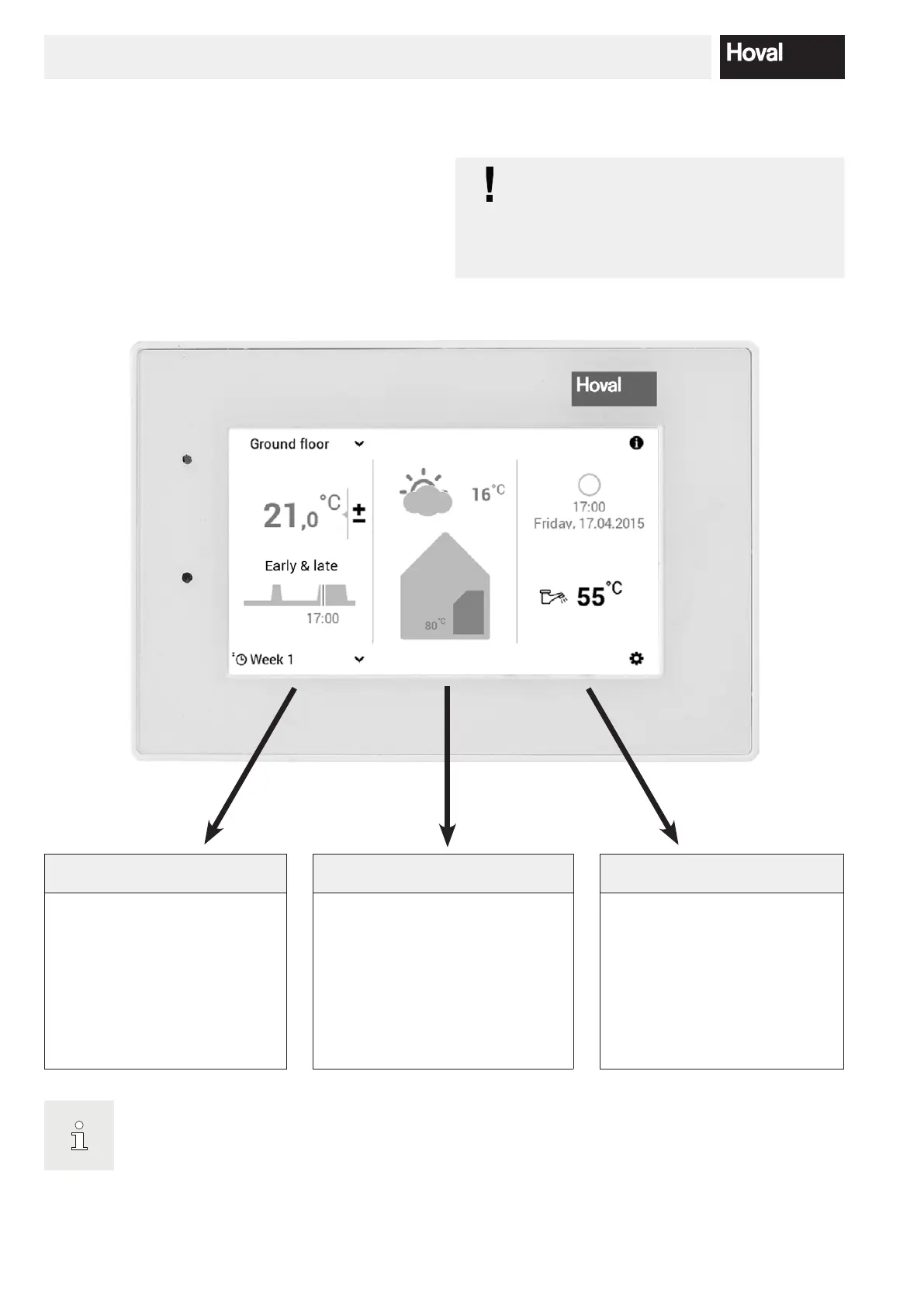
Information living area Information heat generator Information general
The left third of the start screen
contains information about the
living area. Here, you can make
settings for the heating circuit,
current room temperature, day
program and switching cycles as
well as basic program (chapter
5.4 page 14).
The middle third of the start screen
contains information about the heat
generator. This information area dis-
plays the error status, the outside
temperature as well as information
about the heating circuit. In additi-
on, the user level (referred to below
as authorisation level) can be dis-
played.
The right third of the start screen
contains general information.
Information about energy con-
sumption, time/date as well as do-
mestic hot water temperature. In
connection with the TopTronic
®
E
online, the weather forecast is dis-
played on the control module as
an option.
The display of the start screen is a standard view. The operating elements can be adapted by the user.
Please check the start screen settings in 5.13.3 page 72 if the display if dierent.
5.6 Start screen
The start screen of the control module is divided into
three vertical display elements. For a detailed list of the
various start screen functions, refer to 5.6.1 page 17.
The surface of the TopTronic
®
E control mo-
dule is not allowed to be touched with sharp
or pointed objects for operation – risk of
scratching.




 To Next Page