HEATING SYSTEM CONTROL
44 4 213 563 / 03
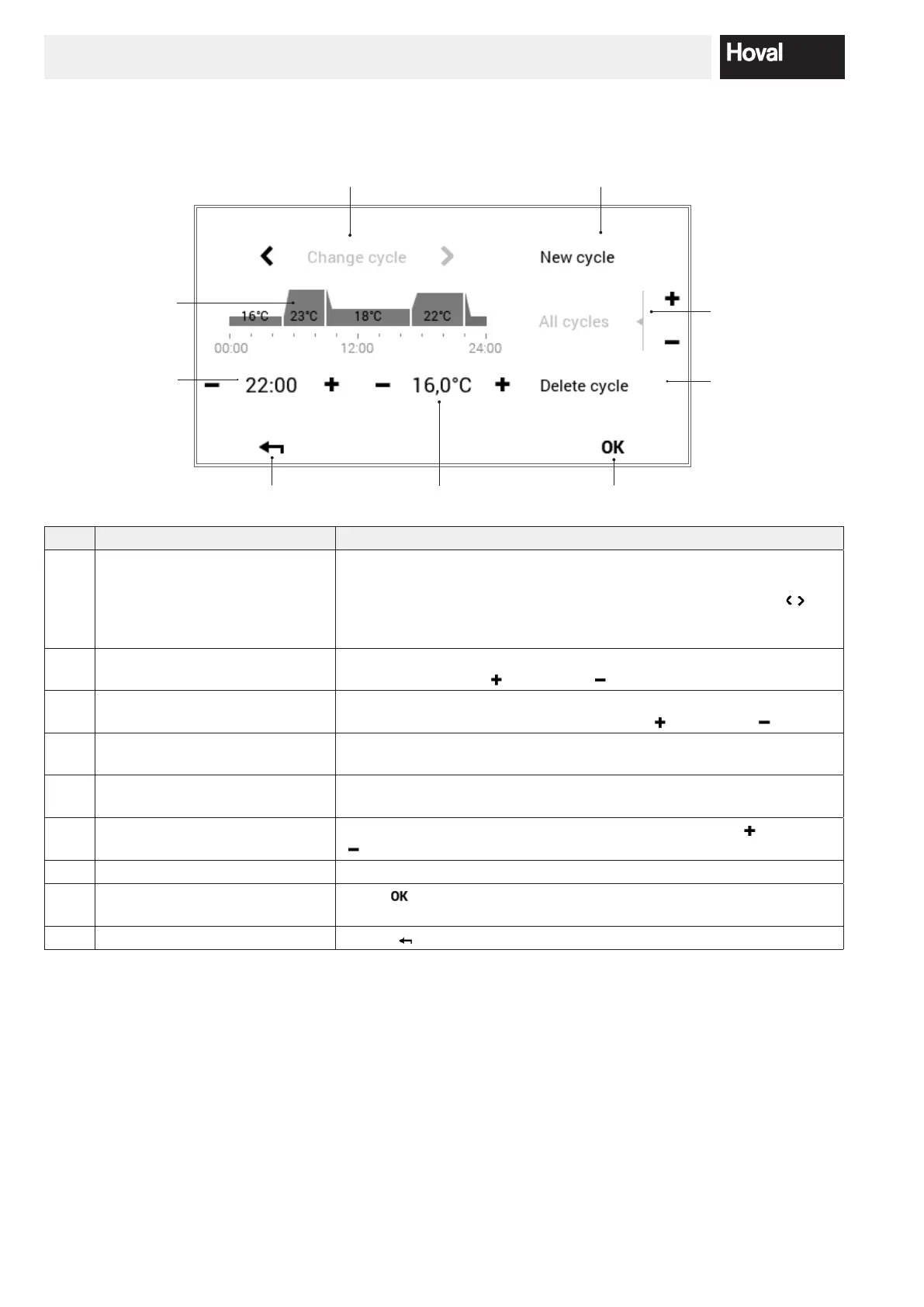
5.10.4 Day program / switching cycles operating elements
1
3 89
2
4
6
7
5
No. Designation Function
1 Day program / switching cycles For adapting the selected day program with time cycles and correspon-
ding temperature specications. The time period marked in yellow shows
the cycle that is active during the editing. The horizontal arrows (
) are
used for selecting the required period of time. Alternatively, the switching
cycle to be edited can also be touched directly.
2 Start time – active cycle Displays the start time of the selected cycle. Changes can be made to the
start time using plus (
) and minus ( ).
3 Temperature – active cycle Represents the room temperature dened in the cycle. The temperature
can be changed in the active cycle with plus (
) and minus ( ).
4 Change cycle Switch the cycle to be edited to the left or right. Alternatively, the swit-
ching cycle to be edited can also be touched directly.
5 New cycle Create a new time cycle. The new cycle is added at the end of the day
program.
6 All cycles Increase or reduce the temperature of all cycles with plus (
) and minus
( ) in the complete day program.
7 Delete cycle Remove the selected cycle.
8 OK Save (
) the changes in the selected day program and return to the
previous screen.
9 Back Return (
) to the previous screen.




 To Next Page