HEATING SYSTEM CONTROL
234 213 563 / 03
5.7.3 Select heating circuit (if there are several)
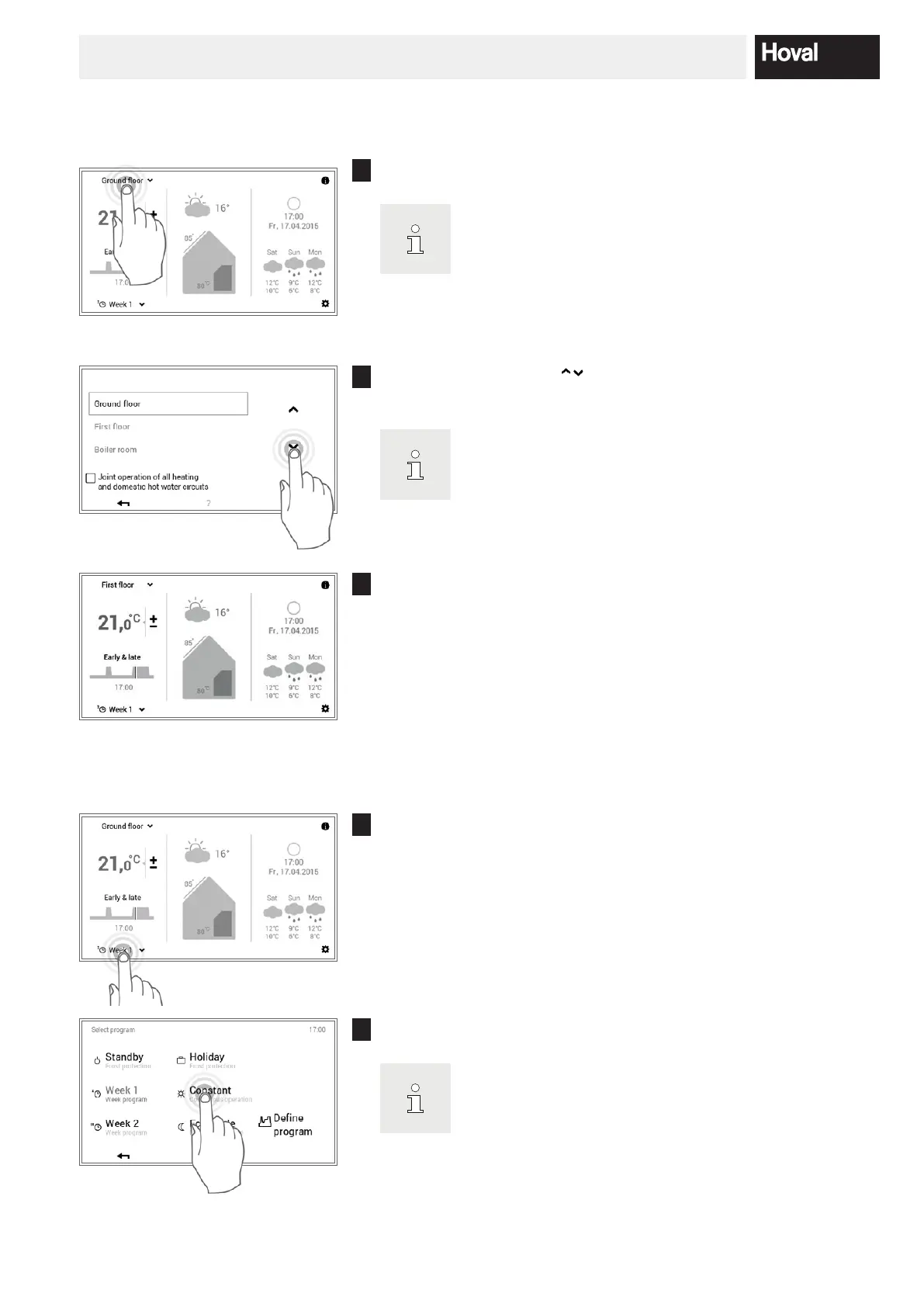
1
Touch the displayed heating circuit to select it (example: ground oor).
If your system only has one heating circuit, no heating circuit
selection is displayed.
2
Use the vertical arrows ( ) to select the required heating circuit and
conrm with OK.
If there are several heating circuits (e.g. apartments), acti
vating the “Joint operation”
checkbox (5.7.8 page 27)
allows all heating circuits to be controlled jointly. The room
temperature, the day program and the basic program are thus
changed at the same time in all circuits.
3
The selected heating circuit is displayed on the start screen. All settings
in the left area of the control module are now accepted for this heating
circuit.
5.7.4 Change the basic program (heating circuit)
1
Touch the displayed basic program to select it (example: Week 1).
2
Select the desired basic program.
Individual basic programs additionally require the room tem
perature or the return date to be entered (5.8.2 page 29).




 To Next Page